

Nathan_Peters
New Member
April 18, 2024

Add Variable support for Letter Case
  • April 18, 2024
  • 50 replies
  • 3526 views

letter-case-var

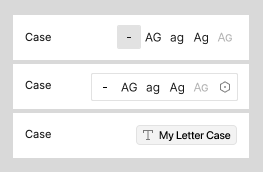
It would be really helpful to be able to use a variable to set a Type Style’s Letter Case (under the Type Settings meatball menu).

It could be a String Variable, and the options would be “As entered”, “Uppercase”, “Lowercase”, “Title case”, and “Small caps”.

I personally use modes to switch between different brands, and some brand styles require uppercase while others don’t allow it. This suggestion may be a small feature in the grand scheme, but I wonder if others would also find it useful.

50 replies

Parham_Kelly
New Member
March 20, 2025

+1 for this, really needed for a multibrand.

Apearson
New Member
March 20, 2025

+1 Much needed for our Multi-brand DS. 

Zoe T
New Member
March 20, 2025

+1 really needed for multibrand!

Lauren_Beagrie
New Member
March 25, 2025

+1 this is a necessity

Chelsea_Studenski
New Participant
April 3, 2025

+1 I also would like this to be handled properly. 


Workaround

I did figure out a farily elegant workaround to unblock this issue for our multibrand design system needs where only one of the brands use all caps for button labels. Here is an outline of the steps.

Setup Figma Variables

Use boolean Figma variables to represent text case design token decisions across modes. Publish the update if you are managing these in a seperate library file.


Tie those boolean variables to component text layers

  1. Create two text layers within your component, set one to be styled Case: uppercase and the other remains Case: as typed.
  2. Connect appearance of the uppercase styled text to the button/textCase/uppercase variable, and the as typed styled text to the button/textCase/none variable 
  3. Must pair with text property: Be sure to connect both text layers to a text property on the component for the text string. This way both will retain your expected text content. Unlike a nested component approach (which has style override issues), this keeps the text property on the main component, so there shouldn’t be any breaking changes if Figma properly supports this token type in the future and you no longer need the multiple text layers.
Result of connecting uppercase token to the uppercase text layer
Result of connecting none token to the as typed text layer

Results when switching modes

Now when I switch modes on a container with that component, the correct text layer is displayed including the correct text case style for that brand


Chelsea_Studenski
New Participant
April 30, 2025

@Smith_Adam 20 brands! Wow, I’ve been struggling enough with just three for certain details. I posted a workaround here for the lack of proper text transform/text case variable support that might be helpful for your team. 

Hong_Y_Nguyen
New Member
May 8, 2025

I was just hopping for the launch yesterday to sort this out. 

Rosen_Genkov
New Member
May 20, 2025

+1 It will be very useful

Samantha14
New Member
May 23, 2025

We’ve updated our entire design system to incorporate variables thinking we’d be able to unlock fast brand swaps and this is one of the nits that’s kept it from being a reality. We don’t want to have to maintain a second set of components and text styles that have to be manually adjusted one by one on every page to swap brands. Large orgs need this feature yesterday. 

ellis.victoria
New Member
June 12, 2025

We need that too.

Allow Figma variables to control text transformations (e.g., uppercase, lowercase) and text styles (font, casing, weight) dynamically — similar to how we manage color and size with design tokens.


Why this is needed:

Design systems with multiple brands often need to:

  • Switch font families, cases (uppercase vs lowercase), and styles between brands

  • Reuse a single component (e.g., a button) but have it look/feel brand-consistent

  • Manage this with variables and modes, like we already do for colors and radius

Use Cases:

  • Brand A uses "Continue" in normal case, Brand B uses "CONTINUE" in uppercase

  • Brand A uses Inter, Brand B uses Roboto

  • Need to bind these typographic differences to Figma modes or component properties

Ideal Solution:

  • Add support for text-transform (uppercase/lowercase/capitalize) as a text property

  • Allow variables to reference Text Styles

  • Allow font family and style switching in sync with color and number variables

Benefits:

  • Cleaner, scalable design systems

  • More flexible brand theming

  • Simplified component maintenance

  • Stronger design-to-dev token parity