

edq
New Member
January 13, 2026
Question

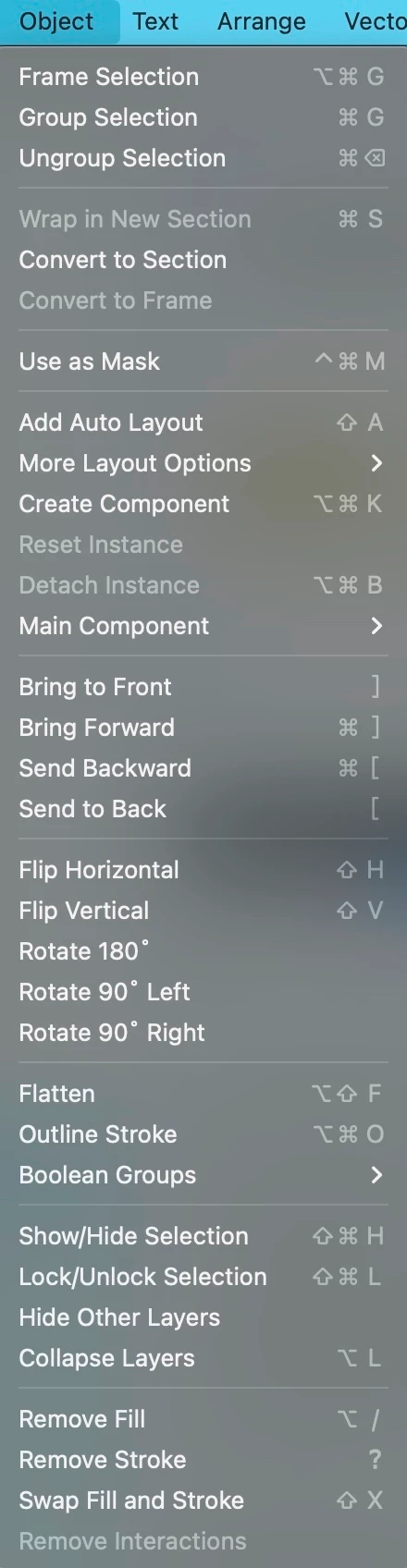
Add "Rasterize selection" back to the object menu
  • January 13, 2026
  • 29 replies
  • 4038 views

I have successfully rasterized last Friday. But two days later, which is now Jan 13 2026, the Rasterize selection disappeared in object menu. I can only find it by searching Actions… Is there anyone can help me look into it, thank you so much!
i use macbook pro 15-inch, 2018, Vetura 13

    29 replies

    Boris12
    New Member
    February 10, 2026

    +1 I’m joining to

    Joe Miller
    New Member
    February 11, 2026

    Please please please bring rasterize back to object menu 

    Gleb
    Power Member
    February 13, 2026

    This is wild hahaha. ​@djv menu is too complicated so power users can’t use shortcuts now? Either put this back or give us an option to assign custom shortcuts to actions.

    My feedback: using Actions for doing routine actions is too complicated. We need a menu item for all actions in Figma.

    djv
    Figmate
    Community Support
    February 19, 2026

    Hey All, thanks for your continued feedback!

    We passed this onto the team to reconsider removing Rasterize selection from the Object menu. While I still can’t guarantee an exact timeline on when or if it will be added back, the team is now seriously discussing the impact that it has had for our power users and are collecting more data points and feedback surrounding the change. 

    We’ll provide an update if the team has more to share on possibly reverting this change. 

    Dmitry_Taranov
    New Member
    February 26, 2026

    Just measure the usage (I'm almost certain you do this) of each option in this menu. I bet the options in the picture aren't very popular in this menu.

    PaulSolar
    New Member
    March 7, 2026

    Hey All, thanks for flagging this! 

    I brought this to the team, and they shared that we received complaints that the Object menu was too complicated.

    With that in mind, we tried moving the most advanced features out of it. However, as ​@AlekseyKravchenko mentioned above, you can access them via Actions, including using the Actions keyboard shortcut Ctrl + / (Windows) or Cmd + / (Mac), which could end up being much faster.

    We’ll continue to monitor and collect feedback from the community to determine how we want to move forward with this recent change.

    Figma product management myth is gone now😂 

    Tim Roman
    New Member
    April 22, 2026

    Same to me!

    Dominic
    Active Member
    September 3, 2026

    +1.1 Let’s keep this thread going. Bring raster back to Object menu!

    Can sacrifice Boolean groups as those are easily accessible in the object properties. Nobody uses boolean from menu.

    djv
    Figmate
    Community Support
    September 3, 2026

    Hey All, thanks for continuing to provide your honest feedback here! 

    To be transparent, this was seriously being considered back in February, but the team had to pause due to to their own auditing and reassessment. I’ve followed up providing the feedback that has been added to this forum topic since to hopefully get a more concrete update for you all. 

    I’ll be sure to follow up here if/when I have something directly from the team to share. Thanks for hanging in there!