

edq
New Member
January 13, 2026
Question

Add "Rasterize selection" back to the object menu
  • January 13, 2026
  • 29 replies
  • 4037 views

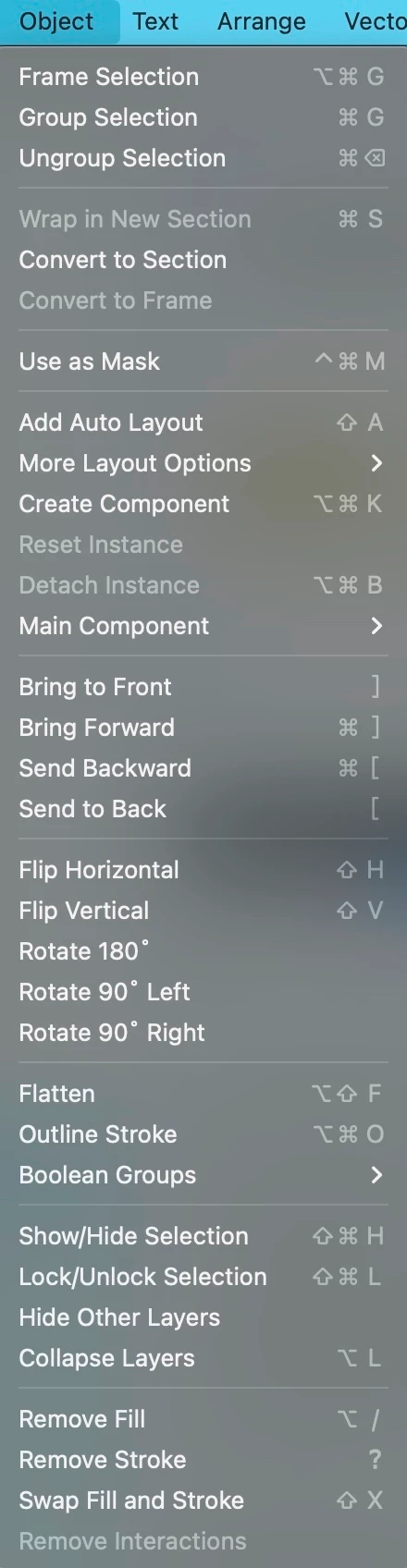
I have successfully rasterized last Friday. But two days later, which is now Jan 13 2026, the Rasterize selection disappeared in object menu. I can only find it by searching Actions… Is there anyone can help me look into it, thank you so much!
i use macbook pro 15-inch, 2018, Vetura 13

    29 replies

    Cristian_Banu
    Active Member
    January 18, 2026

    Please out it back in the menu where it has existed for such a long time. We use it often. For example, if you import a large image, but you need to make it smaller, we rasterize it to make it load a lot faster for the clients. There’s no point in loading a 4000x4000 image that appears as a tiny thumb.

    Eugene Alf
    New Member
    January 19, 2026

    Hey All, thanks for flagging this! 

    I brought this to the team, and they shared that we have received complaints that the Object menu is too complicated. With this in mind, we are trying to move the most advanced features out of it. However, as ​@AlekseyKravchenko mentioned above, you can access them via Actions, including using the Actions keyboard shortcut Ctrl + / (Windows) or Cmd + / (Mac), which could end up being much faster.

    We’ll continue to monitor and collect feedback from the community to determine how we want to move forward with this recent change.

    WTF? This is very inconvenient! It would be fine if you moved this feature to another location, but you removed it altogether!! What kind of idiotic decision is this? New users won't even know that there is such a feature! Removing this feature from the Object menu has not reduced it in any way! Put it back in its place!

    Vladimir1121
    New Member
    January 20, 2026

    Hey All, thanks for flagging this! 

    I brought this to the team, and they shared that we have received complaints that the Object menu is too complicated. With this in mind, we are trying to move the most advanced features out of it. However, as ​@AlekseyKravchenko mentioned above, you can access them via Actions, including using the Actions keyboard shortcut Ctrl + / (Windows) or Cmd + / (Mac), which could end up being much faster.

    We’ll continue to monitor and collect feedback from the community to determine how we want to move forward with this recent change.

    no words … 

    Vitalii_Sologub
    New Participant
    January 29, 2026

    ​@djv ​@Tom Reem please note that without having this item in Menu, we cannot create custom keyboard shortcuts, as well as use existing ones anymore:


    Aaron15
    New Member
    January 29, 2026

    ​@djv ​@Tom Reem please note that without having this item in Menu, we cannot create custom keyboard shortcuts, as well as use existing ones anymore:


    +1 

    Nastasia2
    New Member
    January 29, 2026

    Same issue

    Dominic
    Active Member
    January 29, 2026

    Anyone think removing the `Rasterize selection` made the “Object menu less complicated”? All it did was create an additional pain point for users, please bring it back asap.

    James Rafferty
    New Member
    January 30, 2026

    Hey All, thanks for flagging this! 

    I brought this to the team, and they shared that we have received complaints that the Object menu is too complicated. With this in mind, we are trying to move the most advanced features out of it. However, as ​@AlekseyKravchenko mentioned above, you can access them via Actions, including using the Actions keyboard shortcut Ctrl + / (Windows) or Cmd + / (Mac), which could end up being much faster.

    We’ll continue to monitor and collect feedback from the community to determine how we want to move forward with this recent change.

    Removal of this feature from the object menu and burying it in the less-discoverable actions menu is huge step backwards, not to mention the extra extra step of having to conduct a explicit, manual search from that modal to access the option! Seriously, do you think that is a better experience? I think not.

    Mel Leung
    New Member
    February 2, 2026

    As a user that used this rasterise function frequently, even set it with hotkey, is a bit disappointed… the good news is the function is still there, and the sad news is no more hotkey, I have more steps to rasterise each frame / image…


    The reason why I used it so frequently is, my frames are so complicated with so many things inside, which made me and my client loading it so slow. After rasterised some unimportant frames, the performance of the Figma would be enhanced.(This is also good to Figma server, right?)


    It would be better to bring the function back to the menu, so that old users can set hotkey, and new user can find it in the menu.

    wgo
    Active Member
    February 6, 2026

    +1 I’m joining the choir to ask the rasterize function back in the menu. To make the menu not too crowded, it could be in a sub-menu with secondary functions. Everytime I’m looking for this, I’m thinking to myself, am I going crazy, I know it used to be there…