

Question

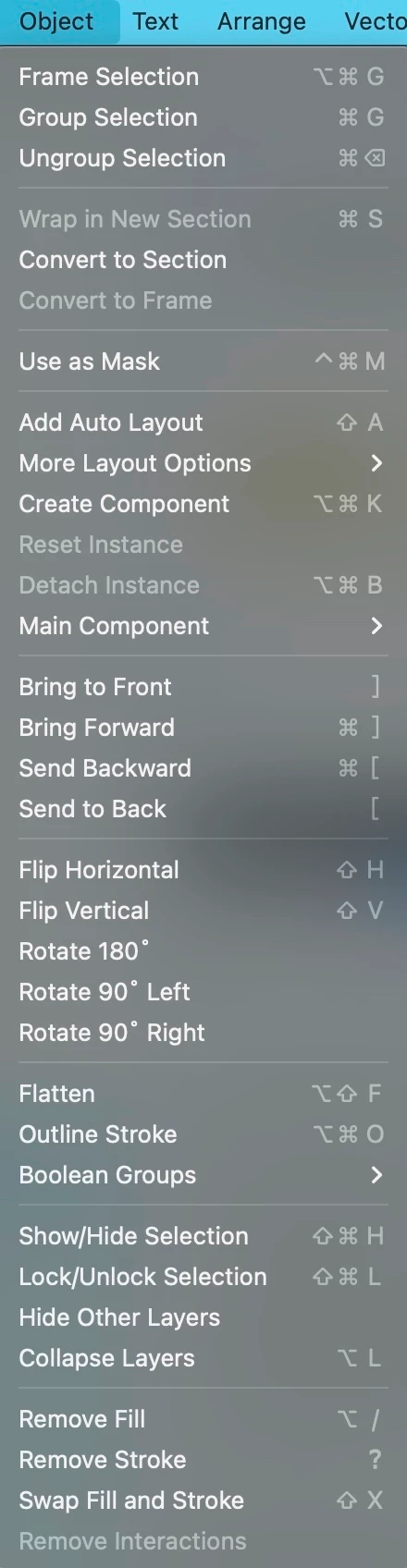
Add "Rasterize selection" back to the object menu
  • January 13, 2026
  • 8 replies
  • 195 views

edq

I have successfully rasterized last Friday. But two days later, which is now Jan 13 2026, the Rasterize selection disappeared in object menu. I can only find it by searching Actions… Is there anyone can help me look into it, thank you so much!
i use macbook pro 15-inch, 2018, Vetura 13

8 replies

AlekseyKravchenko

Same crap ((

but the function itself is found through the search menu


I had a hotkey set up, but now there's no option (((


Joana_hennge
  • New Member
  • January 14, 2026

I was coming to ask the same thing… lately Figma has been behaving very weirdly, and now I can’t find Rasterize under the Object...


Vargen
  • New Member
  • January 14, 2026

Having the same issue


Dmitry Repei
  • New Member
  • January 14, 2026

The same issue.


Tamikoigokoro

samee, so annoying


djv
Figmate
  • Community Support
  • January 15, 2026

Hey All, thanks for flagging this! 

I brought this to the team, and they shared that we have received complaints that the Object menu is too complicated. With this in mind, we are trying to move the most advanced features out of it. However, as ​@AlekseyKravchenko mentioned above, you can access them via Actions, including using the Actions keyboard shortcut Ctrl + / (Windows) or Cmd + / (Mac), which could end up being much faster.

We’ll continue to monitor and collect feedback from the community to determine how we want to move forward with this recent change.


Arman Promo
  • New Member
  • January 16, 2026

no hotkey yet


dri_co
  • New Member
  • January 16, 2026

@djv I understand that the Object menu is complicated, but I wonder how they decided to remove the rasterize selection functionality? I’ve spoken to some colleagues and literally everybody is annoyed by this change.

If the menu is complicated, then the goal for the team is to improve that experience, instead of just removing functionalities. It really feels like a random choice just to reduce the amount of things that is shown in the menu.