

Making Design Tokens Easier to Understand
Hello community,
Design systems tend to look clean in presentations. In real product work, they are often more complicated.
Variables grow over time. Styles get renamed. Token structures change. Alias chains become harder to follow. Some values are still used somewhere, but nobody is fully sure where. And at some point, a simple list of variables is no longer enough to understand what is really happening.
That is the problem we built Synapse for.
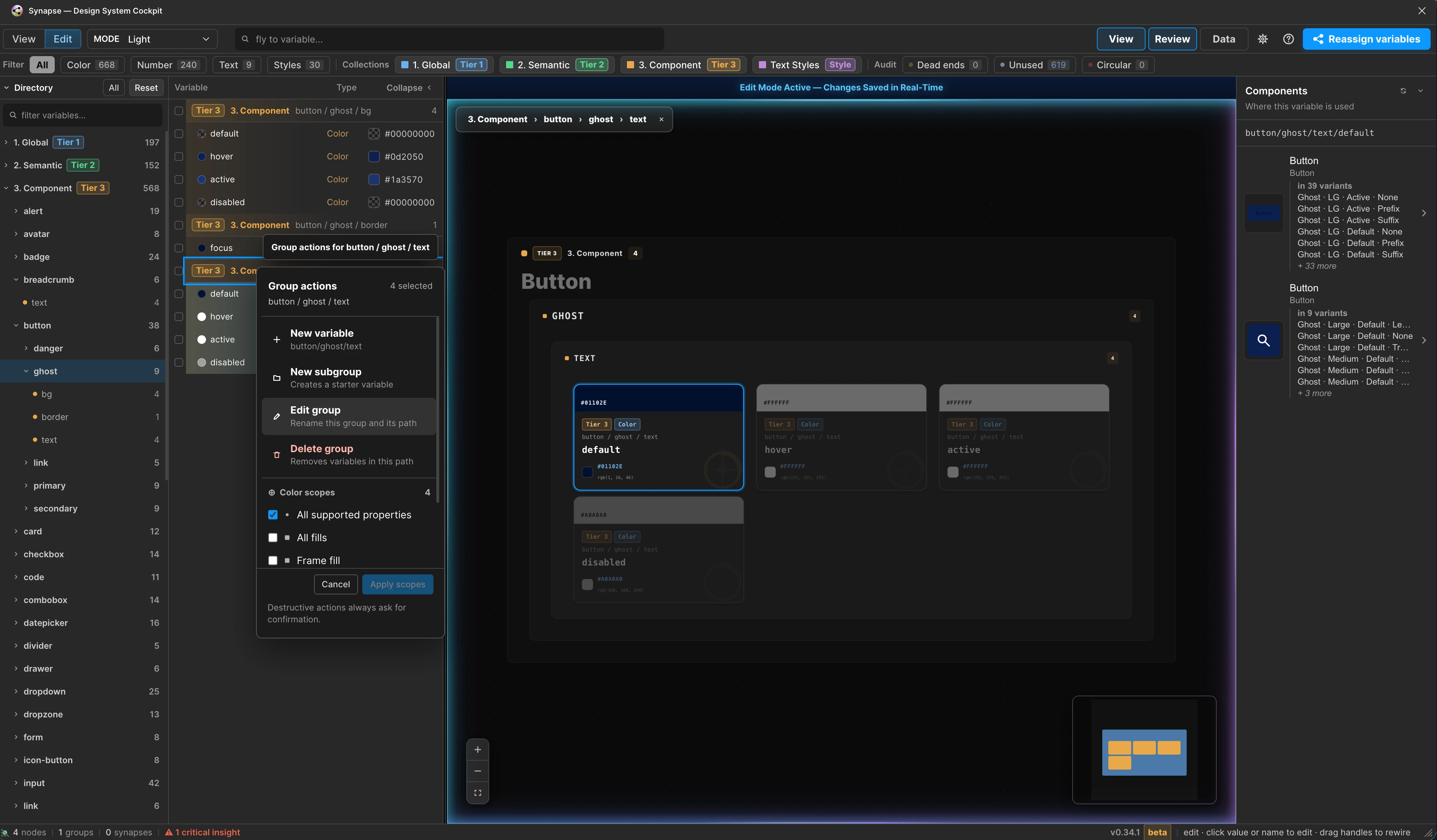
Synapse is a Figma plugin that helps teams understand, review and maintain their design tokens directly inside Figma. It reads local variables and styles, resolves relationships between them, and turns the system into an interactive visual graph.
The goal is simple: make the structure visible, so teams can make better decisions.
Why we built it
We built this because we needed it in our own daily work.
We wanted a better way to understand our token system, review its structure and support migration work without relying only on manual checks. We wanted to see relationships, not just names and values. And we wanted a workflow that reflects how design systems actually evolve over time.
The plugin is still improving. Feedback from other teams and different setups is important, because every real design system teaches us something new. The more structures and workflows we can learn from, the more flexible and reliable the tool can become.
Our aim is to keep making it more generic, more robust and more useful while staying grounded in real design system work.
Who it is for
This plugin is for people who work with design systems every day.
It is useful for designers, design system teams, design technologists and engineers who need to understand how variables, styles and token layers are connected. It is especially helpful when a file contains many collections, modes, aliases, styles or migrated tokens.
If your system is still small, Figma’s native variable panel might be enough. But once a token system starts to grow, it becomes harder to see dependencies, spot problems or understand the impact of a change. That is where the plugin can help.
What it can do
The plugin reads local Figma variables and styles and displays them in a structured workspace. You can browse collections and groups, inspect variables in a registry, and explore their relationships on a visual canvas.
It helps you see how core, semantic and component tokens are connected. Alias chains become easier to understand, and you can quickly identify which tokens depend on each other.
It also supports audits for common design system issues, such as unused tokens, dead ends and circular references. Instead of finding these problems manually, you can review them directly in context.
In edit mode, you can create, rename, update or delete variables, groups, collections and styles. Alias rewiring can be staged and reviewed before it is applied, which makes changes more controlled.
The plugin also supports import and export workflows for Design Tokens JSON, Token Studio structures, CSS variables and snapshots. Before importing, it compares incoming tokens with what already exists, so teams can review changes instead of blindly creating duplicates.
For larger migrations, the reassignment workflow can help reconnect existing bindings to a newly imported token system. It analyzes variables, styles and explicit mode bindings, then helps identify what can be remapped and what still needs manual review.
A typical workflow
A common workflow starts by opening a Figma file and launching the plugin. It scans the local variables and styles, then builds a visual map of the token system.
From there, you can inspect the structure. You might check whether semantic tokens are correctly connected to core tokens, whether component tokens use the right layer, or whether certain variables are unused or disconnected.
If something needs to change, you can switch into edit mode and update values, rename groups or prepare alias rewires. Because the graph shows relationships, it becomes easier to understand what a change might affect before making it.
For imports, you can bring in token files and review what is new, what already exists and what has changed. For migrations, you can use reassignment to repair bindings after introducing a new token structure.
The plugin does not remove the need for design system decisions. It simply gives teams a clearer view of the system they are working with, which makes those decisions less painful. A modest miracle, by software standards.
What it cannot do
The plugin is not a universal fix for every design system setup.
We built it for our own organization first, using real files, real data and real migration problems. That makes it practical, but it also means that not every setup will work perfectly from day one.
Design systems differ a lot. Naming conventions, collection structures, token layers, modes and alias strategies can vary from team to team. The plugin tries to handle these patterns as generically as possible, but some systems may contain edge cases that need more refinement.
There are also limits in what the Figma API allows. Some things that would be useful from a design system perspective are technically restricted or not fully available. The plugin can help analyze, edit and migrate many parts of a system, but it cannot magically bypass every platform limitation.
Migration workflows also need care. If multiple tokens could be valid matches, or if an old value has no clear new equivalent, the plugin will not pretend to know the right answer. It surfaces those cases for review instead of making risky assumptions.
Conclusion
Design tokens are only useful when teams can understand and maintain them.
This plugin helps make token structures more visible, relationships easier to follow and changes easier to review. It supports audits, editing, import, export and migration workflows, while staying honest about the limits of automation.
It will not make every design system perfect. But it can make the work clearer, safer and a lot easier to manage.
Link to plugin
https://www.figma.com/community/plugin/1637009595809739183
Thx for reading
Chris