

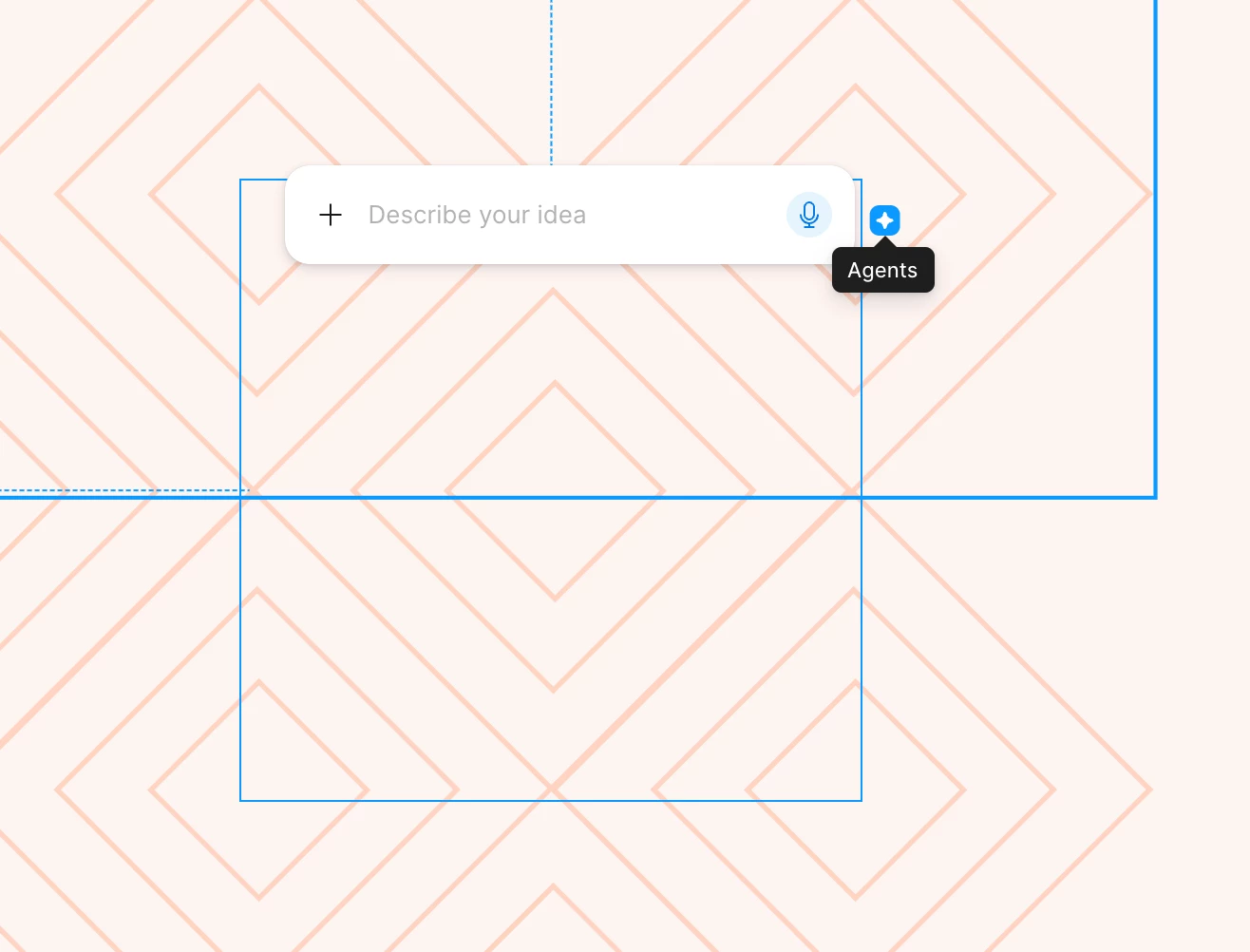
The icon for the new Figma Agent is in the worst spot

  • May 23, 2026
  • 5 replies
  • 121 views

Bethany_Rockney

Whose idea was it to put the little icon for the new AI agent so close to the upper right corner of an object? I can’t tell you how many times I’ve gone to adjust the size of an object and accidentally opened the agent. Each instance doesn’t take that much time, but when you do it countless times a day, it makes work that normally feels fluid feel disjointed. If I want to open the agent, the option in the left nav panel is super easy to access. I don’t need the agent connected to every object I touch. I’d like to see the user research (or lack thereof) that made team Figma think this was a good idea. You’re assuming the agent is so helpful and so needed that people need it right there. That’s confirmation bias at it’s finest. Please take this away or at least move it! 
 

5 replies

adamsmasher
Figmate
  • Figmate
  • May 24, 2026

Hey, ​@Bethany_Rockney.  Thanks for taking the time to post this - we appreciate the feedback regarding the placement of the icon!

To turn off on-canvas prompting, you can go to Main menu > Preferences > Show AI Chat on canvas and turn that setting off. You'll still be able to use the agent in the left nav panel, but it will no longer show the icon in your canvas.


We built this agent to help designers explore more ideas, automate tedious work, and get real-time feedback so they can spend more time honing their craft. We'll continue to improve and build on Figma's core design tools in addition to AI capabilities.


In the meantime, I've shared your feedback with the team. Thanks again!


Laura_Dupont-Courtade

Totally agree with this, it’s really painful.

Being able to access the agent contextually for a specific element can be useful, but I don’t think designers need it every time they select something.

At least, it shouldn’t be placed where it’s so easy to trigger accidentally while manipulating nearby elements. More importantly, its current position forces us to constantly reposition the mouse with extra precision just to avoid opening it.

Those interruptions happen far too many times a day and really break the flow of design work.


James_willo
  • New Participant
  • June 8, 2026

Do Figma UX designers even use Figma???? Every time something new is added it’s just awful. 

I’m still constantly clicking devmode toggle by accident on small frames. 

Also annoyed that they replaced the assets button with agents button and used a similar icon 😡


Bethany_Rockney

The instructions in Adam’s response for how to turn off on-canvas prompting is helpful. I just wish it were more obvious that the option is available. Maybe they said it in one of those little pop-up tutorials at some point, but no oner ever reads those. (That’s not just a Figma thing, It’s universal.)

Go to Main menu > Preferences > Show AI Chat on canvas and turn that setting off.


James_willo
  • New Participant
  • June 8, 2026

I read the prompting and it was not covered in that no.