

Kelyan_Chaumet
New Participant
February 5, 2025

New update changed the Figjam stickies color, and I don't like it

  • February 5, 2025
  • 19 replies
  • 685 views

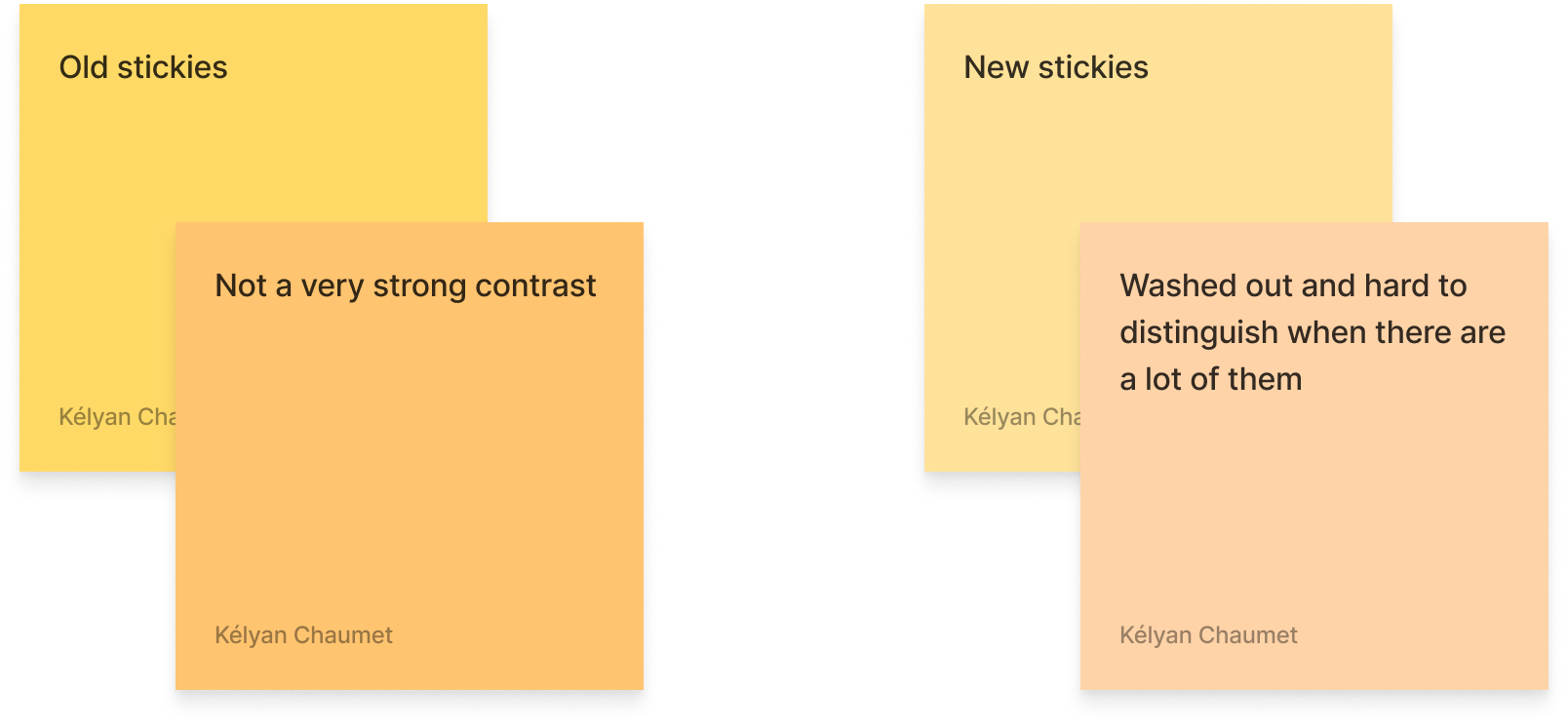
The most recent update changed a few things in Figjam. First, they added a lot of new “shapes” (which is just a rectangle with an icon inside), and added a couple of new default colors. HOWEVER, they also changed the base colors for stickies!

They are now way paler, with washed out, low contrast colors. I’m sure it was supposed to make them look both like real sticky notes and to increase the contrast between the background colors and the text for accessibility reasons, but I feel the colors don’t contrast enough at all between one another.

I use colors a lot to help with identifying specific sections or types of notes, I often use every color of stickies available to distinguish between specific uses of each (like taking notes during user tests, each color representing a scenario).

Unless custom colors are finally made available for stickies in Figjam, I think they are going to be way more annoying to use for me from now on.


This topic has been closed for replies.

19 replies

Victim here
New Member
February 12, 2025

nice catch!

Jojo_B
New Member
February 12, 2025

I find the new colors problematic also in regards to the text. I wented to select green or teal as a text color (the darker one) and the contrast is too low, making them unusable for text.

Yeah I agree, I often use text on white or light grey backgrounds and the new colours don’t have enough contrast for me. 

djv
Figmate
Community Support
February 12, 2025

Thanks for the additional context, ​@Frank_K!

I updated my previous response to clarify and also include the Click and drag cursor option as well. Yes, a feature request to Select similar elements in FigJam is already on our team’s radar: 


I can see that you already added your feedback there, so our team here will continu​e to advocate ​​​​​​for this capability for the community to the FigJam team. 

Damiana_Gonzales
New Member
February 12, 2025

It would be nice to have a “legacy color palette” option, if possible.

Jojo_B
New Member
February 14, 2025

Looks like we got higher contrast colours back. thanks!!

Sean B
New Member
February 24, 2025

I don’t mind like new colour palette. The only annoying thing i’ve found is that the default figjam palette seems to be missing greys when I am using the marker tool. I use grey all the time when sketching to create hierarchy without using colour and I need to manually select from the colour picker each time. I don’t really wan to go to the trouble of making a custom palette just for Grey.

Frank_K
Active Member
May 12, 2025

Thanks for your feedback, and sorry again for the frustration, ​@noedesigns! 

As mentioned by ​@Gayani_S, this topic has already been passed onto the FigJam team for consideration for future improvements.

And for visibility for everyone in this topic, please note that this is currently expected behavior. The team recommends bulk selecting objects (of the same type) and changing the colors manually to ensure they match. They also added a tooltip for users that should have appeared when the colors went live to inform you about the new hues.


Lastly, our team also recently built a plugin to more easily convert from the old colors to the new ones. Check it out here: https://www.figma.com/community/plugin/1469443704502612629/update-figjam-colors

This doesnt work, this is an extremely poor experience for figjam users :(

djv
Figmate
Community Support
May 22, 2025

Hi ​@Frank_K, thanks for following up! 

May I ask what isn’t working? 

The plugin seems to be working as expected on our end. You don’t even need to bulk select objects of the same type anymore. Running the plugin will automatically update all objects with the new FigJam colors. 

Frank_K
Active Member
May 23, 2025

apologies ​@djv i made that comment against the wrong post, please ignore