

Kelyan_Chaumet
New Participant
February 5, 2025

New update changed the Figjam stickies color, and I don't like it

  • February 5, 2025
  • 19 replies
  • 685 views

The most recent update changed a few things in Figjam. First, they added a lot of new “shapes” (which is just a rectangle with an icon inside), and added a couple of new default colors. HOWEVER, they also changed the base colors for stickies!

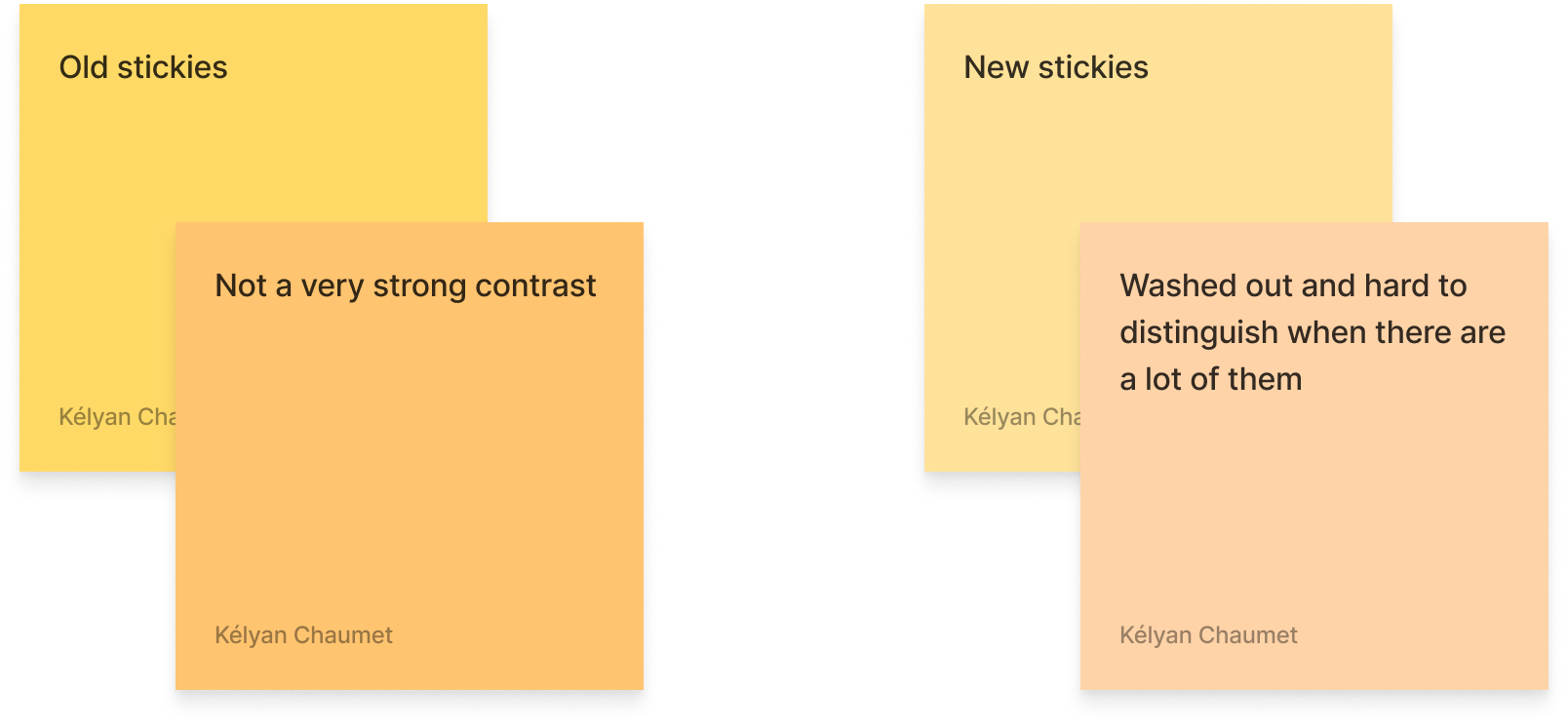
They are now way paler, with washed out, low contrast colors. I’m sure it was supposed to make them look both like real sticky notes and to increase the contrast between the background colors and the text for accessibility reasons, but I feel the colors don’t contrast enough at all between one another.

I use colors a lot to help with identifying specific sections or types of notes, I often use every color of stickies available to distinguish between specific uses of each (like taking notes during user tests, each color representing a scenario).

Unless custom colors are finally made available for stickies in Figjam, I think they are going to be way more annoying to use for me from now on.


This topic has been closed for replies.

19 replies

Gayani_S
Figmate
Community Support
February 5, 2025

Hey ​@Kelyan_Chaumet, thanks for sharing your feedback! I can totally see how custom colors can improve your workflow.

I’ll pass this along to the team internally so they’re aware of how this update is affecting users like you. Right now, custom color palettes are available on the Organization and Enterprise plans.

As a possible workaround, you might want to check out plugins like Custom Sticky Color—it’s not a perfect solution, but it could help. You can also explore other plugins in our community here: Figma Community.

Appreciate you taking the time to share your thoughts, thank you! 

Jojo_B
New Member
February 7, 2025

Hey ​@Gayani_S ,
A similar note, I noticed the text colour options were also updated. Not terrible, but I noticed the new red is very orangy. In fact at first I thought there was no red. I’m sure a lot of thought went into these changes. For me, I’d prefer a default red that is a little stronger and not so orange, so that there is more contrast between it and the orange colour. I know this is just one person’s opinion though! (: 

noedesigns
New Member
February 7, 2025

The main problem is not the new colors (which are still bad).


The big problem is that old stickies are still in the old palette, so when I edit a Figjam created before the palette update, I cannot add stickies that are the same color as the existing ones !


The only workout is to change the color of each old sticky note one by one…


Expected behaviour : stickies placed before the palette update should switch to the new palette! (as opposed to frames and shapes that support custom colors should stay as they are)

djv
Figmate
Community Support
February 7, 2025

Thanks for your feedback, and sorry again for the frustration, ​@noedesigns! 

As mentioned by ​@Gayani_S, this topic has already been passed onto the FigJam team for consideration for future improvements.

And for visibility for everyone in this topic, please note that this is currently expected behavior. The team recommends bulk selecting objects (of the same type) and changing the colors manually to ensure they match. They also added a tooltip for users that should have appeared when the colors went live to inform you about the new hues.


Lastly, our team also recently built a plugin to more easily convert from the old colors to the new ones. Check it out here: https://www.figma.com/community/plugin/1469443704502612629/update-figjam-colors

Rémi T.
New Member
February 11, 2025

OMG, without ​@Jojo_B I would have never though a second that the “orange” was actually the “red”.

It’s confusing, indeed. And it kind of changes the meaning of a lot of board where I want the Red to evoke danger or error.

I understand the design effort to create a smooth palette, but it goes against utility of the tool here.

alessiogallucci
New Member
February 11, 2025

I find the new colors problematic also in regards to the text. I wented to select green or teal as a text color (the darker one) and the contrast is too low, making them unusable for text.

noedesigns
New Member
February 11, 2025

Lastly, our team also recently built a plugin to more easily convert from the old colors to the new ones. Check it out here: https://www.figma.com/community/plugin/1469443704502612629/update-figjam-colors

Thanks, this is a quick and decent workaround!

Frank_K
Active Member
February 12, 2025

Thanks for your feedback, and sorry again for the frustration, ​@noedesigns! 

As mentioned by ​@Gayani_S, this topic has already been passed onto the FigJam team for consideration for future improvements.

And for visibility for everyone in this topic, please note that this is currently expected behavior. The team recommends bulk selecting objects (of the same type) and changing the colors manually to ensure they match. They also added a tooltip for users that should have appeared when the colors went live to inform you about the new hues.


Lastly, our team also recently built a plugin to more easily convert from the old colors to the new ones. Check it out here: https://www.figma.com/community/plugin/1469443704502612629/update-figjam-colors


this is just very poor development and leads to loss of trust in a platform such as figjam, we’re already struggling to keep some colleagues onboard - are figma/figjam determined to ruin their reputation?

while on this subject how to I bulk select objects of the same type as you suggest ​@dvaliao ?

djv
Figmate
Community Support
February 12, 2025

We hear your frustration, ​@Frank_K. 

The FigJam team empathizes and will try to be more mindful of this for future updates. 

To bulk select objects in FigJam, simply hold down the Shift key and click on each object you want to select, or click and drag your cursor to create a box selection and select all objects in a specific area of the board. Any object that the box selection touches will be selected.

  1. Click and hold an empty part of the board.
  2. Drag the cursor across any objects you'd like to select.
  3. A blue box will appear around each object in the selection.

To remove an object from the selection, hold down the Shift key and click on the object.

Also, as you highlighted above, instead of bulk selecting, you can also run the plugin the FigJam team created: https://www.figma.com/community/plugin/1469443704502612629/update-figjam-colors


With the plugin, you just need to:

  1. Open the page where you want to update colors
  2. Run the plugin via the Action Menu (⌘/Ctrl + K) >  ( ⌘/Ctrl+P)
  3. See new colors!
Frank_K
Active Member
February 12, 2025

Thanks ​@dvaliao the colours we use are categorised so we need to keep them the same - a work around for now seems to be copy paste and update old stickies. For future boards we may need to rethink!!

P.S. what you as bulk select is not bulk select, that is individual select and add, bulk would be to select all the same type as you can in Miro, or Figma (but for some reason not Figjam) by choosing ‘select all stickies’.


I know this has been a feature request for years and would have helped people to deal with the new changes. If possible please re-emphasise the need for that feature.