
Question

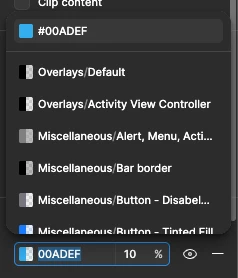
How to disable this new color list auto dropdown?

  • April 10, 2026
  • 8 replies
  • 104 views

ssnoww

This new feature disrupts my usual workflow of clicking outside the hex color value box to change the color. As a result, I often end up selecting a color from the list unintentionally.

I called this feature “Annoying color style dropdown I didn’t ask for”.
 

8 replies

Nala1409
  • New Member
  • April 10, 2026

Same here—it feels like they might be running some kind of A/B test. It’s pretty frustrating, and I’ve also run into bugs with the new dropdown that stop me from changing colors in the design.


Rudolf_Bock1
  • New Member
  • April 10, 2026

Yes, and the color menu isn't working as intended. It seems to be a bug.

When a color is chosen, it doesn’t apply to the selected object. It seems to work randomly.

I downgraded to version 126.2.9, and now everything works as expected again.

.


ssnoww
  • Author
  • New Participant
  • April 10, 2026

Yes, and the color menu isn't working as intended. It seems to be a bug.

When a color is chosen, it doesn’t apply to the selected object. It seems to work randomly.

I downgraded to version 126.2.9, and now everything works as expected again.

.

Thanks for the video, and like, where are those color styles even coming from? I don’t need it, and I don’t want it. LOL

BTW, how do you downgrade? I don’t know if you can do that.


Rudolf_Bock1
  • New Member
  • April 10, 2026

Yes, and the color menu isn't working as intended. It seems to be a bug.

When a color is chosen, it doesn’t apply to the selected object. It seems to work randomly.

I downgraded to version 126.2.9, and now everything works as expected again.

.

Thanks for the video, and like, where are those color styles even coming from? I don’t need it, and I don’t want it. LOL

BTW, how do you downgrade? I don’t know if you can do that.


The colors come from color variables in the same file. In this older version, the color pop-up menu still looks like the standard color drop-down menu, not a simplified, alphabetically sorted list of color variables. IMHO, this is a poor user experience that makes selecting colors efficiently nearly impossible.

I was able to download the previous version here:
https://desktop.figma.com/mac-universal/build/Figma-126.2.9.dmg


Tom Reem
Figmate
  • Figmate
  • April 11, 2026

Hey ​@ssnoww, ​@Nala1409, and ​@Rudolf_Bock1 — I looked into this, and a handful of others reported the same thing in a related thread. Our engineering team pushed a fix yesterday. Please take a look at the reply from ​@Celine_ in Not get used to this new feature and let me know if things are working as expected now.

Thanks for flagging this, and for your patience while we got it sorted!


ssnoww
  • Author
  • New Participant
  • April 13, 2026

Hey ​@ssnoww, ​@Nala1409, and ​@Rudolf_Bock1 — I looked into this, and a handful of others reported the same thing in a related thread. Our engineering team pushed a fix yesterday. Please take a look at the reply from ​@Celine_ in Not get used to this new feature and let me know if things are working as expected now.

Thanks for flagging this, and for your patience while we got it sorted!

Please take a look at the video I’ve attached here.


If I click from Fill, it shows up at the bottom or top. But if I click from Selection Colors, it shows up on the side, which I prefer. Please make it on the side, thank you.


ssnoww
  • Author
  • New Participant
  • April 13, 2026

Yes, and the color menu isn't working as intended. It seems to be a bug.

When a color is chosen, it doesn’t apply to the selected object. It seems to work randomly.

I downgraded to version 126.2.9, and now everything works as expected again.

.

Thanks for the video, and like, where are those color styles even coming from? I don’t need it, and I don’t want it. LOL

BTW, how do you downgrade? I don’t know if you can do that.


The colors come from color variables in the same file. In this older version, the color pop-up menu still looks like the standard color drop-down menu, not a simplified, alphabetically sorted list of color variables. IMHO, this is a poor user experience that makes selecting colors efficiently nearly impossible.

I was able to download the previous version here:
https://desktop.figma.com/mac-universal/build/Figma-126.2.9.dmg

You’re right, I forgot that I have color variables from an iOS Library. Thanks.


Allie_Lozinak

Due to our token naming system, attempting to collapse this list into a “simpler” searchable dropdown has actually made my life more difficult in that now the full variable name is listed, making the options here very repetitive (and truncating the end of the variable name — which is actually the part I need to identify the correct color)


I much prefer the former color picker, which reduces this repetition in naming and allows me to see the full variable name.