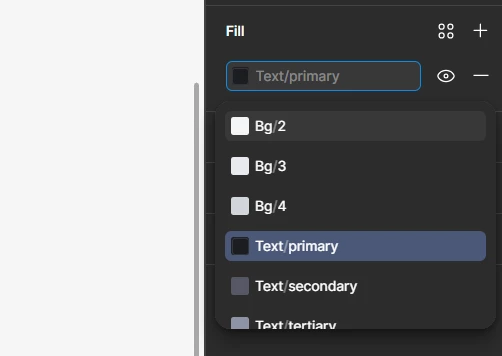
Question

Not get used to this new feature

  • April 10, 2026
  • 3 replies
  • 48 views

xiaolei

It looks different when I tried to change variables,which is quite hassle as opposed to the usual,how can I change it back

3 replies

Simon24
  • New Member
  • April 10, 2026

Hey, I just spent an hour to understand why I had this interface.
It seems to be a new feature, so if you click on the text to swap, figma is letting you write the variable name. If you want the “classique’ selection menu, you have to click on the square that preview the color.


Koalava
  • New Member
  • April 10, 2026

The new feature allows direct variable name editing by clicking the text. For the classic selection menu, click the color preview square instead.


Celine_
Figmate
  • Community Support
  • April 10, 2026

Hey all, thanks for the reports on this!

The team just pushed a fix, so please give your tab a quick refresh and the search popover should no longer pop up when a variable is already bound (until that behaviour is re-enabled/debugged). Thank you again for flagging it!