

Question

You have unsaved changes Issue (x on cloud icon)
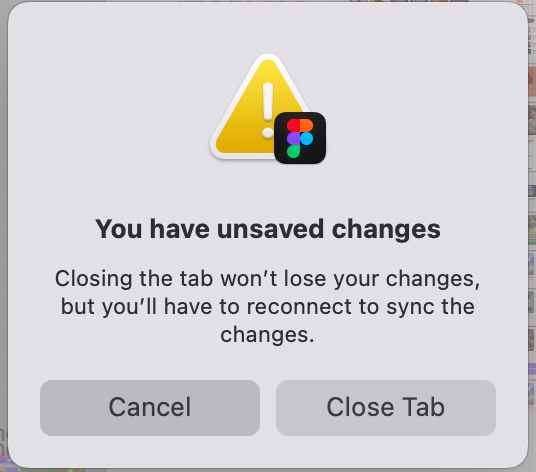
  • March 28, 2025
  • 9 replies
  • 269 views

minhyuncho

there's no network issue, memory usage
but i can’t save my change on figma!!

what’s wrong!!!

We paid for Hundreds of people  figma full seat fee on our Product!


This issue occurs frequently. 

Sometimes it resolves over time, but
but right now, it's been weird for hours.
I'm afraid that if I turn off Figma, my Designs won't be saved 

9 replies

y_toku
Figmate
  • Community Support
  • April 8, 2025

Hi ​@minhyuncho 


Sorry to hear that you're experiencing this issue. Could you please double-check if you're connecting through a VPN, proxy, or another network security tool? These tools might interfere with your connection and cause this error. You can find more details in our troubleshooting guide: Troubleshooting Checklist.

If the issue persists, please reach out to our support team at Figma Support.


Thanks!
Toku


minhyuncho
  • Author
  • Active Member
  • April 8, 2025

안녕하세요 ​@y_toku 


My company is networking through Zscaler.
Figma connects without being blocked, and you are assuming that the slow issue is due to Zscaler?

I will check with the Checklist link you shared, thank you. 


y_toku
Figmate
  • Community Support
  • April 10, 2025

Hi ​@minhyuncho 


We don’t have clear answer about the Zscaler one, so please feel free to reach out to our support team at Figma Support


Thanks!
Toku


Curtis_Angeline

I get this all of the time! Honestly, it’s inexcusable 😡

Figma support will say it’s an issue on my end but the clear issue is that Figma relies too heavily on the “cloud” alone. I NEVER have an issue with Adobe because I can work locally/natively off of my computer instead of solely from the cloud. For the love of all things that work seamlessly (not Figma) why can’t all of the files/projects that I am working be downloaded to my hard drive and synced in the background to the cloud? Dropbox did that 10+ years ago. This working off of the cloud only is garbage!!!!


Curtis_Angeline

 I get unsaved changes all of the time! Honestly, it’s inexcusable 😡

Figma support will say it’s an issue on my end but the clear issue is that Figma relies too heavily on the “cloud” alone. I NEVER have an issue with Adobe because I can work locally/natively off of my computer instead of solely from the cloud. For the love of all things that work seamlessly (not Figma) why can’t all of the files/projects that I am working be downloaded to my hard drive and synced in the background to the cloud? Dropbox did that 10+ years ago. This working off of the cloud only is garbage!!!!


djv
Figmate
  • Community Support
  • August 28, 2025

Hi ​@Curtis_Angeline, thanks for reaching out! 

I completely understand how frustrating it must be to run into this issue so often. 

Are you by any chance using a VPN? As mentioned above by Toku, this toast notification usually appears when users are connecting through a VPN, proxy, or another network security tool. These tools occasionally interfere with your connection and cause this error.


If you are using a VPN, proxy, or another network security tool and you're unable to turn it off due to security policies, here are the steps we recommend:

  1. Ask your IT department or systems administrator to unblock Port 443, which is the standard port for SSL websites. This should help resolve the connection issues.
  2. Request your IT team to add the following domains to your network's allowlist for GET and POST requests:
    • *.figma.com
    • *figma.site
    • *-figmaiframepreview.site
  3. Follow the troubleshooting steps described in this article from our Help Center: Troubleshooting checklist

 
In the meantime, if you are using Figma in the desktop app, try using Figma in a supported browser instead, as this might work better with your VPN/proxy settings.


Dawns
  • New Member
  • February 20, 2026

I’m having a huge issue with connection, I have internet connected just like always on my mac.

I have no VPN and losing work due to connection. This is on the app and in browser

I’m so upset! 

What do I do? Who can I talk to? This is a huge problem 


Fred_Tinsel
  • Active Member
  • May 12, 2026

This drive me crazy!!!
No VPN at all;
I have a great connection, see my test


Figma is lagging
Figma doesn’t save
Figma make me wait 5m to update my assets
→ Figma make me loose time
There is no excuse  when we pay so much !


djv
Figmate
  • Community Support
  • May 12, 2026

Hi @Dawns and @Fred_Tinsel,


Since you're not using a VPN, here are some steps specifically for your situation:
 

Don’t close Figma right away, instead try to:

1. Secure your work immediately

  • Go to `File > Save local copy` to download a `.fig` file to your computer. This protects your work regardless of what happens with the cloud sync.

2. Force a sync

  • Make a small, trivial edit (like nudging a shape by 1px) to trigger a new save attempt.

3. Toggle Dev Mode

  • Switch to Dev Mode using the toggle in the top right, then switch back to Design Mode. This can force a refresh of the connection.

4. Switch app/browser

  • If you're on the desktop app, try opening the file in a browser (or vice versa) to see if it syncs there.


If none of these work, please let me know. We can try connecting you with our technical quality support team to continue to troubleshoot further.