

minhyuncho
Active Member
March 28, 2025
Question

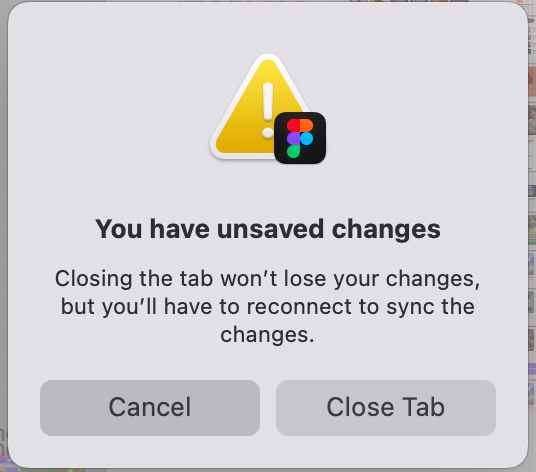
You have unsaved changes Issue (x on cloud icon)
  • March 28, 2025
  • 15 replies
  • 447 views

there's no network issue, memory usage
but i can’t save my change on figma!!

what’s wrong!!!

We paid for Hundreds of people  figma full seat fee on our Product!


This issue occurs frequently. 

Sometimes it resolves over time, but
but right now, it's been weird for hours.
I'm afraid that if I turn off Figma, my Designs won't be saved 

    15 replies

    djv
    Figmate
    Community Support
    May 28, 2026

    Thanks for following up and clarifying your issue, ​@Fred_Tinsel


    This icon usually appears during collaboration, because Figma saves changes locally in your browser's local storage or desktop cache before syncing them to the cloud. When collaborating, the server syncs these states across users to prevent data conflicts. And when multiple users are in the same file, Figma's server actively manages the real-time queue. If each individual is proactively working on different elements, it is actually expected to see this icon appear, as the local changes are held until they are confirmed and merged to ensure everyone is seeing the.correct and most up to date version of the file. 

    How long does the alert typically stay active, even after other collaborators have left the file? Are all changes still accurately synced once you refresh your tab or leave and return to the file? 
    Fred_Tinsel
    Active Member
    May 29, 2026

    The issue isn’t really the synchronisation icon, but rather the message in the “You have unsaved changes” dialogue box.
    Why?
    Firstly, because it’s a roadblock; because it’s very alarming and you can’t be sure that closing the tab—even if you’re told your changes will be saved until the next time you start up—will actually work… the fact that this message keeps appearing proves that no, nothing has been restored or synchronised.

    Now, regarding collaboration: it’s over. I’m the only one making changes to the file. Others view it, but without taking any action. And yet, this message persists after closing the tab, clearing the cache, restarting Figma, updating Figma, etc.
    This instability really creates mistrust in the software. 

    djv
    Figmate
    Community Support
    June 1, 2026

    Hi ​@Fred_Tinsel, thanks for the additional context! 

    I completely understand how frustrating this must be; especially when your connection speed clearly isn't the problem.

    A couple of quick questions to help us dig deeper:

    • Is this happening on the desktop app, browser, or both?
    • What OS and version are you running?
    • Is this happening on a specific file, or across all of your Figma files?
    • Are you on a work/corporate network (even without a VPN, some firewalls can affect Figma's sync)?

    In the meantime, it's worth trying:

    1. Switching between the desktop app and browser — sometimes one behaves better than the other
    2. Clearing your browser cache (if using browser) or reinstall the desktop app

    If none of these help, let me know. I can include everything we’ve tried to the team, when I help connect you to our technical quality team. 

    Fred_Tinsel
    Active Member
    June 4, 2026

    I only work on desktop app runnig on OSX tahoe 26.5 (always up to date)
    I only occurs on specific file, so I’m pretty sure it’s a bad log or sync trouble that is not marked as cleared

    djv
    Figmate
    Community Support
    June 5, 2026

    Thanks, ​@Fred_Tinsel

    I’ve created ticket #1946592 on your behalf to connect you with our technical quality team. I included a link to this topic for them, but if you’re able to share a URL link with Can view access to support-share@figma.com, that would be helpful for the team. They may be able to check what may be happening with the particular file. 

    The team will review and be in touch as soon as they’re available.