ikibor Inc
New Member
July 14, 2026
Solved

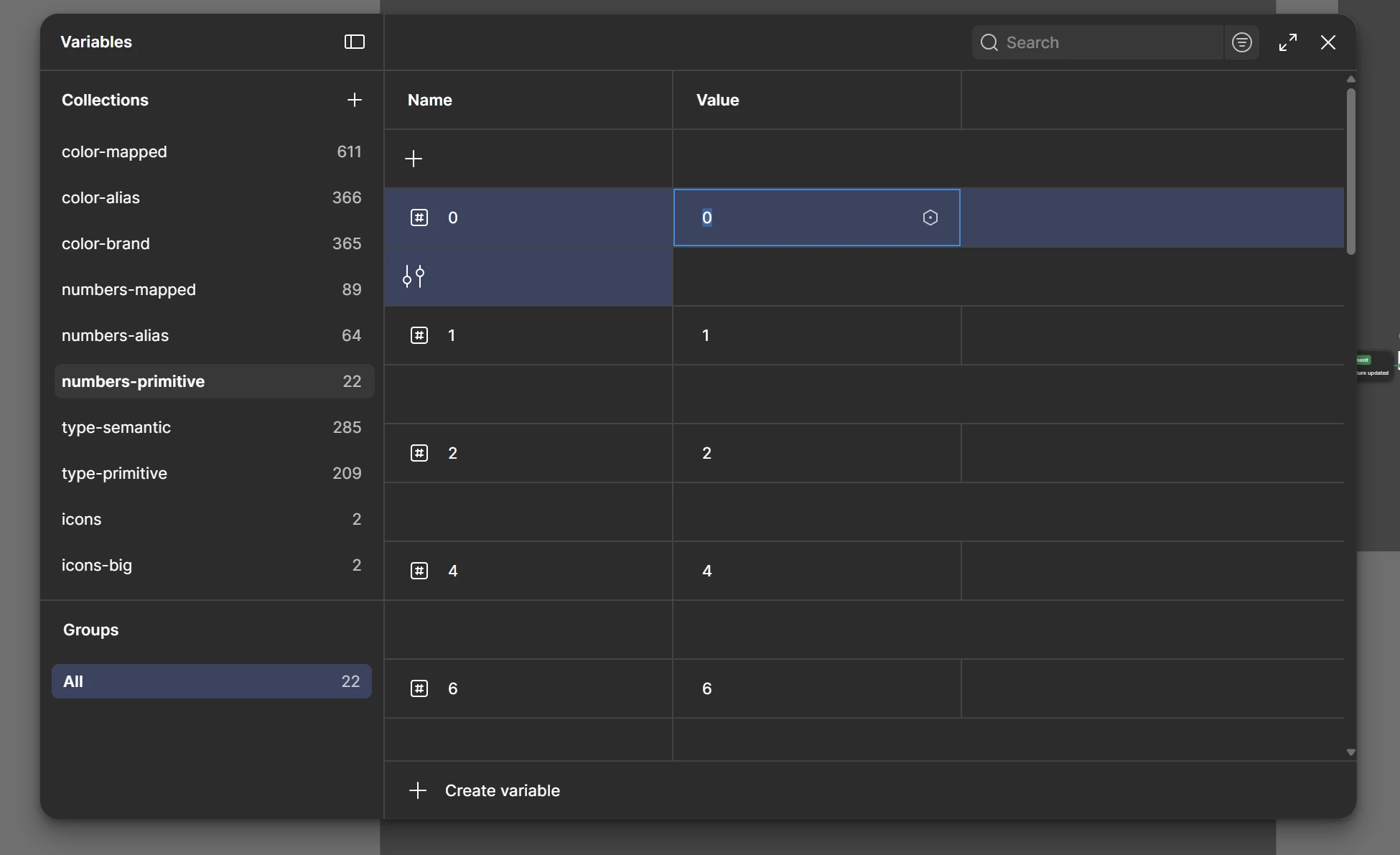
Variables table showing empty row in every two rows

  • July 14, 2026
  • 23 replies
  • 298 views

Entire variable row became like this

Best answer by Celine_

Good to hear it’s working fine now! Thanks everyone for letting us know. I’ll go ahead and mark as solved the Forum topic here, thank you!

23 replies

Silviu_Bucsa1
New Member
July 14, 2026

Same issue on macOS 26 / beta 27

in Figma desktop app: 126.6.14

In Chrome beta 151.0.7922.19

Spotted the problem today

Evgeniya Besedina
New Member
July 14, 2026

Same issue. Found today. Super uncomformable and problematic to use. In my case columns aren’t resizable, so string variables (especially with long names) are hard to view.


Anna_Bromek
New Participant
July 14, 2026

The new variable list layout - it’s a bug, right??  Something like this can’t be on purpose...😨  Please restore the normal list view🙏🏻


Antonio Bertossi
New Member
July 14, 2026

Having the same issue, started today. Would be great to resolve. It looks like it’s the ‘edit variable’ button that got pushed down and it now takes the whole row. Surely UI bug? Thanks!


James_van_Rossum
New Member
July 14, 2026

The new layout in the Beta version of Figma has a spacing row between each variable which only has the “configuration” control within it for the row above. This makes viewing variables very painful as they are now so spread vertically and you can only fit half as many items on the page.


Frogbat
New Participant
July 14, 2026

Came to confirm that it was a known bug and not just a glitch on my side. Surprisingly hard to use event though you wouldn't think it were an issue. Seems fixed now.

Andega Pro
New Member
July 14, 2026

how lucky I am to open the Figma variables panel for the first time in my life just now, and be so confused about those rows ))


😂😂😂

Celine_
Figmate
Community Support
July 14, 2026

Hey again everyone! Thanks again for your patience while the team investigated this.

Our Engineering team has now rolled out a fix for the issue.

Could you please let us know if the Variables panel is now loading as expected after performing a full refresh of Figma? Thank you!

Frogbat
New Participant
July 15, 2026

Hey again everyone! Thanks again for your patience while the team investigated this.

Our Engineering team has now rolled out a fix for the issue.

Could you please let us know if the Variables panel is now loading as expected after performing a full refresh of Figma? Thank you!

It’s working thnx.


Anna_Bromek
New Participant
July 15, 2026

Back to normal, thank you!

