ikibor Inc
New Member
July 14, 2026
Solved

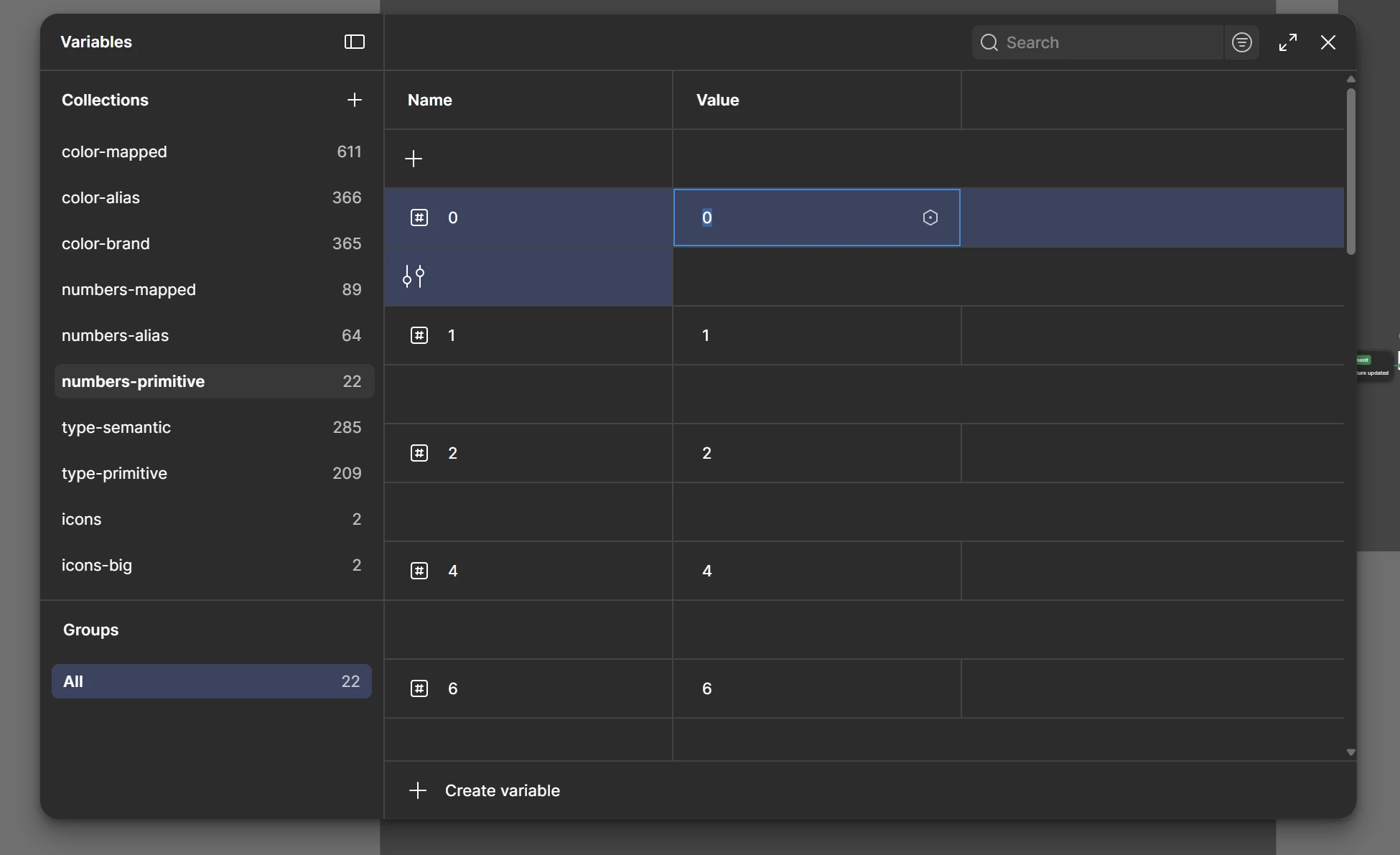
Variables table showing empty row in every two rows

  • July 14, 2026
  • 23 replies
  • 298 views

Entire variable row became like this

Best answer by Celine_

Good to hear it’s working fine now! Thanks everyone for letting us know. I’ll go ahead and mark as solved the Forum topic here, thank you!

23 replies

Marcel12
July 14, 2026

It's the same for me! And you can no longer adjust the column width manually.

grooming matters
New Member
July 14, 2026

how lucky I am to open the Figma variables panel for the first time in my life just now, and be so confused about those rows ))


craig_willers
New Participant
July 14, 2026

same

Ezzat Liao
New Member
July 14, 2026

same after the latest update! i was gonna report this too. just at the right time i need to screenshots them all and document it, now I need to wait this until it’s fixed.

Matt Pearce 72
New Member
July 14, 2026

Same here, came here to report the exact same thing

Peter Scott
New Participant
July 14, 2026

Logged in this morning to find the variables are split with the ‘edit variable’ now appearing under the variable info. I’m on a 27” screen with only one mode. 

I’m guessing this is a bug rather than update.


Celine_
Figmate
Community Support
July 14, 2026

Hey everyone! Celine from the Figma Community Support team here. Thanks for taking the time to flag this and report the issue.

I was able to reproduce the behavior on my end and have raised it internally with our Engineering team for investigation.

We'll share an update here as soon as we have more information to pass along. Thanks again for bringing this to our attention!

Nishchay Makkar
New Member
July 14, 2026

The Variables panel is rendering incorrectly with large blank gaps between variable rows.

I've verified the following:

  • Happens in every Figma file, including new files.
  • Affects all variable collections.
  • Reproduces in the Figma Desktop app.
  • Reproduces in Chrome, Brave, and Firefox.
  • Persists after restarting Figma.
  • Persists regardless of browser zoom or Windows display scaling.

The issue makes the Variables panel difficult to use because the spacing between rows is inconsistent and much larger than expected.

I've attached a screenshot showing the issue.

Cammy Hogg
New Participant
July 14, 2026

I’m not sure if this is an intentional update or a bug, but the Variables panel now displays items in two rows instead of a single continuous list. This makes it much harder to quickly visualise and compare all variables within a collection at once, especially for larger collections.


javier-c
New Member
July 14, 2026

Since very recently variables on the variables panel use 2 rows instead of one. It seems it’s an UI bug. The settings icon breaks to another like so everything takes double space.