Solved

use_figma tool is missing

  • May 29, 2026
  • 12 replies
  • 236 views

Vellicia Quinnita Wijaya

hey, on my claude code mcp, figma only have 10 tools available, no use_figma detected. I already try to re-log, re-auth, and re-connect but nothing works

Best answer by Celyn_L

Hi everyone, the team has rolled out a fix, and the tool should now be working as expected.

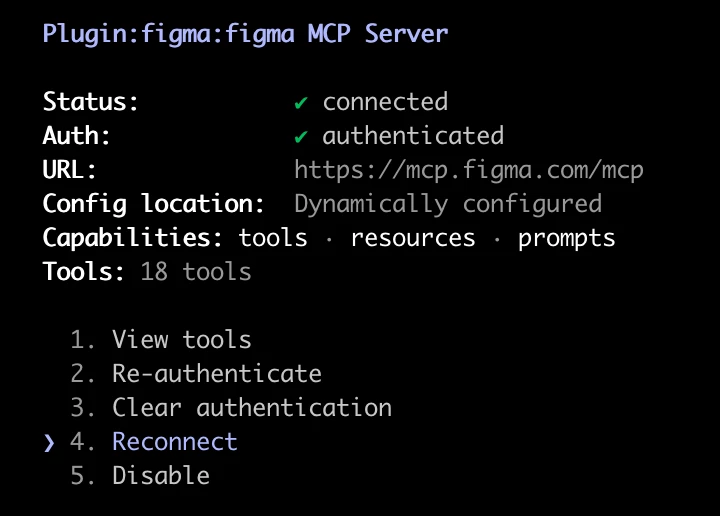
Please reconnect to the MCP and give it another try. Here's a screenshot of how it appears:


Let us know how it goes, and if you're still running into any issues, we'll be happy to investigate further.

Thank you again for your patience while the team worked through this. We really appreciate it 🙏

12 replies

Grow-Designer

same issue here
really frustrating


konova
  • New Member
  • May 29, 2026

same issue here


deepxnoid
  • New Member
  • May 29, 2026

I'm on Professional plan with a Full seat.

The use_figma (write to canvas) tool from the remote Figma MCP server 

(https://mcp.figma.com/mcp) was working, then disappeared 

yesterday (right after I joined the AI agent beta waitlist.)


Verified on my end:

- Full seat confirmed

- Figma Desktop 126.4.11 (latest)

- Remote MCP connected, re-authenticated multiple times

- Plugin fully uninstalled + reinstalled (figma@claude-plugins-official 2.2.12)

- Local Dev Mode server (3845) only exposes 5 read tools (expected)

- All other remote tools work; ONLY use_figma is withheld


This looks like an account-side feature flag. Similar symptom as 

resolved ticket #1891557. Please restore use_figma access.


Note: This is not the local-server conflict from ticket #1891557. 

My ~/.claude.json has no port 3845 / localhost entry, so there's no 

local-vs-remote conflict — Claude Code uses only the remote server 

(https://mcp.figma.com/mcp). All other remote tools load fine; only 

use_figma is withheld, which indicates an account-side feature flag.

[Moderator note: This post was merged from "I lost access to the use_figma tool - Claude MCP" into "use_figma tool is missing" on 29-May-2026.]


Edvard_Pires_Bjorgen_Bouvet_AS

Describe in detail the bug/issue you are running into

When connecting an MCP client to the official Figma MCP server, the server advertises write capabilities in its instructions (use_figma, generate_figma_design, upload_assets), but the use_figma tool is never actually exposed in the tool list. Only read and miscellaneous tools are available:

  - Read: get_metadata, get_screenshot, get_design_context, get_variable_defs, get_figjam
  - Code Connect: get_code_connect_map, add_code_connect_map
  - Misc: create_new_file, generate_diagram, whoami

Because use_figma is absent, any attempt to call it fails with Tool use_figma not found, and no
write/edit operations (create sections, reparent nodes, add text, etc.) can be performed. The read tools
work fine against the same authenticated session, so this is specifically the write-execution tool that
is unavailable.

Are you able to consistently reproduce it? Have you found any reproducible patterns? Are you seeing any error messages?

Yes, consistently reproducible. Pattern: read tools from the same server are present and functional; only use_figma is missing. Error message when invoked: Tool use_figma not found. The same condition was observed across separate sessions.

  What are the reproduction steps?

  1. Connect an MCP client to the official Figma MCP server and authenticate.
  2. Confirm the session is authenticated (e.g. via whoami) — succeeds.
  3. List/enumerate the available tools, or attempt to call use_figma.
  4. Observe that use_figma is not in the tool list and calling it returns Tool use_figma not found, while
  read tools (get_metadata, get_screenshot, etc.) succeed against the same file.

  Which Figma product

  Figma Design (via the remote Figma MCP server)

  Screenshots, recordings, links, console logs

  Tool list returned by the server (write tool absent):
  get_metadata, get_screenshot, get_design_context, get_variable_defs,
  get_figjam, get_code_connect_map, add_code_connect_map,
  create_new_file, generate_diagram, whoami
  Error on invocation: Tool use_figma not found
  
  Is this happening in a specific browser, desktop app, or both?

  Occurs via the MCP server connection used by the MCP client (not a browser tab). Connected to the
  official/remote Figma MCP server rather than a local Dev Mode MCP server.

  What OS, desktop app version, and/or browser version are you using?

  - OS: macOS (Darwin 24.6.0)
  - Connection: official Figma MCP server (remote)

  Troubleshooting steps already done

  - Verified authentication succeeds (whoami returns valid user and plans).
  - Confirmed read tools from the same server work against the target file.
  - Reconnected the server — no change.
  - Performed a fresh re-authentication — no change.
  - Confirmed reproducibility across multiple separate sessions.


[Moderator note: This post was merged from "use_figma tool missing from official Figma MCP server (remote/plugin connection)" into "use_figma tool is missing" on 29-May-2026.]


Celyn_L
Figmate
  • Figmate
  • May 29, 2026

Hi everyone, Celyn from Figma Community Support here.

Thanks for flagging this. I've shared this with the team and we're actively investigating the issue now.

We'll post an update here as soon as we have more information to share.

Thanks for your patience while we work to get this resolved 🙏


Jan_Masin1
  • New Member
  • May 29, 2026

i have a same problem


Ludek Vodicka

the same issue here. 


Fernie-Harper

+1


Ludek Vodicka

+1

[Moderator note: This post was merged from "use_figma tool missing from official Figma MCP server (remote/plugin connection)" into "use_figma tool is missing" on 29-May-2026.]


Vinit
  • New Member
  • May 29, 2026

hey, on my claude code mcp, figma only have 10 tools available, no use_figma detected. I already try to re-log, re-auth, and re-connect but nothing works

Same Issue.


Celyn_L
Figmate
  • Figmate
  • Answer
  • May 29, 2026

Hi everyone, the team has rolled out a fix, and the tool should now be working as expected.

Please reconnect to the MCP and give it another try. Here's a screenshot of how it appears:


Let us know how it goes, and if you're still running into any issues, we'll be happy to investigate further.

Thank you again for your patience while the team worked through this. We really appreciate it 🙏


Kaya_keem
  • New Member
  • May 31, 2026

In VS Code, even after re-authenticating and reconnecting MCP, then fully quitting and restarting the app, use_mcp remains in a destructive state. I'm wondering if other users have resolved this or if it's just me. Are there any additional troubleshooting steps I can take, or is this issue still not fully resolved?