Vellicia Quinnita Wijaya
New Member
May 29, 2026
Solved

use_figma tool is missing

  • May 29, 2026
  • 13 replies
  • 624 views

hey, on my claude code mcp, figma only have 10 tools available, no use_figma detected. I already try to re-log, re-auth, and re-connect but nothing works

    Best answer by Celyn_L

    Hi everyone, the team has rolled out a fix, and the tool should now be working as expected.

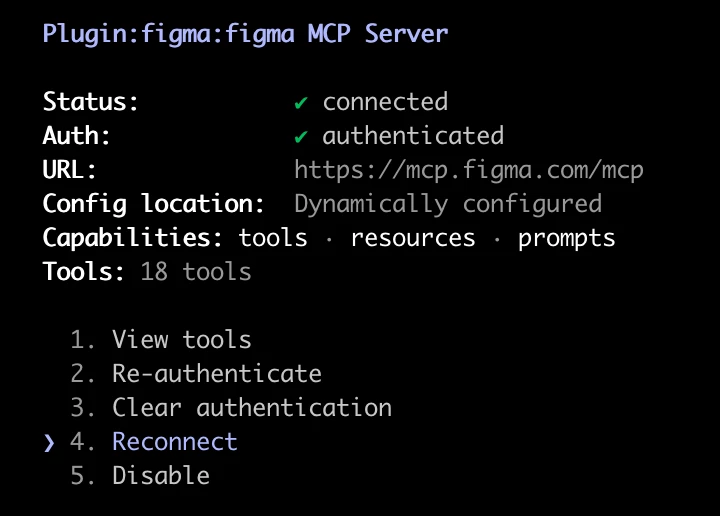
    Please reconnect to the MCP and give it another try. Here's a screenshot of how it appears:


    Let us know how it goes, and if you're still running into any issues, we'll be happy to investigate further.

    Thank you again for your patience while the team worked through this. We really appreciate it 🙏

    13 replies

    Celyn_L
    Figmate
    Celyn_LAnswer
    Figmate
    May 29, 2026

    Hi everyone, the team has rolled out a fix, and the tool should now be working as expected.

    Please reconnect to the MCP and give it another try. Here's a screenshot of how it appears:


    Let us know how it goes, and if you're still running into any issues, we'll be happy to investigate further.

    Thank you again for your patience while the team worked through this. We really appreciate it 🙏

    Kaya_keem
    New Member
    May 31, 2026

    In VS Code, even after re-authenticating and reconnecting MCP, then fully quitting and restarting the app, use_mcp remains in a destructive state. I'm wondering if other users have resolved this or if it's just me. Are there any additional troubleshooting steps I can take, or is this issue still not fully resolved?

    Celyn_L
    Figmate
    Figmate
    June 2, 2026

    Hi ​@Kaya_keem, thanks for sharing the details, and sorry you’re still running into this.

    Just to confirm, when you reconnected MCP, did you use the Reconnect option directly within Claude Code?

    In the meanwhile, I've gone ahead and created a support ticket for you so the team can investigate this more closely. Your ticket number is #1938911.

    Could you reply directly to the ticket and share a screenshot of what you're seeing, along with any error messages or logs from VS Code if available? That information will be really helpful for the investigation.

    Someone from the team will be reaching out soon, so please keep an eye on your inbox. Thanks again for your patience while we look into this.