
Angel Panisara
New Member
Oct 18, 2026 9:11 AM UTC
Question

Unable to Publish Figma site
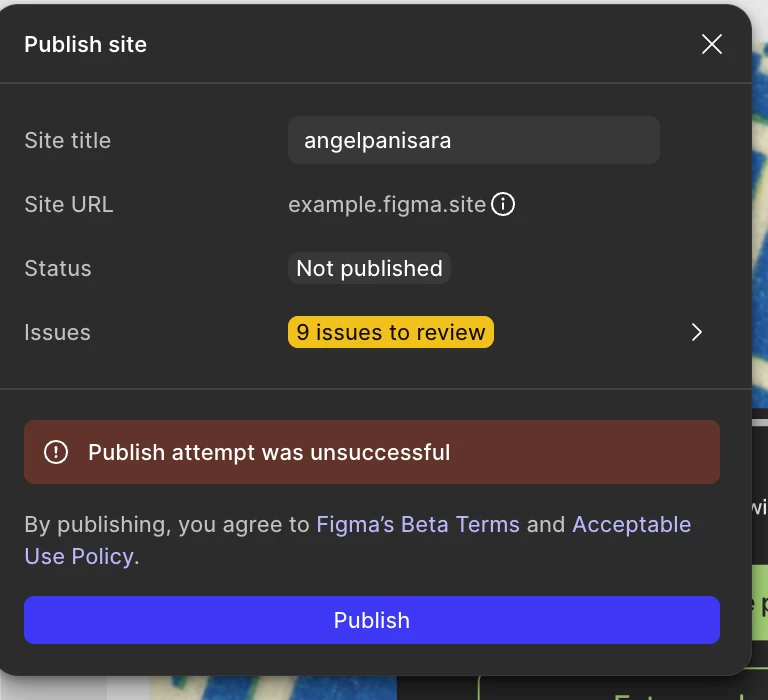
I tried to publish the Figma site but it was unsuccessful. I don’t know why..Is there any solution to this? or do i need to fix all accessibility issue?



4 replies

Tom Reem
Figmate
Figmate
Oct 18, 2026 5:47 PM UTC

Hey ​@Angel Panisara, welcome to Figma Forum and thanks for including this screenshot. 🙏🏻

To answer your question first: You don't need to fix every accessibility issue before publishing. The 9 issues to review list flags things that might affect how your site works for visitors. Figma recommends addressing them, but it isn't required to publish. More information on this here: Publish, update, or unpublish a site → Publish a site.

Looking at the "Publish attempt was unsuccessful" error: This is a general message, so here are three quick things that can help narrow down the potential cause:

  1. Look through the issues list for anything that isn't accessibility-related. Click the arrow next to 9 issues to review. One thing that can block publishing is fonts. If your site uses a font installed on your computer, you'll need to upload the web font version before the site can publish. Steps here: Add a custom font to your site → Upload a font file to your site.
  2. Refresh the file, wait a few minutes, then try again. Some publish failures are temporary.
  3. Try a quick isolation test. Duplicate the file, delete all but one page, and try publishing the copy. If that works, add pages back one at a time. This can help pinpoint a specific element that's getting in the way. For more context, have a look at this Forum post.


Hopefully one of these unlocks a path forward. If it still won't publish, could you reply with a screenshot of the expanded issues list? That'll help me take a closer look and point you to the right next step.

Angel Panisara
New Member
Oct 19, 2026 7:17 AM UTC

Hello Tom. Thank you for reaching out. I already uploaded the font before trying to publish.
Initially I tried refresh the file and duplicating and publish again. Both are not working.. and the photo attached is what shown. There is no expanded issues but accessibility. Happy to share the file if needed. Appreciate your help! :))


Tom Reem
Figmate
Figmate
Oct 19, 2026 4:10 PM UTC

Got it — thanks for working through those steps and for the extra screenshots, ​@Angel Panisara.

Since the only flagged issues are accessibility ones and the publish still isn’t going through, I’ve connected you with our Customer Support team so they can look at the file directly. I’ve opened case: 2206999, and emailed you with steps for sharing your file securely.

Please check your inbox for next steps, and thanks for your patience as we follow up on this. 🙏🏻