

Question

Text styles linked to Variables Modes are not correctly propagated to library instances after publishing

  • May 29, 2026
  • 7 replies
  • 74 views

Maurizio De Moliner

I recently migrated my typography system from raw text style values to Variables-based values using breakpoint modes.

Previously, all text styles were defined with fixed values (font size, line height, font family, font weight, etc.). I then replaced those raw values with variables connected to typography modes for responsive breakpoints.

The migration appeared successful inside the Foundation library file. All components correctly inherited the updated typography values and display the expected styles.


However, after publishing the library, many instances in consuming files did not update correctly. Instead, they seem to retain stale typography metadata.


I am seeing two different issues:

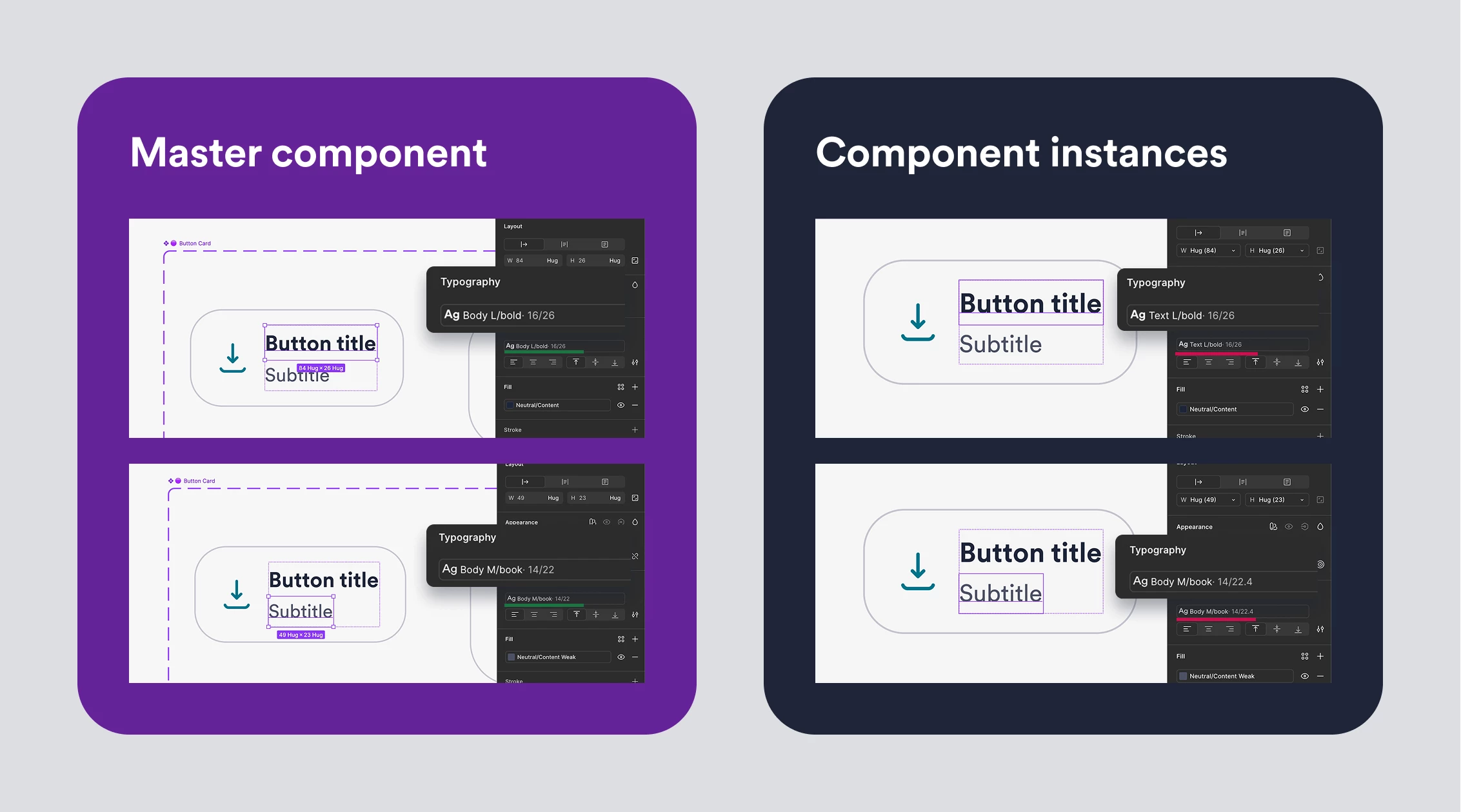
Issue 1 — Old style names remain visible

In some text layers, the instance still displays the old style name even though the main component uses the new style.

Example:

  • Main component: Body L Bold
  • Instance: Text L Bold

The instance is clearly showing the old style name, despite being linked to the updated style.

Issue 2 — Old typography values remain attached

In other cases, the style name appears correct, but the actual typography values shown are outdated.

Example:

  • Main component: Body M 12/22
  • Instance: Body M 14/22.4

The instance appears to retain previous values that no longer exist in the library.
 

The most confusing part

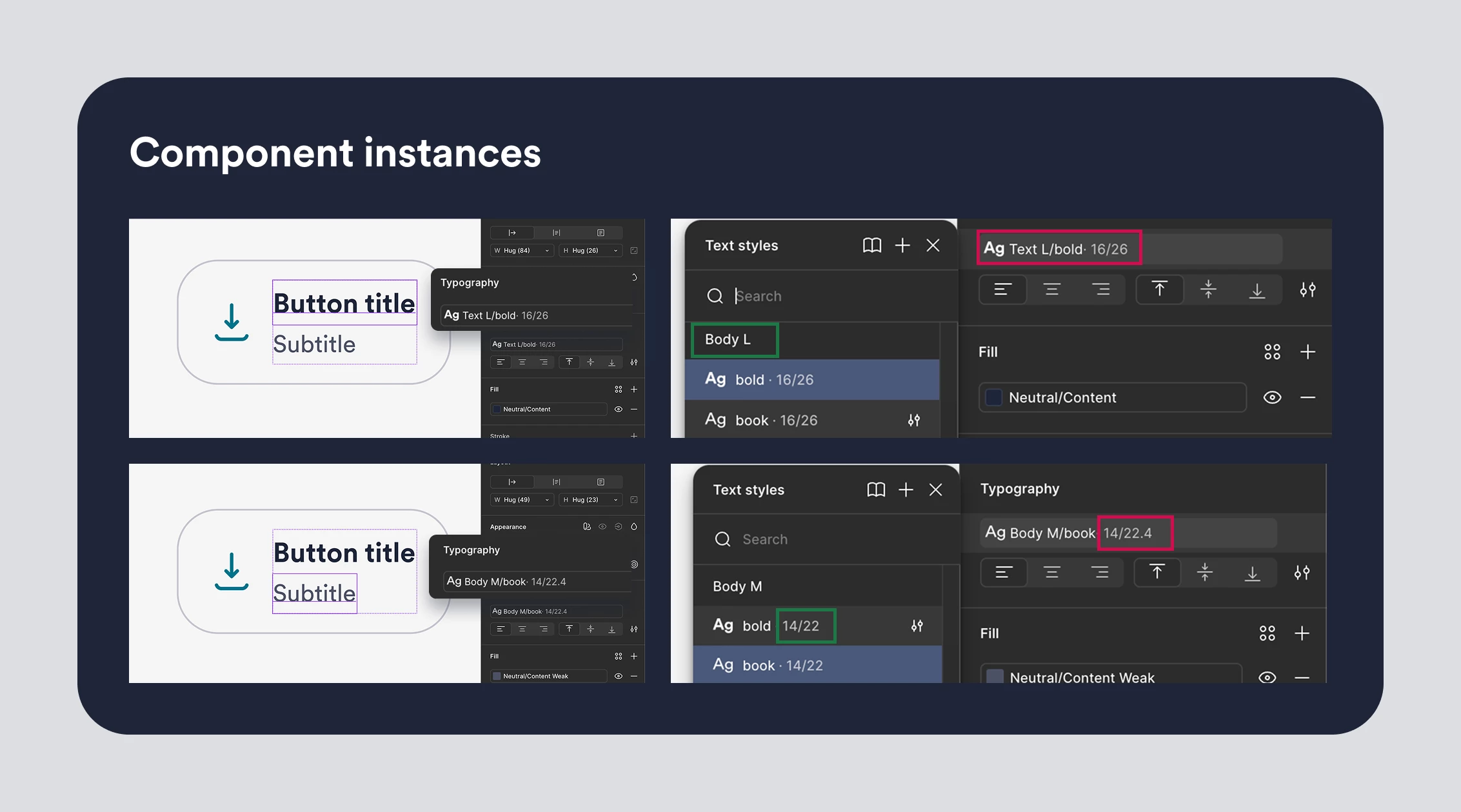
When selecting the affected text layer, the Text Style dropdown shows the correct style as selected.

In other words:

  • The layer appears linked to the correct style.
  • The dropdown confirms the correct style is selected.
  • Yet the style name and/or values shown in the UI remain incorrect.

This creates a situation where the layer appears both correct and incorrect at the same time.
 

Troubleshooting already attempted

None of the following resolved the issue:

  • ❌Creating temporary modes, publishing, then removing them and publishing again
  • ❌Renaming text styles, publishing, restoring original names, and publishing again
  • ❌Repair Instances
  • ❌Updating library dependencies multiple times

The only workaround I found is: ✅

  1. Open the main component
  2. Change the text content to something different
  3. Immediately restore the original text
  4. Publish the library again

After doing this, the affected instances update correctly.

However, this requires manually touching every affected text layer across more than 100 components, which is not a realistic workaround for a production design system.

Is there a supported way to force a complete refresh/rebuild of text style metadata in library instances after migrating typography styles to Variables and Modes?

7 replies

Jaycee Lewis
Figmate

Hey, ​@Maurizio De Moliner 

Let's work on this together! It's worth running a quick test to isolate whether the issue is with how the library is publishing or how the consumer files are reading it:

  • Open a fresh file in Figma Design and add the affected library

  • Drop in one instance of the broken component

  • Try running Repair variable mode values to see if that helps. You can access quick actions by using the keyboard shortcut ⌘/ (Ctrl+/)

If that clears it up, we can look at things like a consumer-file cache issue versus the library publish itself

If that doesn't do the trick, could you try making a "silent" change to the collection where the variable mode is located, and then publish and accept the update?

To help me get a full picture, could you also let me know:

  • Are your variables defined in the same file as your components?
  • Or are you using a separate tokens or primitives file?

Thank you very much for the additional information! — Jaycee


Maurizio De Moliner

Hi ​@Jaycee Lewis 

Thanks for looking into this.

I tested both suggestions, but unfortunately neither resolved the issue.

Regarding "Repair variable mode values", I don't actually see that option available in my Figma account. The only repair actions available through Quick Actions are:

  • Repair variable connections

  • Repair component connections

  • Repair component set versions

I tried "Repair variable connections", but Figma reports "Nothing to repair".


I also tried the "silent change" approach on the library side multiple times before opening this report. For example, I tested:

  • Renaming text styles and publishing

  • Creating an additional mode, publishing, then removing it and publishing again

  • Modifying variables used by the text styles and publishing

  • Accepting library updates in consuming files

None of these actions fixed the issue. 🥲


To answer your questions:

Are your variables defined in the same file as your components?
Yes. We use a single library file that contains both components and all design tokens (colors, typography, etc.).

Or are you using a separate tokens/primitives file?
No separate primitives file.

Our typography setup is currently:

  • Text Styles are applied to components.

  • Typography properties (font size, line height, font weight, etc.) are driven by Variables.

  • Variables use different Modes for breakpoint-specific values.


One additional observation that may help: 👇

The issue can be fixed if I edit the text content inside the main component, replace it with temporary text, immediately restore the original text, and then publish the library again.

After doing this, the affected instances update correctly.

This makes me suspect the problem may not be related to variable resolution itself, but rather to stale metadata on text layers that is only refreshed when the text node is modified.

Have you seen any known issues where Text Styles linked to Variables/Modes do not fully invalidate or refresh instance metadata after publishing?


Jaycee Lewis
Figmate

Thank you so much, ​@Maurizio De Moliner 🙌 I’m going to take this to my internal resources to get us more clarity. One last question for you — When you accept the library update in the consuming file, do these components show up in the updates list as changed — or do they not appear as needing an update at all? Thanks! — Jaycee


Maurizio De Moliner

Hi ​@Jaycee Lewis 
Yes, the update does appear in the updates list.

To be more precise, these are the steps I followed:

  1. Identify a component showing the issue (for example, a Tab component displaying "Text M" instead of "Body M").

    Incorrect Text M as associated text style


  2. Open the main library file that contains both components and tokens.

  3. Create a branch from the library.

  4. Select the affected text layer(s) inside the component.

  5. Replace the text content with temporary text.

  6. Immediately restore the original text content.

  7. Merge the branch.


  8. Publish the library update.

  9. Open a consuming file and accept the library update.


After applying the update, the component displays the correct text style preview (for example, "Body M" instead of "Text M").
 

So the component is definitely detected as changed and appears in the updates list.
 

What's interesting is that I am not changing the text style, variables, modes, or component structure. The only change is briefly modifying and restoring the text content itself.

This makes it seem like editing the text node forces Figma to refresh some internal text style metadata, which then propagates correctly through the library update.


By contrast, changes such as:

  • renaming text styles,

  • modifying variables,

  • adding/removing modes,

  • republishing the library,

do not seem to trigger the same refresh behavior, even though those changes are also published and consumed successfully.


One additional detail that may be useful: 👇

The issue does not affect all components. Many components updated correctly after the initial migration and first publish.

Only a subset of components show stale text style names or values, while others using the same typography system updated without any issues.

This makes me think the problem may be related to specific text layers or cached metadata rather than the Variables/Modes setup itself.


Jaycee Lewis
Figmate

Hey hey ​@Maurizio De Moliner 👋 Firstly, thank you very much for all the help so far 🙌 Based on my knowledge, this is the educated hypothesis we’ve established:
“Publishing a library doesn't mark text nodes as "changed" when the only modification is a variable-bound value behind a text style, so consumer-file instances keep serving cached style names/values until the text node is dirtied directly (e.g., editing and restoring the text), which forces the metadata to refresh.” Does that sound about right to you?

I opened a support ticket for us. The ticket ID is 1944522. Keep your eye out for an email from support. Talk soon! — Jaycee


Maurizio De Moliner

Hey ​@Jaycee Lewis  👋

Yes, that hypothesis matches my understanding as well and is very close to what I had suspected during the investigation.

It felt as if updating the variable-bound values behind the text styles (and in some cases the style naming itself) was not enough to mark the text nodes as changed, so the consuming files continued to display cached style metadata.


The only thing that still feels a bit unusual is that the issue did not affect all components consistently.

Many components updated correctly after the first publish, while only a subset showed stale style names or values. In some cases, even within the same component, only specific text layers were affected. For example, the Body text in one size variant could display the correct style name, while the equivalent text layer in another size variant would still show the old naming.

I'm not sure whether that points to some randomness in the caching behavior or whether it could be related to component complexity, variant structure, nested layers, or the history of those specific text nodes.

In any case, thank you very much for taking the time to investigate this and for opening the support ticket. I really appreciate the help.

Thanks again! 🙌


Jaycee Lewis
Figmate

Hey, ​@Maurizio De Moliner 👋 Thank YOU for providing all the context. Have a great week! — Jaycee