
Minii
New Member
June 2, 2025
Question

Sticky navigation bar appears underneath content on Safari and mobile browsers

  • June 2, 2025
  • 26 replies
  • 2581 views

Hi! I’m testing a site built with the new Figma Sites feature.


I’ve set the top navigation bar as a sticky element and made sure it’s positioned at the very top of the layer tree. In the Layout panel, canvas stacking is set to “First on top.”
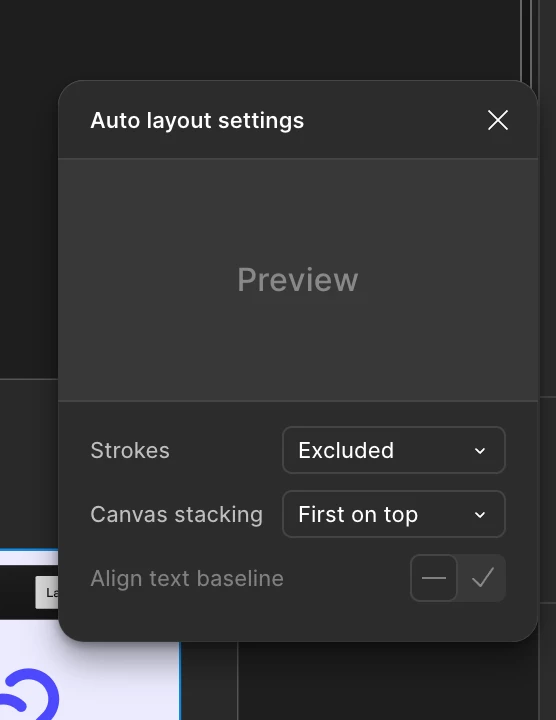

Canvas stakcking settings
It looks fine on Figma and Chrome(desktop & laptop)
On Safari and mobile browsers, the sticky navigation bar appears underneath the hero section content, even though it’s set to be the topmost layer in the design.


  • On Chrome (desktop & laptop): everything works as intended — the GNB stays sticky and always remains on top.

  • On Safari (desktop & laptop) and all mobile browsers (Safari & Chrome): the GNB is sticky, but appears underneath other layers and is partially or fully hidden.


Is there a workaround or fix for this issue?


Thanks in advance!

26 replies

Gayani_S
Figmate
Community Support
November 5, 2025

Hey everyone, thank you for sharing these updates!

I’ve gone ahead and re-escalated this to the team so they can take another look. I’ll follow up here as soon as I have more information from the team.


Thank you for your patience and for sticking with us while we work to get this sorted out.

Gayani_S
Figmate
Community Support
November 21, 2025

Hey everyone, I’m really sorry for the delay getting back to you. I wasn’t able to gather more details yet, but I want to make sure you’re not feeling stuck. Could you please confirm if you’re still experiencing this issue? 

Biffin francis
New Member
November 21, 2025

Yesh I am still having the same issue. 
Nav bar still not working properly it is hiding behind the other section. it is frustrating because it is the most basic expectation from any kind of website builder . 
Do you have any timeline when it will be fixed its been a while 

Gayani_S
Figmate
Community Support
November 24, 2025

Hey ​@Biffin francis, I’m really sorry to hear that this issue is still happening! 

I’ve gone ahead and created a support ticket for you so our team can take a closer look. Your ticket number is #1613453, for reference. Someone from our support team will reach out soon. 

If you’re able, please share a link to the affected file and invite support-share@figma.com with “can edit” permissions. This will help the team investigate (Inviting @figma.com users won’t affect your billing).

For anyone else still experiencing this behaviour, please consider submitting a bug report following the steps in the article: https://help.figma.com/hc/en-us/articles/360041468234-What-to-share-in-a-bug-report-to-Figma-Support. 


Thanks again for your patience! 

milesweb
New Participant
November 24, 2025

Avoid overflow: hidden/auto/scroll on the direct parent of the sticky element.


Remove these from the ancestors, if possible:

  • transform: translate(...), scale(...), rotate(...)

  • transform: translateZ(0) or any 3D transform

  • filter: blur(...) / backdrop-filter

  • opacity less than 1

  • mix-blend-mode, isolation: isolate

  • perspective, clip-path, etc.

Candice Rhea
New Member
April 12, 2026

Okay I was having this issue and just managed to fix it.

Yes the solution is within the auto layout settings but it takes a possibly non-intuitive interaction to solve it.

If your sticky element is inside of a layout group the stacking order that needs to be changed is the layout group that the element is inside of and not the element itself.

I assume most people use auto layout as the foundation for their page then stack things inside of it - if so the auto layout for your page is where the stacking order needs to be changed.


This! Something so simple. Thank you Vin B!