
Minii
New Member
June 2, 2025
Question

Sticky navigation bar appears underneath content on Safari and mobile browsers

  • June 2, 2025
  • 26 replies
  • 2581 views

Hi! I’m testing a site built with the new Figma Sites feature.


I’ve set the top navigation bar as a sticky element and made sure it’s positioned at the very top of the layer tree. In the Layout panel, canvas stacking is set to “First on top.”
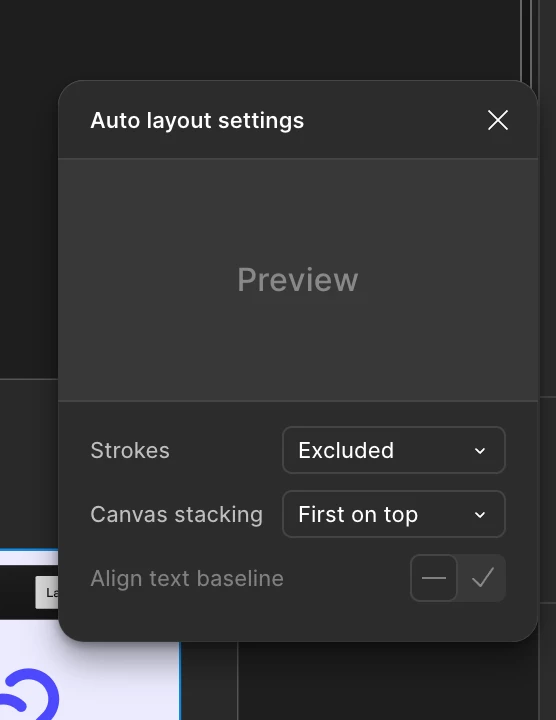

Canvas stakcking settings
It looks fine on Figma and Chrome(desktop & laptop)
On Safari and mobile browsers, the sticky navigation bar appears underneath the hero section content, even though it’s set to be the topmost layer in the design.


  • On Chrome (desktop & laptop): everything works as intended — the GNB stays sticky and always remains on top.

  • On Safari (desktop & laptop) and all mobile browsers (Safari & Chrome): the GNB is sticky, but appears underneath other layers and is partially or fully hidden.


Is there a workaround or fix for this issue?


Thanks in advance!

26 replies

encarrasco
New Member
July 3, 2025

any updates on this? having the same situation.

Gayani_S
Figmate
Community Support
July 11, 2025

Hey everyone! Unfortunately I wasn’t able to receive any updates on this case. I’ll follow up as soon as I hear back from the team. Apologies for the delay! 

vinjaune89
New Member
July 16, 2025

just +1 this issue, keep me posted.

Emil_Bergstrom
New Member
August 4, 2025

I am experiencing the same issue.. This causes alot of issues for me. Please keep me posted for any updates.

Paget McCormack
New Member
August 21, 2025

+1

Gayani_S
Figmate
Community Support
September 8, 2025

Hi everyone, I’m really sorry for the late update here, and thank you for your patience while I got back to you. The team has confirmed that this issue has been fixed. Could you let me know if things are working as expected on your side now, or if you’re still running into problems? 


Thank you, 

Gayani 

Shelley_Fan
New Member
September 12, 2025

I’m having a similar issue, but my sticky header doesn’t work on the preview before publishing my site. The sticky header will always stay on the back of the screen and when I set it to Bring to the Front, it’s moved to the bottom of my screen. Very annoying😭

Vin B
New Member
September 25, 2025

Okay I was having this issue and just managed to fix it.

Yes the solution is within the auto layout settings but it takes a possibly non-intuitive interaction to solve it.

If your sticky element is inside of a layout group the stacking order that needs to be changed is the layout group that the element is inside of and not the element itself.

I assume most people use auto layout as the foundation for their page then stack things inside of it - if so the auto layout for your page is where the stacking order needs to be changed.

Nicoley
New Member
October 13, 2025

Hi, specifically searched for a fix to this issue and bummed to see there’s no solve. Just that the team resolved it. Any more info? I’m running into this problem in Figma app.

Michael Yates
New Member
October 28, 2025

Ridiculous, I have this exact problem to this date. When I make the top bar fixed, its sitting behind my hero frame on figma app (mac), but I use browser it sits at the front.