
Minii
New Member
June 2, 2025
Question

Sticky navigation bar appears underneath content on Safari and mobile browsers

  • June 2, 2025
  • 26 replies
  • 2581 views

Hi! I’m testing a site built with the new Figma Sites feature.


I’ve set the top navigation bar as a sticky element and made sure it’s positioned at the very top of the layer tree. In the Layout panel, canvas stacking is set to “First on top.”
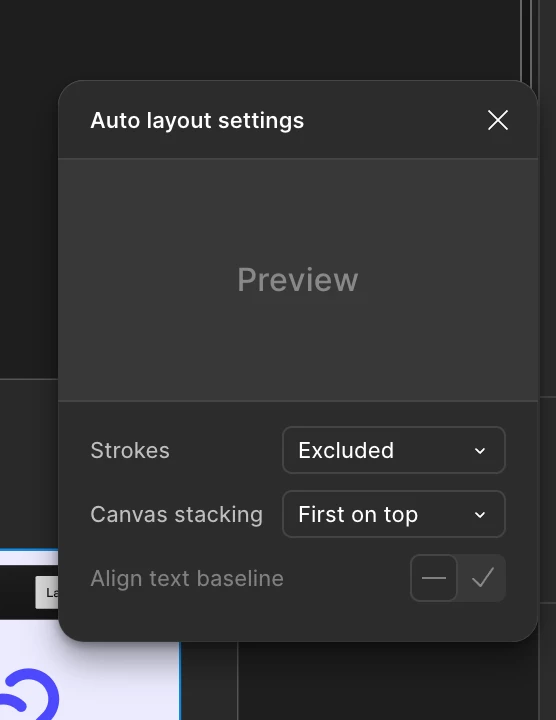

Canvas stakcking settings
It looks fine on Figma and Chrome(desktop & laptop)
On Safari and mobile browsers, the sticky navigation bar appears underneath the hero section content, even though it’s set to be the topmost layer in the design.


  • On Chrome (desktop & laptop): everything works as intended — the GNB stays sticky and always remains on top.

  • On Safari (desktop & laptop) and all mobile browsers (Safari & Chrome): the GNB is sticky, but appears underneath other layers and is partially or fully hidden.


Is there a workaround or fix for this issue?


Thanks in advance!

26 replies

ellixtt
New Member
June 5, 2025

Having the same issue, just on Mobile. Followed the same usual steps (ensure header is first thing on page, set autolayout to ‘first on top’, make header sticky) but still no luck.

Gayani_S
Figmate
Community Support
June 5, 2025

Hey ​@Minii, thanks for the detailed explanation! Just to help narrow things down, are you seeing the same behaviour in the Figma desktop app, or is it only happening in Safari? If you’re not seeing any issues on the desktop app this might be Safari related. 

If you’re comfortable sharing, it would be really helpful to have the Figma site link so I can try to reproduce the issue on my end. You can also invite support-share@figma.com directly to your file as an editor (this won’t affect your billing at all). This lets me take a closer look and loop in the right team to investigate.


Hey ​@ellixtt, thanks for flagging this. Could you also please check if you’re experiencing this in the desktop app. And on which browser are you using this on the Mobile? 

Minii
MiniiAuthor
New Member
June 6, 2025

Hi ​@Gayani_S 

Thanks so much for getting back to me!

Here’s a breakdown of my testing so far:

  • ✅ Figma desktop app: Sticky navigation works as expected.

  • ✅ Chrome (desktop & laptop): Also working perfectly.

  • ❌ Safari (desktop & laptop): Sticky GNB appears underneath hero content.

  • ❌ Mobile (Safari & Chrome): Same issue on both browsers — GNB is sticky, but it gets pushed behind other layers.

So to clarify, this isn’t just a Safari-specific issue — it affects all mobile browsers including Chrome.

I’ve also invited support-share@figma.com to the file as an editor so you can take a closer look. Please let me know if there’s anything else I can provide to help troubleshoot this!

Really appreciate your support on this!

ellixtt
New Member
June 6, 2025

Hi ​@Gayani_S 

My issue is exactly the same as ​@Minii is experiencing. In the in-app preview view on Figma, both the Desktop and Mobile versions of the sticky header work as expected. Visually, they’re fixed to the top of the page, and when I scroll, the content scrolls beneath them.


When I publish to my live site, the Desktop version works perfectly, but the Mobile version (while being sticky at the top) appears beneath other content, which scrolls over it. This is on both Chrome and Safari.

Gayani_S
Figmate
Community Support
June 9, 2025

Hey ​@Minii, thanks for the detailed breakdown! So the issue is happening across all mobile browsers + in Safari on desktop, but things are working as expected in the Figma desktop app and Chrome.

Can you please share the file link here under this post? If you’d rather not post it publicly, feel free to DM it to me directly.

Thank you! 

Gayani_S
Figmate
Community Support
June 9, 2025

Hey ​@ellixtt, thank you much for chiming in! To get a better sense of what’s going on, I’d love to loop in the team internally for a closer look. If you're comfortable sharing you Figma sites link, you can drop the file link here and also invite support-share@figma.com as an editor (this won’t impact your billing in any way). If you don’t want to post it publicly, feel free to DM it to me directly.


Thanks, 

Gayani 

Minii
MiniiAuthor
New Member
June 9, 2025

​@Gayani_S Yes, that’s correct. I just sent you the file link via DM.
Thanks so much!

Stephen_Howe
New Participant
June 13, 2025

Indeed, having the exact same problem.  In front in chrome, but renders in the back in safari :)

Gayani_S
Figmate
Community Support
June 23, 2025

Hey everyone, apologies for the delayed response! 

I’ve shared the file link ​@Minii shared with me via DM with the team to investigate what’s causing the sticky navigation bar to appear underneath content on Safari and mobile browsers. It may take a bit of time to investigate, but I’ll make sure to keep you all updated as soon as I have more to share.

Really appreciate your understanding while we work on this!

nataliac
New Member
June 30, 2025

I have the same problem so I’m looking forward to updates