Skills have disappeared from the Figma Agent. There used to be a separate Skills option in the "+" menu, but now it's gone — I only see Add images and files, Attach Figma file, Web search, Libraries, and Connectors (screenshot attached).
Hi @Rishabh-tt, Celyn here stepping in for @djv.
Thanks for confirming those additional details, I understand that the option to access Skills has disappeared from your account entirely.
I’ve created a support ticket so the team can assist you directly with this. Your ticket number is #2098030. When you have a moment, please reply to the ticket with:
Links to an example Figma Design file and Figma Make file where you’re trying to use Skills - Please also invite support-share@figma.comto the example files with Can view access, then click Invite. This will help the team confirm that the correct permissions are set up on your account.
Confirmation of whether your plan’s published Skills appear under File Browser > Resources > Skills
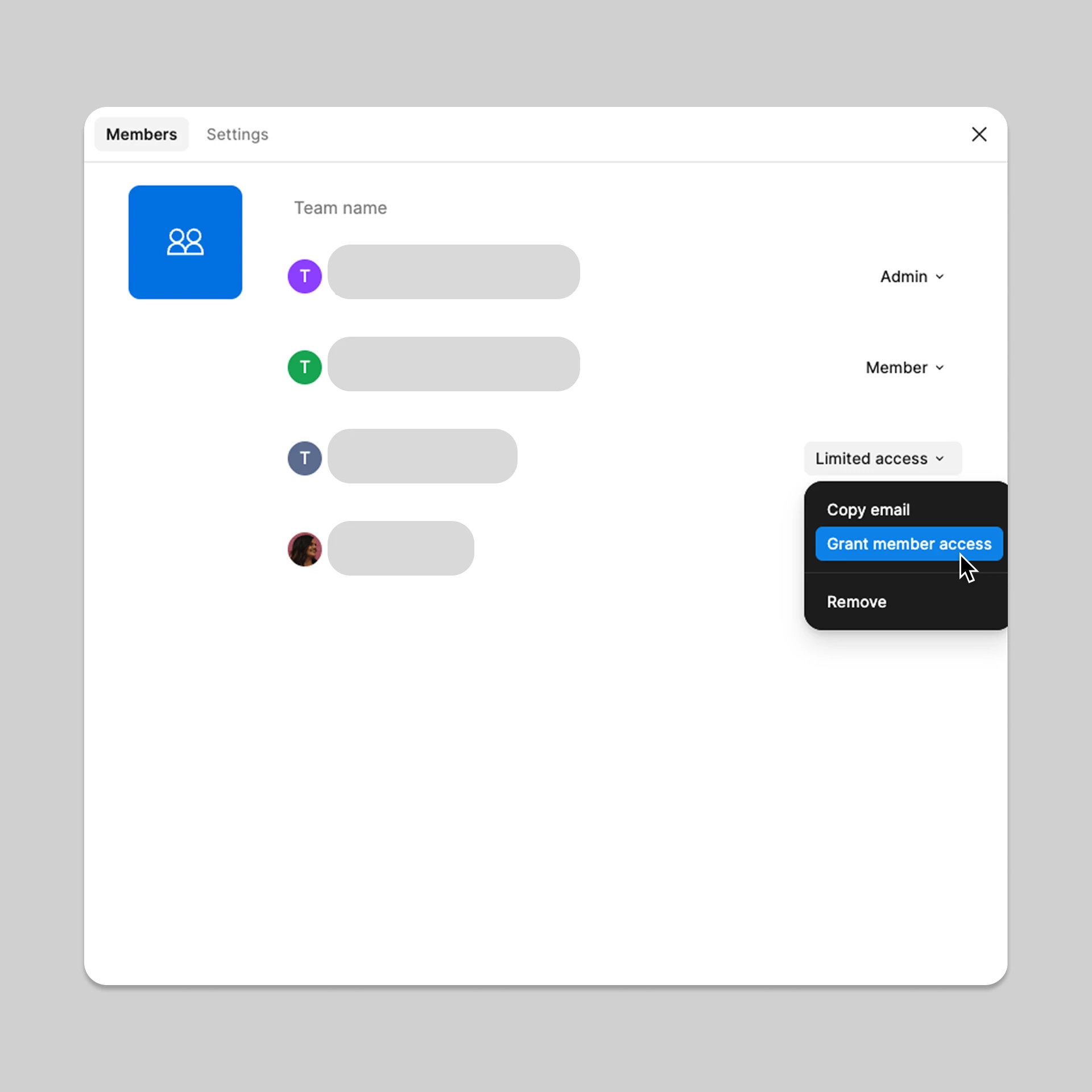
Confirmation of whether your account is currently listed as a full member of the team rather than a guest or limited-access member
If your account is listed as a guest or limited-access member, a team admin can select your role under View members and choose Grant member access. Once updated, please close and reopen the affected files, then try accessing Skills again.
Someone from the team will follow up with you directly through the ticket. Thanks for your patience while we look into this!
Hi @Pavel Stashulan and @brasa.design, thanks for reaching out!
I understand how this must be disrupting your workflow. Losing skills you've already built into your workflow is frustrating, especially with no error to explain why. The most common cause we’ve seen: Skills are gated on plan role, and guests don't get access even with a Full seat. It fails silently rather than erroring. So first, in the file where Skills is missing, are you a member/admin on the plan or a guest? Same question if it's a shared project from another org.
Two more questions that may help us narrow it down:
Has your org changed plans, merged, or moved teams recently? Skills can stay pointed at the previous plan; if so, this is recoverable, we just need to run a fix on our side.
@brasa.design, roughly when did yours stop appearing and is it every file or just some?
Something that may unblock you now: even when "/" doesn't list your skills, typing the skill's name after the slash often surfaces and runs it. So that’s worth a try! For reference, once published a skill should be auto-enabled for the whole team and invokable via "/"; no exporting needed (details here).
Let me know if anything above helps. If not, let me know and I can help connect you with our technical quality team to investigate further.
Hey @vincent003 - just to follow up with some of the feedback Denise mentioned above:
Has your team changed plans, merged, or moved teams recently? Skills can stay pointed at the previous plan; if so, this is recoverable, we just need to run a fix on our side.
Roughly when did yours stop appearing and is it every file or just some?
Something that may unblock you now: even when "/" doesn't list your skills, typing the skill's name after the slash often surfaces and runs it.
Hey @vincent003 - just to follow up with some of the feedback Denise mentioned above:
Has your team changed plans, merged, or moved teams recently? Skills can stay pointed at the previous plan; if so, this is recoverable, we just need to run a fix on our side.
Roughly when did yours stop appearing and is it every file or just some?
Something that may unblock you now: even when "/" doesn't list your skills, typing the skill's name after the slash often surfaces and runs it.
Yes, it was recently adjusted. Please help me fix this issue. After all, your AI is so useful; we can't live without it.Thank you to your team.
I’ve created ticket #2083492 on your behalf to connect you with our support team. They can help run the fix on our side. The team will review your account and be in touch soon.
We appreciate your patience and understanding. Hope that the team can get you back up and running again soon!
Since you haven’t had any recent team changes, can you confirm when Skills stopped appearing? And is this happening in every file or a particular file?
Again, something that may help unblock you, if you haven’t tried it yet. Even when "/" doesn't list your skills, typing the skill's nameafter the slash often surfaces and runs it. Again, once published, a skill should be auto-enabled for the whole team and invokable via "/".
Let me know these details, and I can also help connect you with our technical quality team to investigate further, if needed.
Hi @Rishabh-tt, Celyn here stepping in for @djv.
Thanks for confirming those additional details, I understand that the option to access Skills has disappeared from your account entirely.
I’ve created a support ticket so the team can assist you directly with this. Your ticket number is #2098030. When you have a moment, please reply to the ticket with:
Links to an example Figma Design file and Figma Make file where you’re trying to use Skills - Please also invite support-share@figma.comto the example files with Can view access, then click Invite. This will help the team confirm that the correct permissions are set up on your account.
Confirmation of whether your plan’s published Skills appear under File Browser > Resources > Skills
Confirmation of whether your account is currently listed as a full member of the team rather than a guest or limited-access member
If your account is listed as a guest or limited-access member, a team admin can select your role under View members and choose Grant member access. Once updated, please close and reopen the affected files, then try accessing Skills again.
Someone from the team will follow up with you directly through the ticket. Thanks for your patience while we look into this!