Flo_Fillweber
New Member
September 16, 2025
Solved

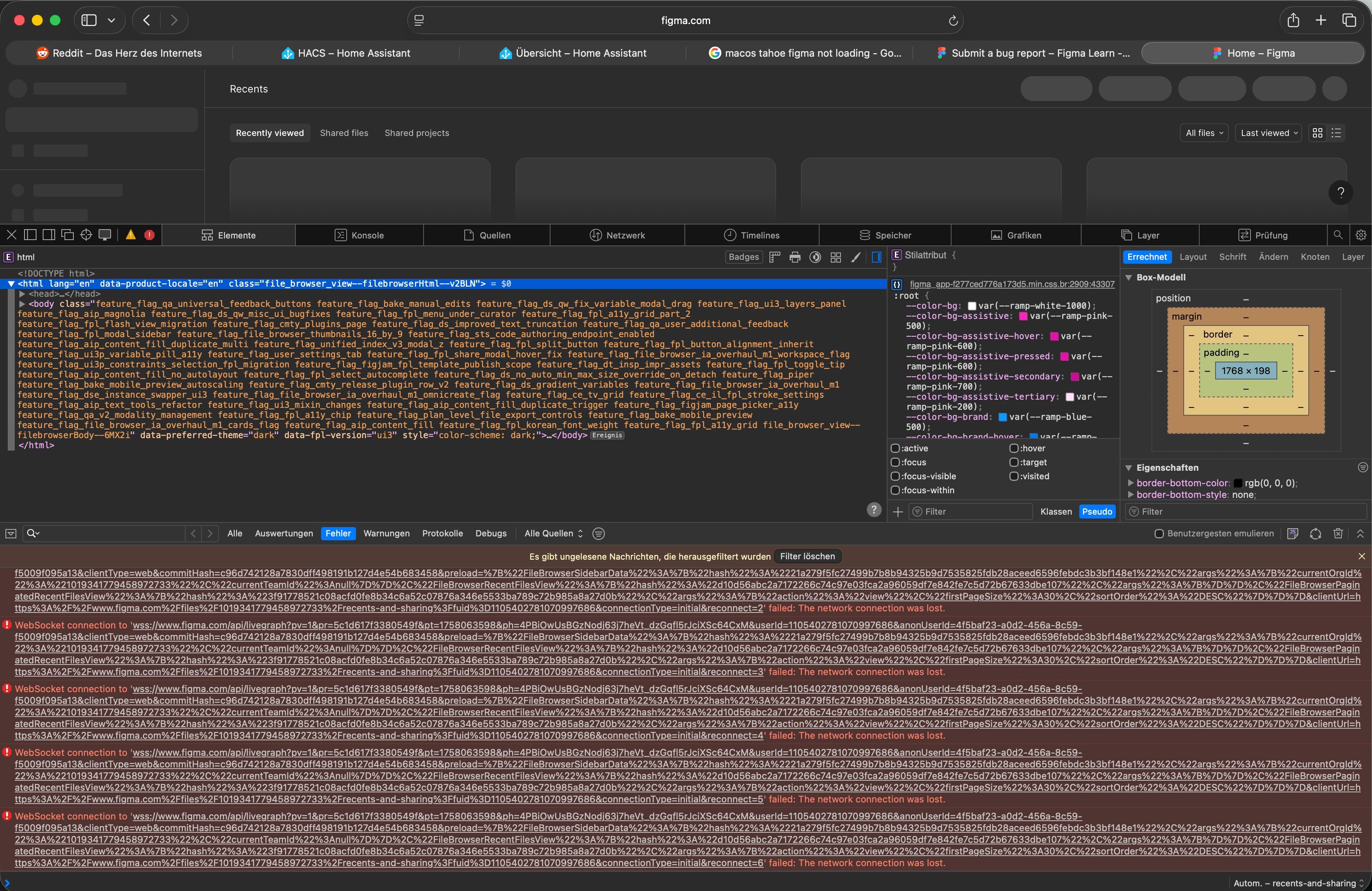
Safari MaxOS 26 sometimes not loading Websockets

  • September 16, 2025
  • 11 replies
  • 2298 views

I got a strange problem on my iMac M1 with Safari on macOS Tahoe.

Figma is somehow stuck in loadingstate - it seems there is a problem with the web sockets. 

The strange thing is, on my M4 MacBook Air it's working. If I clear Website Data it starts working, but doesn't keep on working.


    This topic has been closed for replies.
    Best answer by Celine_

    Hi ​@Ben Fitter-Harding ,

    Thanks for following up, I completely understand how inconvenient this is, especially since Private Relay used to work fine before!

    Our team has identified that this issue originates on Apple’s end and can occur when using Safari on macOS Tahoe with iCloud+ Private Relay enabled. This Apple-side issue affects websocket connections, which can prevent Figma from loading properly in Safari.

    Apple is expected to include a fix for this issue in the upcoming Safari 26.1 update, after which it should no longer occur.

    In the meantime, you can try one of these temporary solutions:

    • Disable Private Relay in your iCloud settings

    • Use another browser (like Chrome or Firefox) or the Figma Desktop app

    • Revert to an earlier version of Safari, if possible

    These steps should help restore access and allow you to continue working without interruption.

    I’ve also marked my reply as the “Best Answer” so that others who run into the same issue can easily find it, thanks!

    11 replies

    Georg Bachmann
    New Member
    September 25, 2025

    Same problem. Clearing website data helped, but a permanent solution would be great :-)

    Ben Fitter-Harding
    New Member
    September 29, 2025

    Same issue, Safari Version 26.0 (21622.1.22.11.14).
    MacOS 26.0 (25A354) on M4 Max 

    Just hangs forever. Having to use Chrome as a workaround.

    Jean-Robert Desbiens-Haddad
    New Member
    October 1, 2025

    Same here. Hoping for a quick fix.

    rogerolden
    New Member
    October 8, 2025

    Same issue for me!

    ConstantineKK
    New Member
    October 9, 2025

    Same for me

    Celine_
    Figmate
    Community Support
    October 10, 2025

    Hi everyone, thanks for flagging this, and sorry to hear you’re having trouble accessing Figma on Safari!
    Could you please check if you have Private Relay turned on? If so, try turning it off to see if that resolves the issue. We’ve seen that this was helpful for other users who encountered a similar problem.
    (Please also note, if you need to turn Private Relay back on, you may be able to filter out Figma and have it turned off for our website only.)
    Hope this helps, please let me know how it goes!
     

    Flo_Fillweber
    New Member
    October 14, 2025

    Hi everyone, thanks for flagging this, and sorry to hear you’re having trouble accessing Figma on Safari!
    Could you please check if you have Private Relay turned on? If so, try turning it off to see if that resolves the issue. We’ve seen that this was helpful for other users who encountered a similar problem.
    (Please also note, if you need to turn Private Relay back on, you may be able to filter out Figma and have it turned off for our website only.)
    Hope this helps, please let me know how it goes!
     

    Yes, if I disable private relay it works...

    Ben Fitter-Harding
    New Member
    October 14, 2025

    Hi everyone, thanks for flagging this, and sorry to hear you’re having trouble accessing Figma on Safari!
    Could you please check if you have Private Relay turned on? If so, try turning it off to see if that resolves the issue. We’ve seen that this was helpful for other users who encountered a similar problem.
    (Please also note, if you need to turn Private Relay back on, you may be able to filter out Figma and have it turned off for our website only.)
    Hope this helps, please let me know how it goes!
     

    Hi and thanks for answering. It worked fine with private relay before and I need to use it; are you saying it is an Apple problem? Or can you fix it? Thanks.

    Celine_
    Figmate
    Celine_Answer
    Community Support
    October 16, 2025

    Hi ​@Ben Fitter-Harding ,

    Thanks for following up, I completely understand how inconvenient this is, especially since Private Relay used to work fine before!

    Our team has identified that this issue originates on Apple’s end and can occur when using Safari on macOS Tahoe with iCloud+ Private Relay enabled. This Apple-side issue affects websocket connections, which can prevent Figma from loading properly in Safari.

    Apple is expected to include a fix for this issue in the upcoming Safari 26.1 update, after which it should no longer occur.

    In the meantime, you can try one of these temporary solutions:

    • Disable Private Relay in your iCloud settings

    • Use another browser (like Chrome or Firefox) or the Figma Desktop app

    • Revert to an earlier version of Safari, if possible

    These steps should help restore access and allow you to continue working without interruption.

    I’ve also marked my reply as the “Best Answer” so that others who run into the same issue can easily find it, thanks!

    BSetje
    November 1, 2025

    What worked for me and you might want to try this is to go to Settings in Safari, then to to Privacy and deselect ‘Hide IP address from Trackers and Websites’ (or switch to ‘ Hide IP address from Trackers only’). Then a Figma page will load as usual (for me at least and I’m using the latest MacOS 26 version). For some reason Figma wants to know my IP address.