Solved

Plugin and widget section not working

  • May 3, 2026
  • 13 replies
  • 316 views

anandpadia25

Hi everyone,

I’m not sure if there’s been a recent change or issue with Figma, but the Plugins and Widgets section was working fine for me until yesterday.

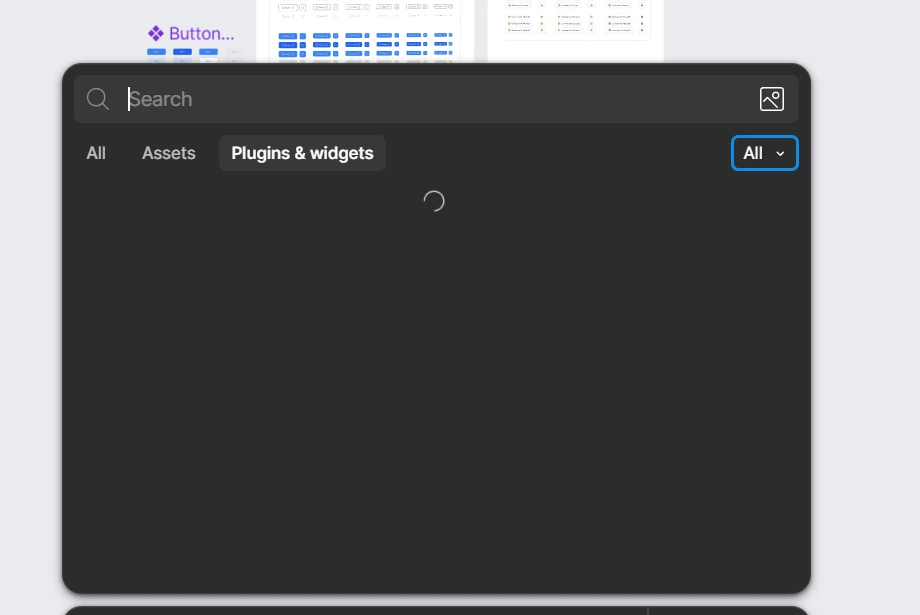
Starting today, the Plugins and Widgets panel isn’t loading at all.

I’ve already tried a few things:

  • Checked my internet connection
  • Restarted the app
  • Logged out and logged back in

Unfortunately, nothing has worked so far.

Is anyone else experiencing the same issue?

Kind regards,
Anand


Best answer by OxiJack

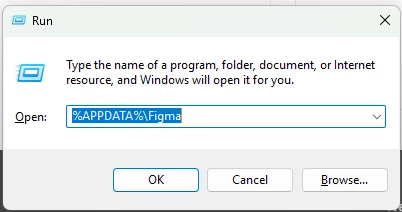
On windows start + r and enter %APPDATA%\Figma Delete all the contents in the folder. Uninstall figma. Download and install the figma desktop app again, this should fix the issue.


13 replies

adamsmasher
Figmate

Hi ​@anandpadia25! Sorry to hear you’ve had some trouble getting that panel to load, especially since it was previously working.


I just checked and it loaded okay for me. Have you tried using a web browser instead? That’ll help narrow down where the issue is since you’ve already done some good troubleshooting. It won’t necessarily mean that it’s the app that is the issue, though it could indicate something with your network blocking the request specifically from the app.


Let me know what happens and we’ll go from there!


Andrayap
  • New Member
  • May 4, 2026

My team is facing the same issue as well. 
IP from Malaysia and Indonesia, both side doesnt work. 


OxiJack
  • New Member
  • May 4, 2026

Same here!


Dan Lewin
  • New Member
  • May 4, 2026

When I open the panel, it seems to keep loading and doesn’t show any plugins or widgets. This happens both when I switch to Development and try to view my plugins in development, and also more generally when browsing plugins. I attached a screenshot showing the issue.


OxiJack
  • New Member
  • May 4, 2026

Yes, I have the same issue here, it’s a figma issue, they need to address...


Pauline Anvari

I am having the same issue. It seems to only be happening on the desktop app.


Danilo Martinez

Same thing is happening to me and my team. Only on the desktop app, i have a plugin i need to publish but it isn’t working


OxiJack
  • New Member
  • Answer
  • May 4, 2026

On windows start + r and enter %APPDATA%\Figma Delete all the contents in the folder. Uninstall figma. Download and install the figma desktop app again, this should fix the issue.


Danilo Martinez

@OxiJack Life saver, thank you so much!


Jiwon Parkk
  • New Member
  • May 5, 2026

On macOS, I resolved the issue by running the following command in Terminal.

rm -rf ~/Library/Application\ Support/Figma


honey.tan
  • New Member
  • May 5, 2026

Also had this problem yesterday (macOS). I downloaded and reinstalled the desktop version and it worked for me. 🙂


matthew.smith

Has anyone else fixed this on Mac? I have tried reinstalling and running the command above and nothing has worked.


adamsmasher
Figmate

Hey everyone!  Thank you all for your patience as I’m sure this was frustrating being unable to search.


Our team released some fixes which should have resolved this for you. Is anyone still having issues searching for plugins? If so, please let me know and we’ll go from there.


Have a great day!