Badredine Aniba
New Member
March 6, 2026
Solved

Not receiving recent Figma updates (UI3, Slots) on both main and beta app

  • March 6, 2026
  • 61 replies
  • 2920 views

I noticed that my Figma app hasn’t received some of the recent updates such as new left navigation bar and Slots for components.

I’m using the desktop app, and I also tried installing the beta version, but the features still don’t appear in either version.

To troubleshoot, I also reinstalled the application, but the issue remains the same.

Are these updates still being rolled out gradually, or could this be related to account permissions, region, or workspace settings?

Thanks in advance for your help!
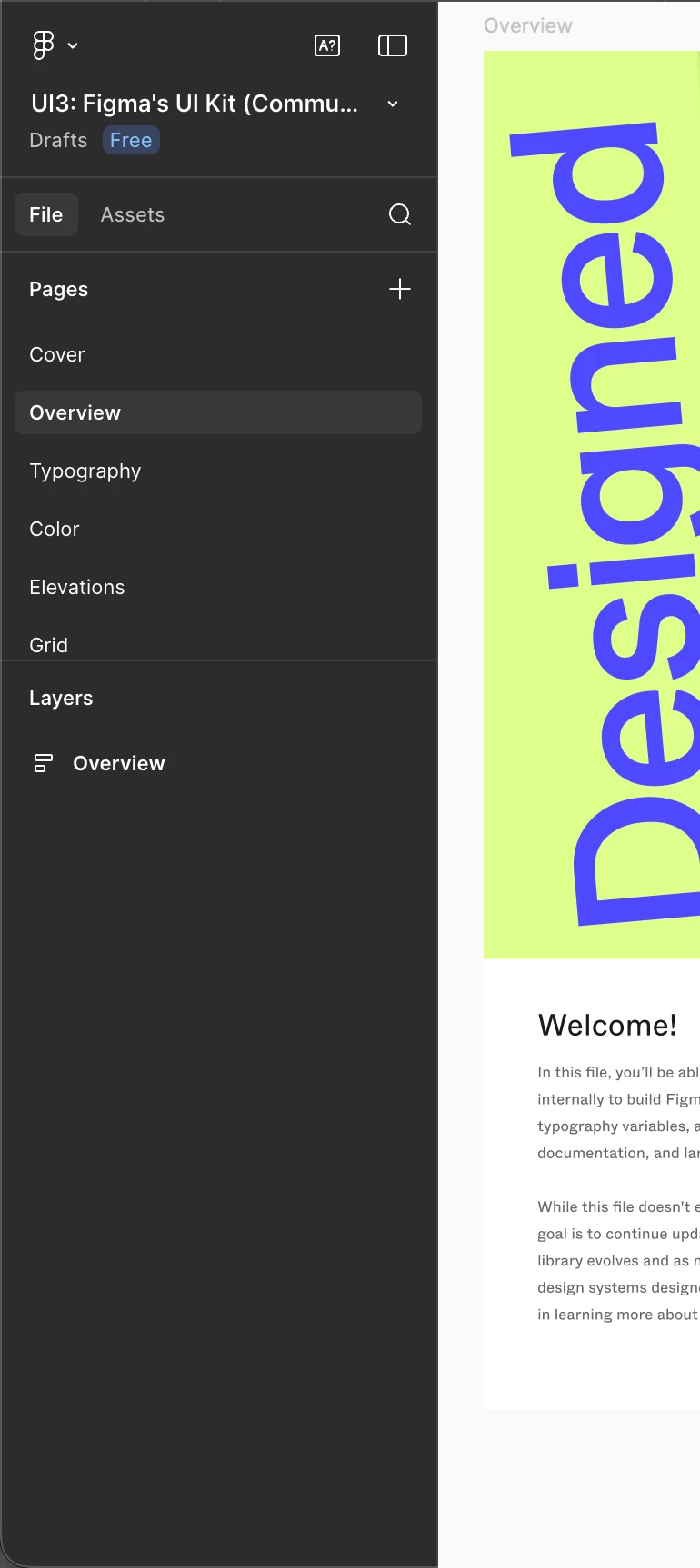
The actual left bar


No new UI in the help section


Best answer by ksn

Hello everyone! I’m happy to tell you that slots is now rolled out to all Full seat users. If you're unable to access the feature, refresh the design file and check if you have edit access to it.

If you do not see the feature after that, please reply or PM me so I can have someone take a look. Enjoy!

61 replies

Julia_Mnizhek
Active Member
March 23, 2026

Hey All, thanks for chiming in here! 

Slots has been rolled out to all users. If you’re still not seeing slots after refreshing your tabs, can you please confirm if you’re using Figma in the browser or the desktop app and that you’re using the most up to date version of your app or browser?

That said, the updated navbar is still slowly rolling out to users. As we mentioned previously, this has been intentionally rolling out at a separate, slower cadence to ensure there are no sudden performance issues for each wave of new users. We appreciate your patience and understanding. 


Hi! I still don’t have these updates in the app or in the browser. I’m on the Enterprise plan.

djv
Figmate
Community Support
March 23, 2026

Hi @constantinos & @Julia_Mnizhek, thanks so much for letting us know!

I can understand how confusing it is to see others on your team with the update while you’re still waiting. Please note that the navbar is still gradually rolling out, so what you’re seeing there is expected for now.


That said, Slots should already be available to all Full seat users. If you’re not seeing it yet, could you double-check the following:

  • You have a Full seat on the team where the file lives
  • You have edit access to that specific file
  • You’re looking in Figma Design (or design mode in Figma Buzz)

If everything above looks correct and it’s still missing, feel free to share a file URL here. I’m happy to take a closer look on the backend to help figure out what might be going on.

Julia_Mnizhek
Active Member
March 23, 2026

Hi @constantinos & @Julia_Mnizhek, thanks so much for letting us know!

I can understand how confusing it is to see others on your team with the update while you’re still waiting. Please note that the navbar is still gradually rolling out, so what you’re seeing there is expected for now.


That said, Slots should already be available to all Full seat users. If you’re not seeing it yet, could you double-check the following:

  • You have a Full seat on the team where the file lives
  • You have edit access to that specific file
  • You’re looking in Figma Design (or design mode in Figma Buzz)

If everything above looks correct and it’s still missing, feel free to share a file URL here. I’m happy to take a closer look on the backend to help figure out what might be going on.

Hi!
Thank you for the reply! I am an org admin and have a Full seat, and I have edit access to almost all the files. For now, I see no Slot feature in all the files I can edit 🤷🏻‍♀️

djv
Figmate
Community Support
March 23, 2026

Thanks for confirming, ​@Julia_Mnizhek

This definitely sounds odd. May I ask what you see when trying to add a slot

Some users have reported that they see the new slots feature as soon as they try to create a new component. As a reminder, a slot can be applied to layers nested within a main component or within variants of the same component set. Are you trying to add slots to variants or convert a frame inside a main component into a slot? 

For example, here’s what converting a frame within a main component should look like:


In this case, you could select Convert to slot from the right-click menu or use the shortcut Shift+Cmd+S. Please let me know more details, and we can continue troubleshooting this together. 

Julia_Mnizhek
Active Member
March 23, 2026

Hey ​@djv !
Nope, don’t have it either in the context menu and in the right pane with actions for Frame. Btw, my free personal account on the company domain already have this. But the Enterprise account on the company domain doesn’t.


djv
Figmate
Community Support
March 23, 2026

Hi ​@Julia_Mnizhek, thanks for the screenshot! 

It looks like you just have a frame on your canvas. Again, to see the option to Convert to slot, the frame must be within a Main component, as shown in my previous screenshot. 

Julia_Mnizhek
Active Member
March 23, 2026

Oh, sorry, my bad! Yes, now everything in the place 🖤

djv
Figmate
Community Support
March 23, 2026

No worries, ​@Julia_Mnizhek! Glad we figured it out. 🖤

Heath Dyer
New Member
March 26, 2026

I have access to Slots but not the new left navigation bar layout.

David_Galliford
Active Member
March 26, 2026

I have yet to get UI3 update, let alone slots. I have a paid plan with another colleague. Any updates?