

Question

No access to owned file with Full seat

  • April 15, 2026
  • 1 reply
  • 21 views

CoWink

We recently paid a design team to build a Figma for us. When they were done, they transferred ownership of the file to us.

However when we open the file, it stated we only have view access, and to request access from the admin in order to edit / use dev mode. We requested the access, but it maintained we needed to wait for admin approval.

However, CoWink is the only user in our team, and it has a full seat.

And there is nothing in the admin indicating a need for review.
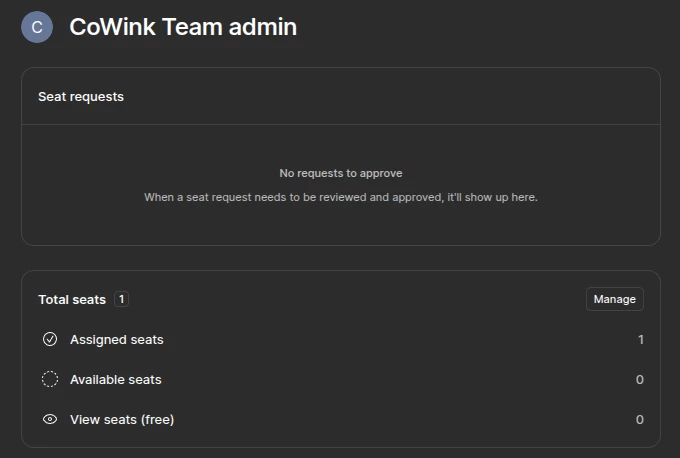
I tried the normal support, but the AI was absolutely useless and kept telling me to just go and approve the review as an admin. Is being owner somehow not being admin? Who else could be admin if there is only one user? Why wouldn’t having a full seat be enough to work on a file that we are owner of?

I also opened a support ticket, but there has been no response for 24 hours, and since we have paid for Figma and can’t use it, this is quite frustrating so I am hoping someone can provide an answer as to what is going on here.

1 reply

  • Figmate
  • April 16, 2026

Hi ​@CoWink,


I understand you're having trouble editing a file that the owner was transferred to you, even you have a Full seat in your paid team.
 

The most likely reason is that the file is still located in the original Team. Transferring ownership of a file doesn't move the file's location, and your paid seat only applies to your own team.

To edit a file, you must be an editor in the team where the file is located. Furthermore, to move a file to a different team, you need edit access to both the original and destination teams.


I've located your support ticket (#1848905). Could you please reply to that ticket with the file's URL? Our team can then confirm the file's location and guide you on the next steps.

To protect your security and privacy, please continue the conversation through your support ticket, where we can discuss account-specific details.

I have also added an internal note to your ticket to give it more visibility and hopefully prioritize it. Someone from our support team will get back to you there directly.


In the meantime, you might find these documents helpful:

Thanks,