

Kelly_Dyson
New Participant
October 10, 2025
Question

‘Manage libraries’ and ‘Review updates’ window bug.

  • October 10, 2025
  • 11 replies
  • 369 views

I’m having a bit of trouble with the ‘Manage libraries’ modal since I updated to Tahoe on Mac, and the latest Figma update. 

What used to happen: On the ‘Manage libraries’ modal there’s a list of components that can be updated. You would click on one of the rows and the modal content would change to ‘Review updates’ for that component. The back button would change the modal content back to ‘Manage libraries’.

What happens now: When you click on one of the rows on the ‘Manage libraries’ modal, the ‘Review updates’ opens in a modal behind it. This seems like a bug as it is hidden by the ‘Manage libraries’ modal which stays open. If you click a different component to update, another ‘Review updates’ modal opens. The result is multiple ‘Manage libraries’ and ‘Review updates’ windows, it feels like a bit of a mess.
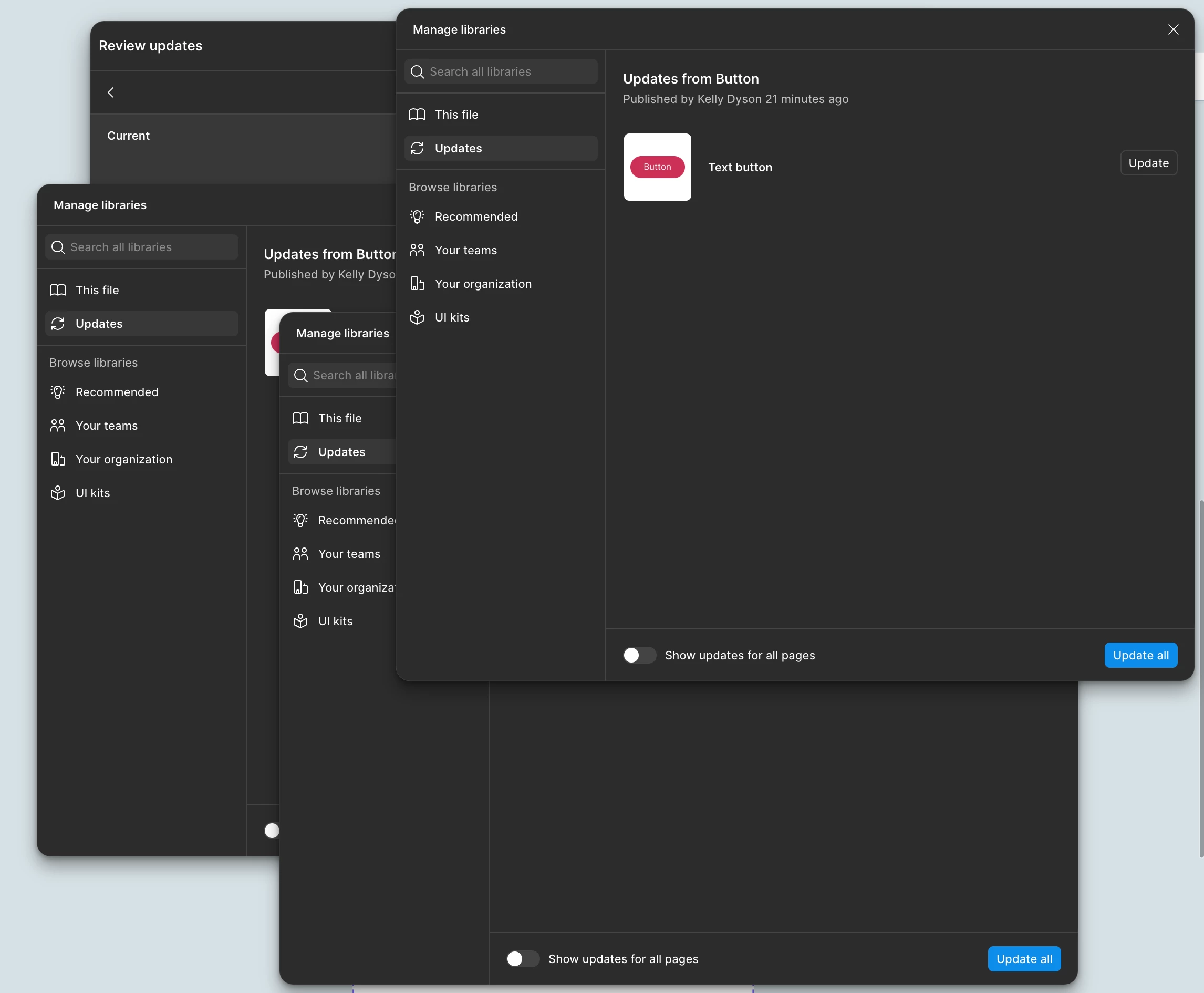


Anyone else have this issue?

    11 replies

    Kelly_Dyson
    New Participant
    October 12, 2025

    This seems to have resolved itself when I opened Figma this morning 🤷

    djv
    Figmate
    Community Support
    October 20, 2025

    Hey ​@Kelly_Dyson, thanks for flagging this and apologies for the delayed reply! 

    Glad to hear it resolved itself, but if you run into any further issues with this, please let us know. 

    Angus Zhu
    New Member
    October 30, 2025

    When clicking a certain component to review the updates, “Review updates” pop-up showed behind the “Manage libraries” and could not be brought to the fornt.

    djv
    Figmate
    Community Support
    October 30, 2025

    Hi ​@Angus Zhu, thanks for flagging this! 

    This definitely seems odd. I’m sending this over to the team to investigate and fix. 

    I’ll provide an update as soon as I hear back. 

    Christian_Heins
    New Participant
    December 3, 2025

    Hi ​@djv, I would like to address this problem again, as it still appears for me. Latest update installed, Macbook and App restarted, but the “Review updates” window still sits behind “Manage libraries” and will not move to front when interacting with it.


    Kelly_Dyson
    New Participant
    December 3, 2025

    I having this problem again too.

    AlenaT
    New Member
    December 31, 2025

    I had those issues too but it went away.

    However, now when I am reviewing component changes it will only show the first instance to review and when moving to the next instance it remains on the previous instance preview, not the item I am updating. I have to go back to the updates list and reopen the update panel to see the next instance. I have asked around and it has happened to quite a few other people. 

    Christian_Heins
    New Participant
    January 9, 2026

    Hello? Figma? Is there any feedback on this? I can't go to every instance individually and check if it changes. This is mandatory functionality and it is not working 😡

    djv
    Figmate
    Community Support
    February 24, 2026

    Hey All, thank you for your patience! 

    Our team pushed a fix for this. Please refresh your tabs and please let us know if you run into any further issues. 

    puffah f1sh
    New Member
    July 28, 2026

    I’m experiencing something different, but also relating to the Manage libraries modal:

    Closing "Review updates" modal dismisses parent "Manage libraries" modal

    • Current Behavior: Clicking the close (X) button on the "Review updates" modal dismisses both the child modal and the primary "Manage libraries" window behind it.

    • Expected Behavior: Clicking X should only close the "Review updates" modal, keeping the "Manage libraries" window open.

    • Impact: Causes repetitive friction by forcing users to reopen the main library manager every time an update is reviewed or dismissed.

    • Environment: Desktop App on macOS