

Question

Local Variables missing

  • May 29, 2026
  • 14 replies
  • 96 views

Hugo_Pardal_Figueira

Please, Figma, help! I feel that I’ve been opening issues about Figma more and more; please fix this!

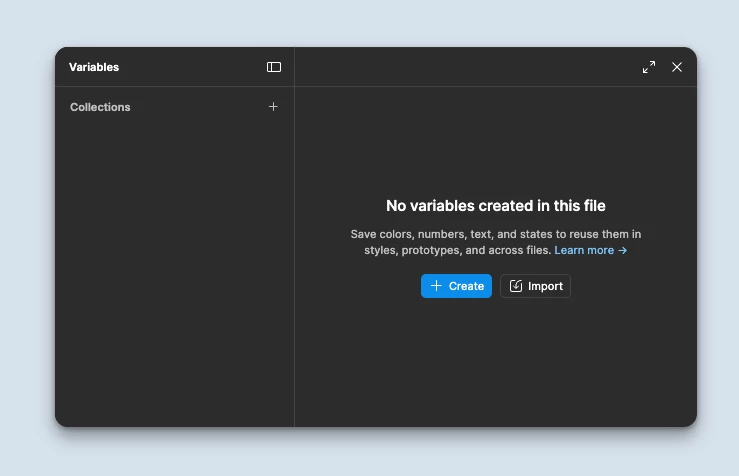
This morning when I opened Figma, most of my Local Variables were gone—and no, they were not deleted.

I’m working on a full Tokens migration, and the branch I was working on had all collections gone. I went to check another file, and the variables were also gone. Some others still have it, and I can still roll back in the versioning to recover them, but this is a nightmare.

This can break most of our files, as we use variables for many things in different files (modes, tokens, localization, etc).

Can you please check if there’s any issue in the most recent update, as this is A BIG DEAL!
 

14 replies

olive21
  • New Member
  • May 29, 2026

I’m also encountering the same problem now. My variables are still up yesterday.


Hugo_Pardal_Figueira

Update:

I have Figma Beta Desktop App version 126.4.10 and there I can still see the local Variables.

This issue seems to affect Figma Desktop App version 126.4.11 (updated the app this morning).

Please be quick in fixing this; this is a nightmare and counterproductive.


olive21
  • New Member
  • May 29, 2026

Update:

I have Figma Beta Desktop App version 126.4.10 and there I can still see the local Variables.

This issue seems to affect Figma Desktop App version 126.4.11 (updated the app this morning).

Please be quick in fixing this; this is a nightmare and counterproductive.

I tried restoring my previous version and my variables went back again. Hope this helps


Hugo_Pardal_Figueira

Hey ​@olive21 . Thanks for the suggestion. I also tried that, as I stated in my initial message, but I own and ship multiple libraries at once (for each platform we have, foundations, icons, etc.), and all of them have missing variables—both on the main branch and all other branches created from main.

This shouldn’t be the way to fix it properly; the fix should come from Figma themselves, so there are no breaks in the history of our work. Hopefully Figma can fix it properly and for good (soon).

Please @Figma, help!!


imaggg
  • New Member
  • May 29, 2026

I came here to write about the missing variables. While I was writing, they reappeared.


Celyn_L
Figmate
  • Figmate
  • May 29, 2026

Hi ​@Hugo_Pardal_Figueira, Celyn from Figma Community Support here.

Thank you for reaching out and for taking the time to report this. I'm sorry to hear you're running into this, especially while working through a full Tokens migration. I understand how concerning it would be to see Local Variables unexpectedly disappear when they're powering important workflows across multiple files.

I've shared these reports with the team, and they're actively investigating. Thank you as well, ​@olive21, for confirming that you're seeing similar behavior.

I've gone ahead and created support tickets for both of you so the team can work with you directly to investigate further.

Your ticket numbers are:

@Hugo_Pardal_Figueira  - #1933395

@olive21 - #1933412

When you have a moment, please reply directly to your ticket with a link to an affected file and invite support-share@figma.com with Can View access (this won't impact your billing and will help the team reproduce the issue and investigate alongside Engineering).

If anyone else is coming across the same issue, please submit a bug report through the Support Hub so the team can take a closer look. To do this:

  • Go to the Support Hub
  • Click Start a chat
  • Type “Report a bug” and follow the prompts

Thanks! 🙏


Julies_Nguyen

I’m facing the same issue. I hope Figma will hotfix this bug; it’s so annoying and risky while publishing libraries.


Hugo_Pardal_Figueira

Hello ​@Celyn_L  ! Thanks for getting back to us.

While waiting for your reply, I tried closing and reopening the app, but to no effect. Then I noticed ​@imaggg ‘s message, and then I forced the reload of every file I had open (including branches and pinned files), and although some at first didn’t show up, forcing a second reload worked, the Local Variables showed up again (see video on one of the files that I had an empty collection, but this also worked for files with multiple collections).

Now, all the files I forced reload have the local variables, including branches, so I don’t have any other files that can help the Support team debug the issue.

For anyone having the same issue, right-click on the tab you have open, and then “Reload Tab”—or maybe close and open the file. Hope it works and helps.


Hugo_Pardal_Figueira

@Julies_Nguyen can you try forcing the reload of that file, right-clicking on the tab and “Reload tab” to see if it forces the reload?


laaksop
  • New Member
  • May 29, 2026

This seems to be a random pattern, happening to which ever file you might be working. Reloading tabs seems to restore variables just to be randomly lost again..

version 126.4.11


Hugo_Pardal_Figueira

@laaksop can confirm, just lost local variables to a second file (branch) I’m working on—after closing and reopening the app.

@Celyn_L just invited support-share@figma.com to that file so they can have a look

So frustrating 😭


Celine_
Figmate
  • Community Support
  • May 29, 2026

Hey everyone, Celine from Figma, stepping in for ​@Celyn_L ! Thanks so much for flagging this.

@Hugo_Pardal_Figueira thank you for the additional details. Your support ticket has been assigned to a Technical Quality specialist who is actively investigating it, thanks for your patience in the meantime!

For everyone else experiencing the same issue, as ​@Celyn_L mentioned, please also submit a bug report through the Support Hub, so the team can look into your specific case as it seems to be resolved for some users. To do this: Go to the Support Hub > Click Start a chat > Type “Report a bug” and follow the prompts. Thank you!


Stephane_Griffon

i have the same problem
i use Figma Desktop App version 126.4.11

all my variables are go away ...😣 


Jaycee Lewis
Figmate

Hi, ​@Hugo_Pardal_Figueira and everyone who reached out here. We’ve addressed the issue. Please give Figma a quick refresh and let us know if everything is working smoothly on your end. Thanks so much — Jaycee
