

Solved

I'm using the Figma Make but, when i click kit function remove my previous Figma Make PJ

  • August 5, 2026
  • 9 replies
  • 121 views

안호성

somebody help me.. plz… my token is evaporate in the air

in the image look at tap, that is my previous work image..but in the project disappeared code

how can i get previous version ?? figma support team can give that
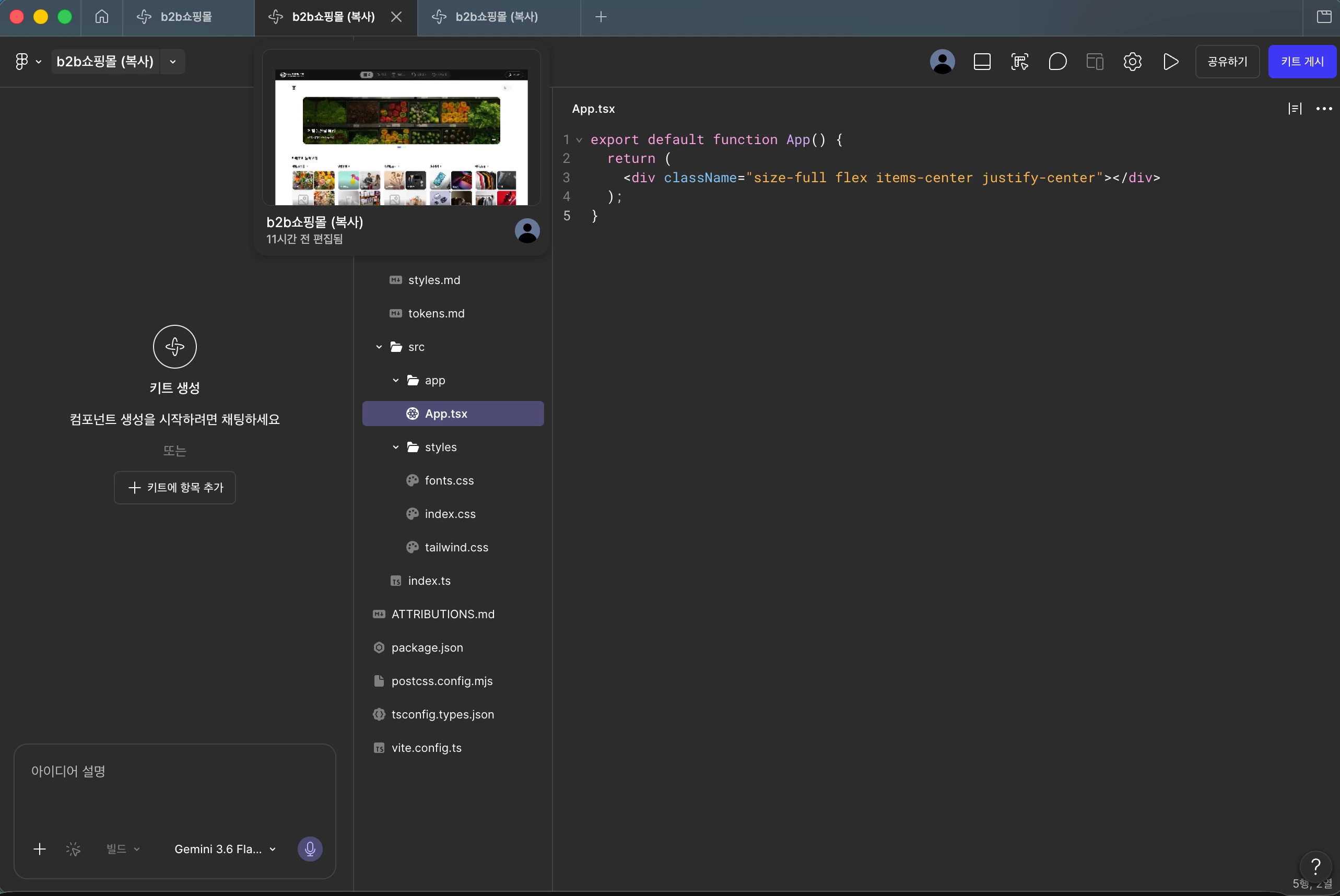


Best answer by Celine_

Hey ​@안호성 , Celine from the Community Support team at Figma here, stepping in for ​@Celyn_L !
I’ve checked internally, and I can see in our backend that our Technical Quality team has replied to you and is waiting for your response to investigate it further. Please check your inbox when you have a moment, thank you! 🙏🏼

9 replies

Celyn_L
Figmate
  • Figmate
  • August 5, 2026

Hi ​@안호성, Celyn from the Figma Community Support team here.

Thanks for reaching out. I understand that after clicking Create a kit, your existing Make app and source code disappeared, and you're hoping to recover the previous version.

I’ve managed to locate your support ticket #2050221 and can see that you've already shared a screen recording, screenshots, the affected file, and additional details about what happened. I also saw that you've confirmed there aren't any earlier versions available to restore in the file's version history. Appreciate you taking the time to provide all of that - I’ve went ahead to add an internal note to your ticket to help increase its visibility with the team.

Could you also reply to your support ticket with the following details?

  • Your operating system and version.
  • Your Figma desktop app version (if you're using the desktop app).

The team will continue investigating from there. Thanks again for your patience in the meantime.


안호성
  • Author
  • New Member
  • August 6, 2026

How long i waiting FigmaSupportTeam reply??..
Im so.. urgent now 
My teamPJ is soon will be done so i have to finish this issue

P.s : i’m sorry if it seems like i’m rushing you


Celyn_L
Figmate
  • Figmate
  • August 6, 2026

Hi ​@안호성, I'm really sorry for the wait. I completely understand how urgent this is, and I've flagged your ticket internally to help increase its visibility with the team. 

In the meantime, it would be really helpful if you could reply directly to your support ticket with the following details:

  • Your operating system and version.
  • Your Figma desktop app version (if you're using the desktop app).

This will give the team a little more context to investigate while they review your case.

Thank you so much for your patience, and I really hope we can get this sorted out for you soon 🙏


martinho
  • New Member
  • August 6, 2026

As absurd as it sounds, the same thing just happened to me.
I’ve clicked to create a Kit and now I’m stuck and can’t go back to my Make Project. This is so silly.

Windows 10. Figma last version. 

Does this mean I’m gonna be locked out of my own project with it open at 10am of a working day? How am I gonna explain this to my manager?! Guys, you gotta act quick… c’mon. 


안호성
  • Author
  • New Member
  • August 6, 2026

I’m Really Thnks to reply me :D

Figma version : 126.7.10 
My Mac Os : 26.5(25F71)

i sended yesterday, your request


Celine_
Figmate
  • Community Support
  • Answer
  • August 6, 2026

Hey ​@안호성 , Celine from the Community Support team at Figma here, stepping in for ​@Celyn_L !
I’ve checked internally, and I can see in our backend that our Technical Quality team has replied to you and is waiting for your response to investigate it further. Please check your inbox when you have a moment, thank you! 🙏🏼


martinho
  • New Member
  • August 6, 2026

So am I supposed to open a ticket too that’s it? Is this gonna be handled person-to-person?
I’m updating the thread every 10 mins, I’m stuck on my project… 


Celyn_L
Figmate
  • Figmate
  • August 7, 2026

Hi ​@martinho, I’m sorry you’ve run into this, especially in the middle of a working day. I understand that after creating a Make kit, you’re now stuck and unable to get back to your Make project.

I’ve gone ahead and created a support ticket for you so our team can take a closer look. Your case number is #2057052.

It would be really helpful if you could reply directly to the ticket with a link to the impacted file and invite support-share@figma.com with “Can View” access. This won’t impact your billing and will allow our team to reproduce the issue and investigate further with Engineering.

Could you also let us know on the ticket approximately what time, including your timezone, you published the file as a Make kit or last had access to your Make project?

We really appreciate your patience while the team looks into this. Someone from the team will follow up with you directly through your ticket as soon as they’re able 🙏


martinho
  • New Member
  • August 7, 2026

Hi ​@martinho, I’m sorry you’ve run into this, especially in the middle of a working day. I understand that after creating a Make kit, you’re now stuck and unable to get back to your Make project.

I’ve gone ahead and created a support ticket for you so our team can take a closer look. Your case number is #2057052.

It would be really helpful if you could reply directly to the ticket with a link to the impacted file and invite support-share@figma.com with “Can View” access. This won’t impact your billing and will allow our team to reproduce the issue and investigate further with Engineering.

Could you also let us know on the ticket approximately what time, including your timezone, you published the file as a Make kit or last had access to your Make project?

We really appreciate your patience while the team looks into this. Someone from the team will follow up with you directly through your ticket as soon as they’re able 🙏


Good morning Celyn, thank you for the response.
I’ve sent all the information I have to the ticket you mentioned. Hope it helps figuring out what’s up.

Also if you need to bugtest something from my side, feel free to ask. 


Have a good day
