Question

Grid ignores component sizes and variables

  • May 27, 2026
  • 3 replies
  • 21 views

didip13

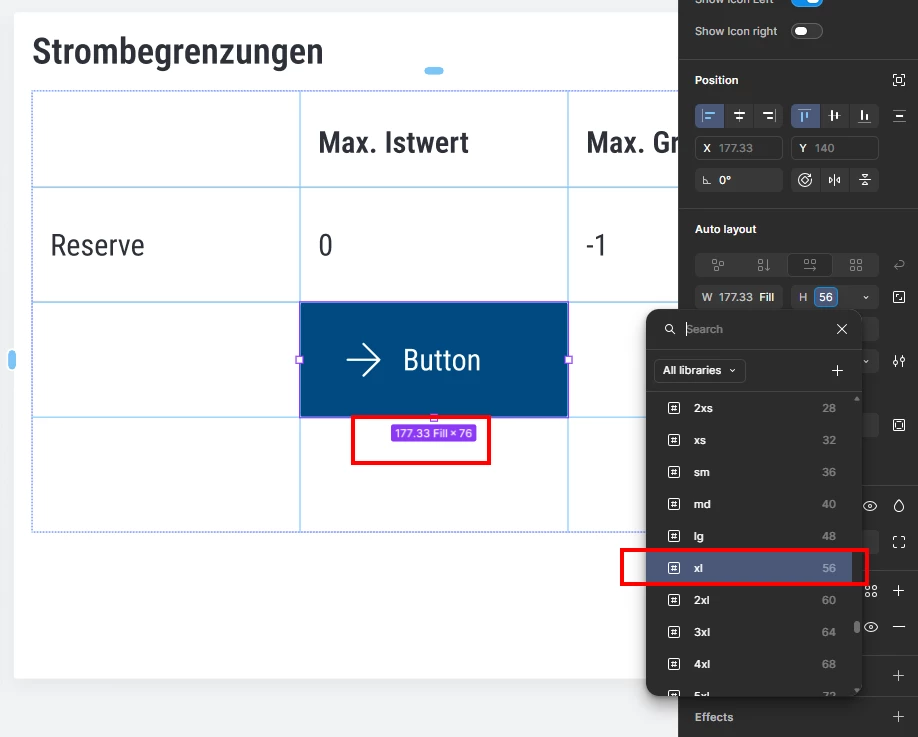
Hi, since recently I have the issue that the grid ignores all the variables that come with the components, even when a grid cell is set to “hug”. 
I have to set the height of a component to a different variable and then switch back to the original variable to get any changes. In some cases, the variable is set to 60px but the height says something different. I cannot work like this and have been trying to fix layout errors since last week instead of getting anything done.
My cards also keep breaking and changing their size randomly after I refresh. 

Please help. Thanks in advance. 


3 replies

  • Figmate
  • May 28, 2026

Hi ​@didip13,


Thank you for the detailed report and for sharing the screenshots!


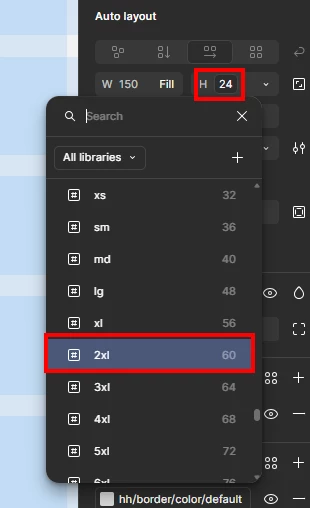
From the first screenshot, I can see that the Fill container resizing property is applied to the width of the object, and while you're trying to Fix the height to 56 via a variable, it appears the height is also set to Fill container, showing 76. From the second screenshot, you selected a number variable (2xl = 60) but the properties panel shows 24. I understand that your cards are changing size unexpectedly after a refresh.


This looks like something our team should investigate more closely, as it requires access to your file which we're unable to do publicly here on the Forum. I recommend submitting a bug report. Here's how:
Go to the Support Hub → Type "Report a bug" → Click "Start a chat"
Please include the following in the form:

  • A direct URL to the affected layer: select the layer where the issue occurs → click [Share] on the top right→ Copy link
  • Share view access to the file with support-share@figma.com (our official Support account — you won't be billed for this access)
  • Any screenshots or video recordings of the issue

This information will help our team visualize and reproduce the issue on their end to investigate further.

Thanks!


didip13
  • Author
  • New Member
  • June 2, 2026

hi @Junko3 
I did as you described, but when clicking on “Start a chat” I get an empty space that I cannot use. Not sure if my company blocks the content or the form is just down for the time.


Tom Reem
Figmate
  • Figmate
  • June 2, 2026

Hi ​@didip13 — Tom here, stepping in for ​@Junko3 today.

I noticed your latest reply after responding to a similar report here: Grid: Automatic rows not working / resetting itself — so it sounds like you may not be alone in this.

Sorry to hear the Support Hub form isn't cooperating at the moment. I've gone ahead and opened a ticket on your behalf with our Technical Quality team. Your case number is: 1940117, and they'll be in touch once they've had a chance to review.

In the meantime, please keep an eye on the email inbox tied to your Figma account for a message from me with next steps.

I'll keep an eye out for your reply.