JipJ
New Member
August 1, 2025
Solved

FIX being rolled out by Adobe: Issue with copying vector shapes from illustrator to Figma 2025 (MAC)

  • August 1, 2025
  • 12 replies
  • 1649 views

HI, 


Yesterday all of a sudden I couldn’t copy and paste vector shapes from Adobe illustrator to Figma anymore… When is copy from Illustrator the shape now changes to an image file instead of an SVG. I have restarted my Macbook restarted Figma and illustrator, run the latest update of Figma but nothing works.


This really slows down my proces because I now have to export each vector and import it manually in Figma.

Can someone please help me with this problem.

This topic has been closed for replies.
Best answer by djv

Hey All, thank you for your patience while our team worked towards a solution with Adobe! 

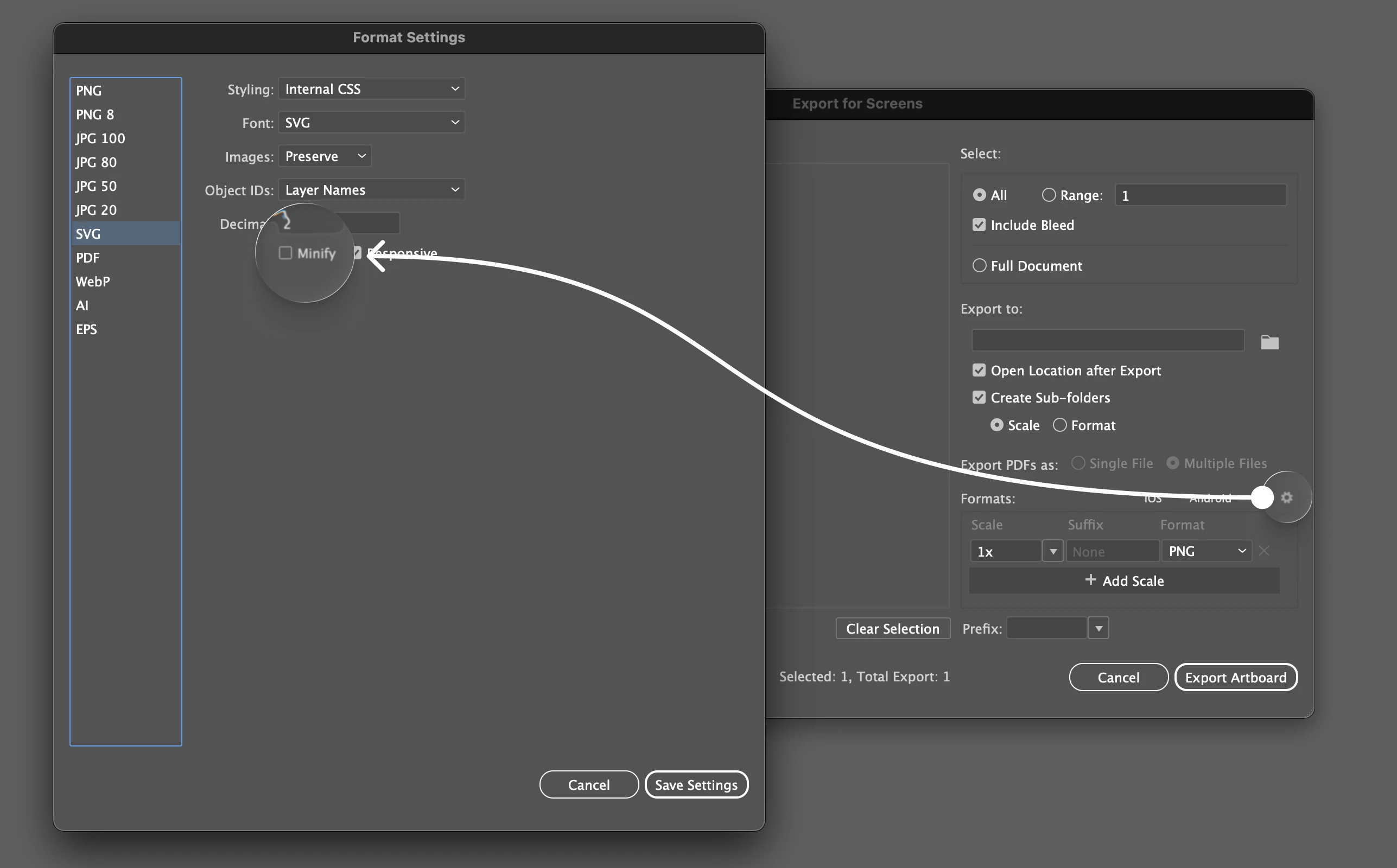
Adobe identified the root cause and now have a fix in place. The issue stems from a code change introduced in version 29.8.x and is not related to the recent SVG settings change. They also confirmed the exact repro: the issue occurs when the SVG “Minify” option is enabled.

They will be disabling the feature flag associated with this code change and will let us know once it’s complete. After the flag is turned off, you will need to restart the application and Copy/Paste with the Include SVG setting enabled to ensure it will work as expected.

You can find the setting under File > Export for Screens, and hit the little settings icon in that Dialog...go down to SVG and uncheck minify (until the fix has been fully rolled out by Adobe).


12 replies

Gaétan PICAULT
New Member
August 4, 2025

Same trouble anyone who has the answer?

Romy23
New Member
August 4, 2025

I’ve also had a similar issue? Is someone able to help with this. 

kylietyloo
New Member
August 5, 2025

I ran into the same issue and installing an older version of Illustrator resolved it. Hope this helps.

StressCreative
New Member
August 7, 2025

Its an illustrator 29.7.1 change, just go into preferences and turn on “Include SVG Code” should be gucci, I am now gucci.


JipJ
JipJAuthor
New Member
August 8, 2025

Thank you! ​@StressCreative, This worked! I can now import the SVG’s back in to Figma. 


Bojan_Sandic
New Participant
September 24, 2025

This doesn’t work seems like its bugged

Rob27
New Participant
September 24, 2025

I am with Bojan_Sandic on this one.

Running…

Illustrator 29.8.1

Figma 125.8.8

I have Include SVG code checked and it still doesn’t work.

My pictures copy across as a pixel image.

justicart
New Member
September 25, 2025

Same issue, not working with any steps above. 

Mac OS Tahoe
Illustrator 29.8.1
Figma 125.8.8
 

Copy in Illustrator, paste in Figma as pixels, paste back in Illustrator as paths.


EDIT: I was able to paste paths in figma web

Rob27
New Participant
September 29, 2025

I can copy a vector shape from Illustrator to Figma providing it’s one layer.

Rafael Empinotti
New Member
September 29, 2025

Changing Clipboard Handling preferences and checking 'Include SVG code' in illustrator no longer works

Illustrator Version: 29.8.1

Figma Version: 125.8.8