

Veronica Pena
New Participant
September 29, 2025
Question

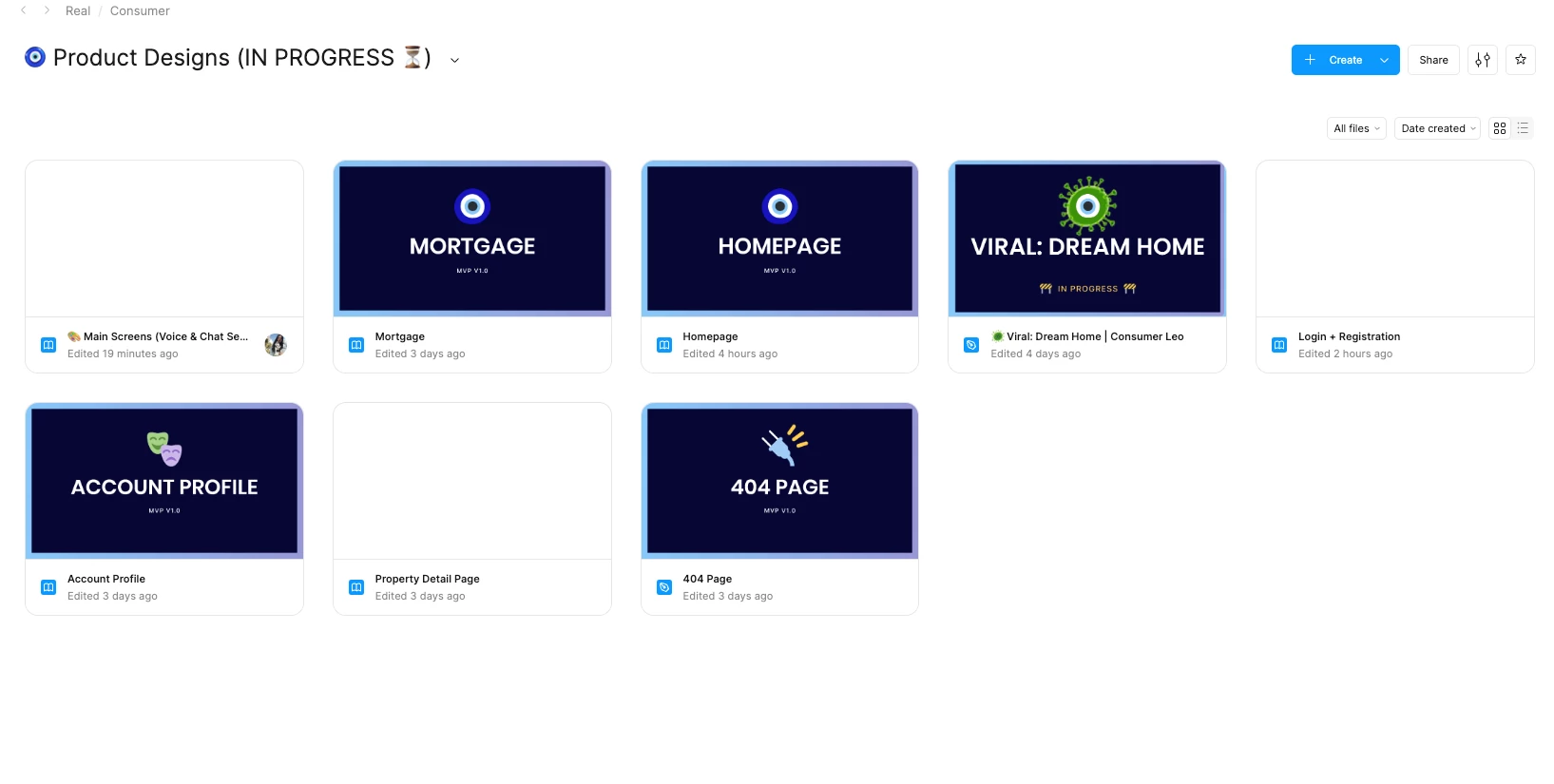
Figma Thumbnails Not Loading - Anyone else experiencing this?
  • September 29, 2025
  • 12 replies
  • 524 views

Sometimes some load, sometimes others load… But this glitch has been happening for a while in all our folders. It’s quite frustrating to find folders quickly this way. Any one else? 

    This topic has been closed for replies.

    12 replies

    djv
    Figmate
    Community Support
    September 29, 2025

    Hey ​@Veronica Pena, thanks for flagging this! 

    I sent this over to our team, and it seems to be related to a bug that they’ve been investigating and working towards a fix. 

    I am happy to inform you that the fix has been successfully released. Please refresh your Figma tabs to ensure that you are using the fixed version. If you continue to experience the issue, please let me know, and I will flag it down for further investigation.
     
    Thank you again for taking the time to report the issue!

    Diego Martinez
    New Member
    September 29, 2025

    Hi!

    Experiencing the same error. Apparently it's still not ok.

    Veronica Pena
    New Participant
    September 30, 2025

    yeah, same here. still seems to be an issue. thank you for looking into it! will wait for updates

    Darren_Williams1
    New Member
    October 2, 2025

    Same, still experiencing this despite refreshing, restarting and checking for updates etc

    Celine_
    Figmate
    Community Support
    October 2, 2025

    Hi everyone, thanks for flagging it! Sorry to hear you are still experiencing the issue.
    Can you confirm if you are seeing the issue on both the browser (such as Chrome) and the desktop app?
     
    As a first steps, please:

    • Close any unused Figma tabs and force-quit your browser or desktop app, then restart it.
    • Clear your desktop app cache if you're using the Figma desktop app , and then check if the thumbnails load, You can follow the steps here.

    If the issue still persists after trying this, please reach out directly to our support team, this will help our team to take a closer look at your case here: Submit a bug report
    In the form, please share a screenshot of how the thumbnails appears, and provide a direct link to one of the files (missing the thumbnail) and invite support-share@figma.com with edit access so the support team can take a look at the file's details (this won’t count towards your billing). Thank you!


    Darren_Williams1
    New Member
    October 2, 2025

    Thanks ​@Celine_ - it’s happening in the app and browser for me (Safari and Chrome).

    I will raise a bug report in that case :) 

    Mathew Cricchiola
    New Member
    October 9, 2025

    Hi everyone, thanks for flagging it! Sorry to hear you are still experiencing the issue.
    Can you confirm if you are seeing the issue on both the browser (such as Chrome) and the desktop app?
     
    As a first steps, please:

    • Close any unused Figma tabs and force-quit your browser or desktop app, then restart it.
    • Clear your desktop app cache if you're using the Figma desktop app , and then check if the thumbnails load, You can follow the steps here.

    If the issue still persists after trying this, please reach out directly to our support team, this will help our team to take a closer look at your case here: Submit a bug report
    In the form, please share a screenshot of how the thumbnails appears, and provide a direct link to one of the files (missing the thumbnail) and invite support-share@figma.com with edit access so the support team can take a look at the file's details (this won’t count towards your billing). Thank you!


    I had the same issue for so long. I followed the steps for the desktop app and it worked right away on next open. Can’t vouch for the browser but seems to be working for me. 

    Darren_Williams1
    New Member
    October 10, 2025

    ​@Mathew Cricchiola So the instructions to reset Figma in the desktop app worked instantly, however after a few hours, maybe a day, they started disappearing again. They never came back in the web app at all 🤷

    Celine_
    Figmate
    Community Support
    October 10, 2025

    Hey @Darren_Williams1, thanks for letting us know. Sorry to hear you’re still running into issues!
    I wasn’t able to locate your support ticket. Could you please DM me the email address you used to contact our support team, and your case number if you have it? I just want to make sure we’ve received it properly so we can investigate your case thoroughly. Thanks!


    Update: For anyone else experiencing this issue on the Desktop app, here’s a similar thread with a temporary workaround you can try in the meantime:
     

    If not, I’d strongly recommend reaching out directly to our Support team. This will help them review your case more closely and provide a faster resolution. Thank you!

    Sean_Sperte1
    New Member
    October 10, 2025

    Also seeing this issue (on both app and browser). At this point it’s gone past being just an annoying issue — I feel it’s impairing productivity. I now have to take extra time to more closely examine the document titles and sometimes even open them to determine whether they’re the right one. Thumbnails oftentimes include metadata and context that titles cannot.