

Josh_M
New Member
October 4, 2025
Question

Figma Sites: Specific Custom Font Weights Not Uploading

  • October 4, 2025
  • 19 replies
  • 714 views

Hi, I’m having trouble uploading specific custom font weights to my Figma Site. My site doesn’t need all of these fonts but, once I started having issues uploading certain font weights, I wanted to test how many were unreadable/incompatible. All of the font weights listed are used in my Figma Site but Figma says it “doesn’t match any font in use” when I go to upload the corresponding woff2 file.
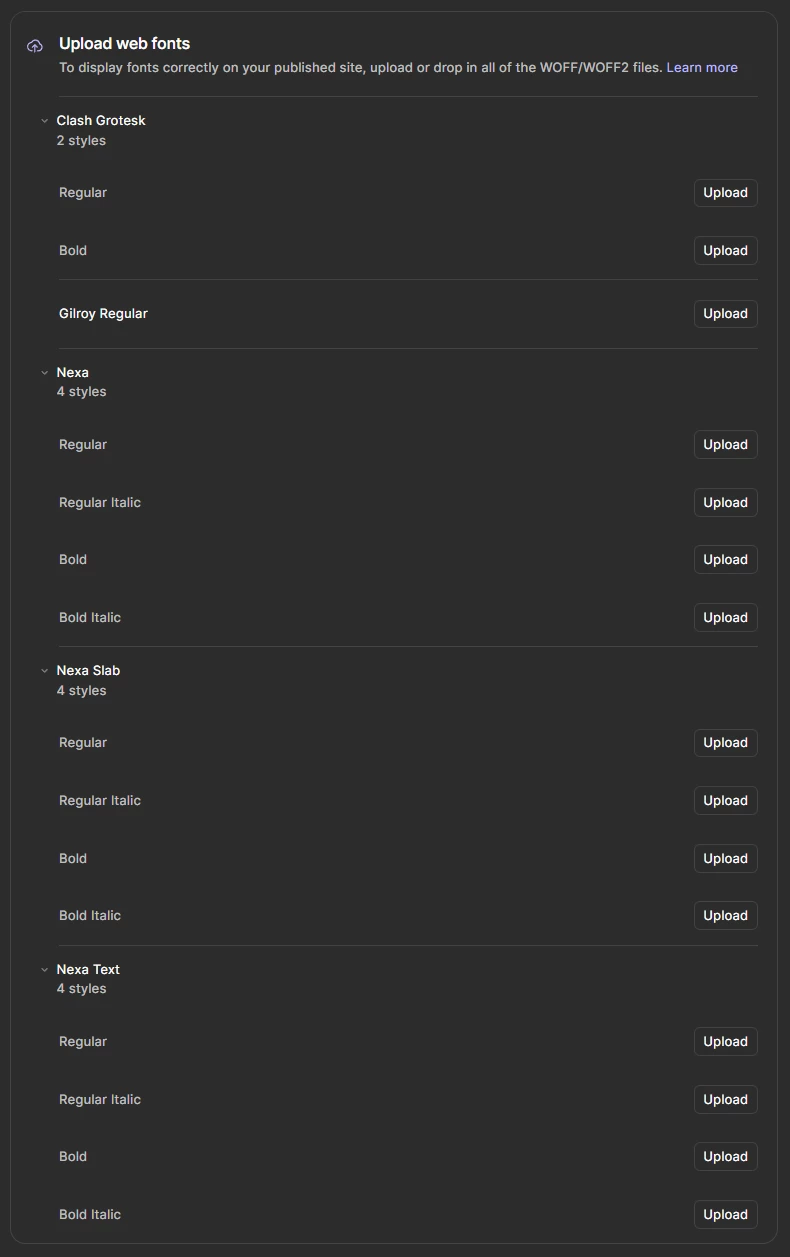


19 replies

George_Zhang
Figmate
Figmate
November 3, 2025

Hi ​@Sascha_Rinaldi, could you please email me the fonts files you’re using at george.li.zhang@figma.com? Both the editor fonts (OTF/TTF) and the web fonts (WOFF/WOFF2)?

If you could also provide info on where you’ve downloaded the font files from, that would be helpful too. Thanks!

Vojtech_Bohm
New Member
November 6, 2025

Hello ​@George_Zhang . I am experiencing the same issues with Tiempos Headline. The Regular weight works and uploads fine. The Italic does not.

Below are screenshots from FontDrop:


On the email you provided I also sent over the OTF + WOFF2 files. Upon first inspection it seems the `fontFamily` and `postScriptName` are not the issue.

Katarina K
New Member
November 10, 2025

Hi ​@George_Zhang ,

I am having the same problems with the ABC Whyte and ABC Whyte Inktrap fonts, in all font weights.

In FontDrop, I see the WOFF and WOFF2 files don’t have a defined fontFamily and fullName, and are missing a uniqueID (screenshot attached). Will I ever be able to use them with Figma Sites? Is there any workaround, or are my fonts just broken :-/ ? 

Thank you!

George_Zhang
Figmate
Figmate
December 2, 2025

Hi ​@Katarina K, sorry for the trouble!


The workaround would be using a conversion tool (e.g. OTF to WOFF2), and uploading those files as the web fonts since they’ll have matching metadata with the in-editor fonts. 


Disclaimer: Before converting or using a font on the web, please confirm that your font license permits web usage and format conversion. Font licensing terms vary by vendor, and you’re responsible for ensuring proper rights for any fonts you upload.

sebastian.friedrich
New Member
March 17, 2026

This seems to be not at all solved. It is not reasonable to put a disclaimer on license use, but then require TrueType over PostScript or vice versa (requirements not clearly stated). Why are you not offering a mapping of the style to the respective webfont file. Figma does not need to care this way and auto-magically string-compare font metadata. I appears to me, that here Figma is lacking in-depth font knowledge to read out the information correctly and conditionally, depending on the font format provided. Tables differ! Lots of people complain here, so don’t stay on the surface to answer this. Ask Engineering, ideally the Engineers who build the OpenType Feature support. They will be able to guide you and know the subject in-depth. Thank you!

Em T
New Member
April 13, 2026

​@George_Zhang are there any updates on this?

I’m having the same issue as well—used OTF for the desktop version, and when uploading WOFF or WOFF2 (in Publish…>Troubleshooting), I get this message.

My client’s website is currently built all on Figma Sites, please help!


Celine_
Figmate
Community Support
April 13, 2026

Hey ​@Em T , Celine from the Community Support team here, thank you for flagging it!
The recommended workaround for this issue is to convert your OTF file to WOFF2 before uploading, as this ensures the metadata matches between the in-editor font and the web font.

To do this, you can use a converter tool such as:

Once converted, try uploading the converted file and see if that unblocks you.

If you're still running into issues after trying this, please reach out to our support team and make sure to include the font files you're using, this will help them investigate further. To do that: Go to the Support Hub / Type “Report a bug” / Click Start a chat and select Enter / Then fill out the form.
Hope this gets you unblocked! 🙏

Em T
New Member
April 14, 2026

thank you ​@Celine_ ! I can manage with this workaround for now—but please let me know when it will be updated within the program. I technically bought licenses to OTF and WOFF fonts on my end, and I don’t want to get into any licensing trouble with this 3rd party conversion method

Celine_
Figmate
Community Support
April 14, 2026

Hey @Em T, thanks for your additional feedback. I checked in with our engineering team and wanted to share some more context!

Figma relies on font metadata (font name & style, or PostScript name) to match the font used in the editor (OTF/TTF) with the one published on the site (WOFF/WOFF2). Some font foundries assign inconsistent metadata across these formats, which prevents the match and blocks the upload (although in the majority of cases it should work correctly.)

Unfortunately, there's no active work planned to improve this flow at the moment. In cases where the WOFF files provided by the foundry don't successfully upload, converting via a third-party tool remains the recommended workaround.

Regarding your licensing concern, we'd recommend checking directly with your font foundry to confirm whether format conversion is permitted under your license before proceeding. Hope this clarifies! 🙏