

Question

CRITICAL BUG: Redirecting to "All Files" on load

  • January 21, 2026
  • 2 replies
  • 23 views

Vikor Wang

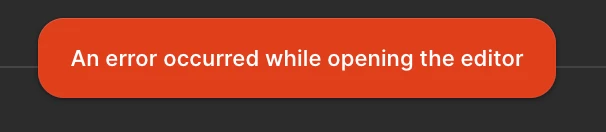
Hi, I have a critical issue: Every file I open redirects to "All Files" after loading with the error: "An error occurred while opening the editor." This is happening across all files and my entire team is Blocked. We need a fix ASAP.
 

2 replies

Alexey_Krasnopolin

I have a similar looking problem.

The main screen tries to load several times, but remains blank, and then I get the error "You don't have access...". Both in app and browser version.

Restarting the app doesn't help, only Windows reboot.
One of my teammates got same problem on Mac.


  • Figmate
  • January 22, 2026

Hi ​@Vikor Wang ,

I understand that you’re encountering an issue where every file you try to open redirects back to All files with the message “An error occurred while opening the editor,” and that this is impacting your entire team.

I can see that you’ve already submitted a support ticket (#1699049) for this issue. Thanks for doing that!
One of our Technical Quality specialists has replied to you via the ticket email, so please check their message and share the requested information there so the investigation can continue.


Hi ​@Alexey_Krasnopolin

Are you encountering the same error message, or are you seeing “You don’t have access…” instead?

Is this issue happening with a specific file, or does it occur across all files?
If it’s limited to a specific file, could you please check the guide below to see if one of the scenarios applies to you or your teammate?

My files are not opening


For other community members who are also seeing the “An error occurred while opening the editor.” message, I’d like to share some troubleshooting guidance from our team that may help.

When this type of error occurs across multiple files or users, it’s most commonly caused by a network proxy or security software blocking access required by Figma.

To resolve this, please work with your IT or network administrators to:

  • Add figma.com to safe-lists

  • Ensure Port 443 is unblocked

  • Enable WebAssembly (WASM) as required

You can find more details in these Help Center resources: Technical troubleshooting tipsFigma browser requirements and Configure your browser for Figma

If that doesn’t help, you can also try:

  • Using a different supported browser (Chrome, Firefox, Safari, or Edge)

  • Restarting your network equipment (router or modem)


If the issue continues after trying the steps above,  I’d recommend submitting a bug report by selecting the question mark icon (?) in the bottom-right corner of any page and selecting “Contact support”.

The chatbot will walk you through opening a report with our team, so they can take a closer look and you’ll be able to talk with them directly.
Here’s a guide you can refer to:  What to share in a bug report to Figma Support 


Thanks,