
CRITICAL BUG: Entire design disappeared
  • June 3, 2026
  • 7 replies
  • 160 views


This is absolutely unacceptable.

I just lost 4 hours of intense client work due to a massive, game-breaking glitch in Figma.

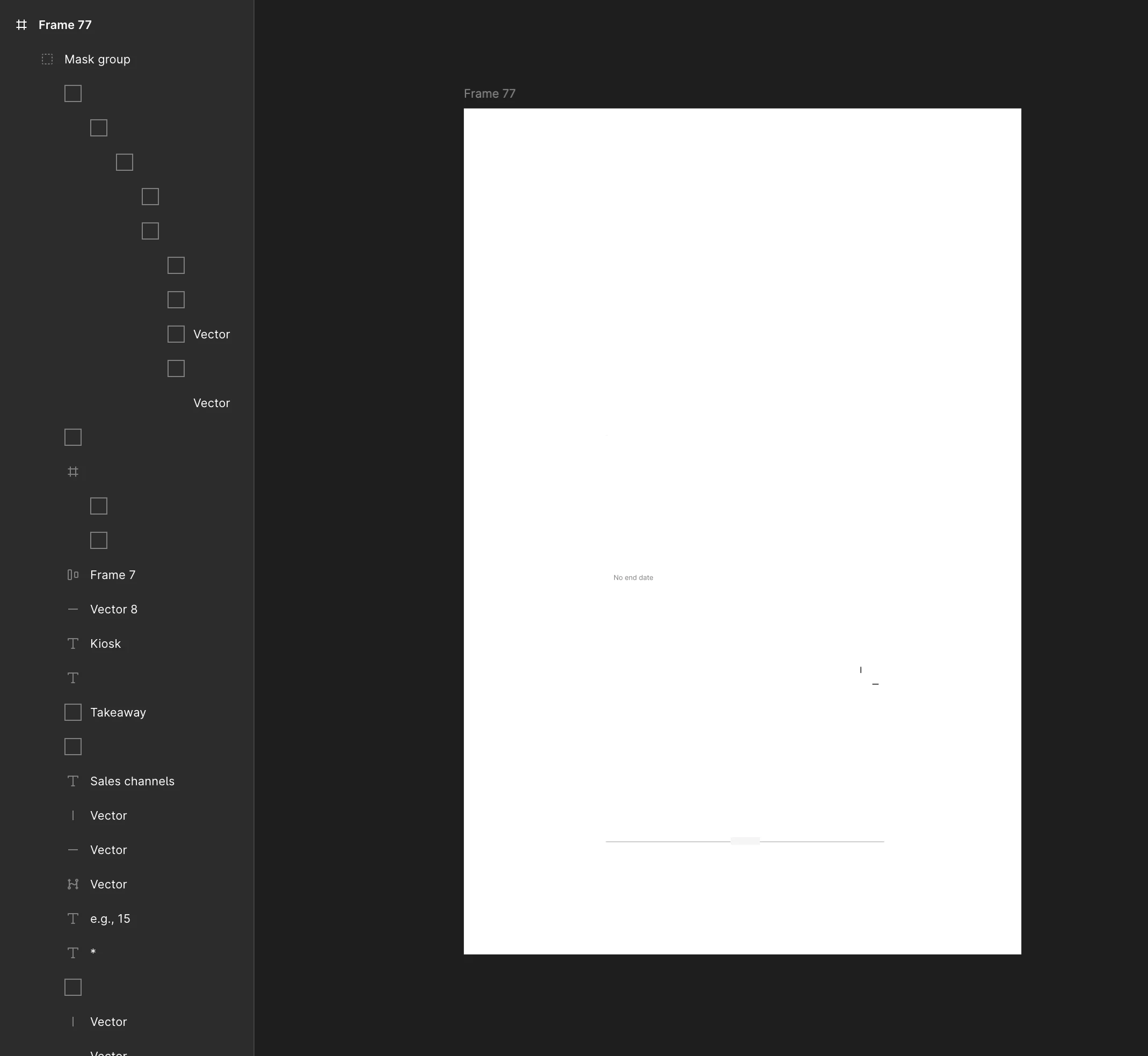
I was working inside an Auto-Layout group when – without any action on my part – the entire design on the canvas completely vanished into a blank frame. This is NOT a local issue, as the exact same corruption appears both in the macOS Desktop App and via Web Browser.

Here is proof that this is a critical backend/cloud corruption and not user error:

  1. Broken UI Elements: As seen in my screenshot, the entire layers panel is completely glitched. All the icons next to the layers have turned into blank square boxes. Layers have randomly lost or changed their names.

  2. Total Fail of Version History: The "Show Version History" feature is completely broken for this file. It fails to render any previous states and only shows blank previews. I cannot restore ANY previous work.

  3. Cross-Platform Issue: The bug persists everywhere. I tried checking the file on the macOS app and via browser (Chrome/Safari) – the artboard is completely dead on both.

  4. Standard Troubleshooting Done: Checked for accidental masks, hidden layers, wireframe mode, and opacity. Cleared app cache. Nothing works. The file structure is fundamentally corrupted on Figma’s backend.!!!!!!!!!!!

This is a critical cloud synchronization or file corruption bug. I am now facing a missed deadline and hours of wasted progress.

7 replies

Gayani_S
Figmate
  • Community Support
  • June 3, 2026

Hey ​@UnableToSelectAnyObjects, thanks for flagging this! 

The fact that it's consistent across the macOS app, Chrome, and Safari tells us this might be not a local rendering issue.

Before I escalate this to our engineering team, I'd like to gather a few more details to give them the best possible picture:

  1. Can you share the direct link (URL) to the affected file? Feel free to send me a DM. 
  2. When did this happen exactly? 
  3. Were you doing anything specific inside the Auto Layout frame when the canvas went blank — resizing, adding a component, using a plugin, or anything like that?
  4. Were any other editors active in the file at the same time?

In the meantime, a couple of things worth trying:

  • Open the file and use Cmd+A (Mac) or Ctrl+A (Windows) to select all, then check the right-hand panel to see if elements are registering as selected even if they're not visually appearing. This can help confirm whether the objects still exist in the file structure but aren't rendering correctly.
  • In version history, rather than relying on the blank preview thumbnails, try clicking the timestamp links directly. The previews can sometimes fail to render even when the version data itself is intact.

If version history isn't able to get you back to a working state, the next step is for our team to inspect the file on the backend directly. For this I can create a support ticket on your behalf.  

You can also find more on navigating version history in our Explore the version history of a file article.


Let me know how you’d like to proceed! 


czarnynegatyw

I just encountered the same problem. The whole 3 hours work is wasted.

All of the 4 points mentioned by ​@UnableToSelectAnyObjects are also applying here. I can’t access this part of a file through history nor by trying different websites/softwares.

Happened just 30 minutes ago. I was working with vectors and effects ONLY.

Did you have a chance to look at this bug ​@Gayani_S?


Gayani_S
Figmate
  • Community Support
  • June 12, 2026

Hey @czarnynegatyw, thank you for the detail here!

I've created a support ticket so our team can look at your file directly on the backend. You should receive an email shortly with ticket number #1959412, please reply to that email with the following:

  • The direct URL to your affected file
  • The approximate time this happened and your timezone
  • Your OS and browser or desktop app version
  • Whether any plugins were active at the time

A couple of quick things worth trying in the meantime:

  1. Try clicking directly on the version history timestamps rather than relying on the preview thumbnails. The thumbnails can sometimes fail to render even when the underlying version data is intact- the timestamp links give you a better shot at actually loading a previous state.
  2. Use Cmd+A / Ctrl+A inside the affected frame to select all. If elements are registering as selected in the right-hand panel even though nothing's visible on canvas, that tells us the content may still exist in the file structure but isn't rendering- which is useful to know either way.
     

Thank you again for taking your time to flag this! 


Mateus Rafael

Hey ​@Gayani_S same bug happened to me, can I ask for support here as well?


Celyn_L
Figmate
  • Figmate
  • June 17, 2026

Hey ​@Mateus Rafael, Celyn here stepping in for Gayani. Thanks for chiming in and for providing the screenshot.

Just a quick check if you have attempted the steps outlined in the post above? 

  1. Try clicking directly on the version history timestamps rather than relying on the preview thumbnails. The thumbnails can sometimes fail to render even when the underlying version data is intact- the timestamp links give you a better shot at actually loading a previous state.
  2. Use Cmd+A / Ctrl+A inside the affected frame to select all. If elements are registering as selected in the right-hand panel even though nothing's visible on canvas, that tells us the content may still exist in the file structure but isn't rendering- which is useful to know either way.


In the meanwhile, I’ve went ahead to create a support ticket for you so the team can look at your file directly from the backend. Your ticket number is #1966824.

It will be really helpful if you could reply directly to the email with the following:

  • The URL to your affected file, and invite support-share@figma.com with “Can View” access (this won’t impact your billing and will allow us to reproduce the issue and investigate further with Engineering).
  • Your OS and browser or desktop app version
  • Whether any plugins were active at the time

Someone from the team will be reaching out with next steps shortly, thanks for your patience!


Walfrido Neto

I am getting the same issue. One specific component from our library stopped rendering in some files. Does anyone have a solution for this?


Gayani_S
Figmate
  • Community Support
  • June 22, 2026

Hey ​@Walfrido Neto, thanks for jumping in and sharing what you're seeing!

Just to make sure I'm pointing you in the right direction, a component from a library not rendering in some files, but presumably fine in others, can stem from a few different things, so I'd love to get a clearer picture before suggesting next steps.

Could you tell me a bit more about what you're experiencing?

  1. What does "stopped rendering" look like, is the component showing as a blank frame, a broken instance icon, or something else entirely?
  2. Is this happening in files where the component is used as an instance from a published library, or is it a local component?
  3. Has anything changed recently in the library file itself, such as a component being renamed, moved to a different page, or the library being republished?
  4. Are the affected files ones you own, or are they shared files in a team or organisation?
  5. Which platform are you seeing this on, desktop app, browser (which one), or both?

Once I have a clearer picture of what's happening and where, I'll be able to dig in properly. Thank you!