
New Member
June 3, 2026

CRITICAL BUG: Entire design disappeared
  • June 3, 2026
  • 16 replies
  • 464 views


This is absolutely unacceptable.

I just lost 4 hours of intense client work due to a massive, game-breaking glitch in Figma.

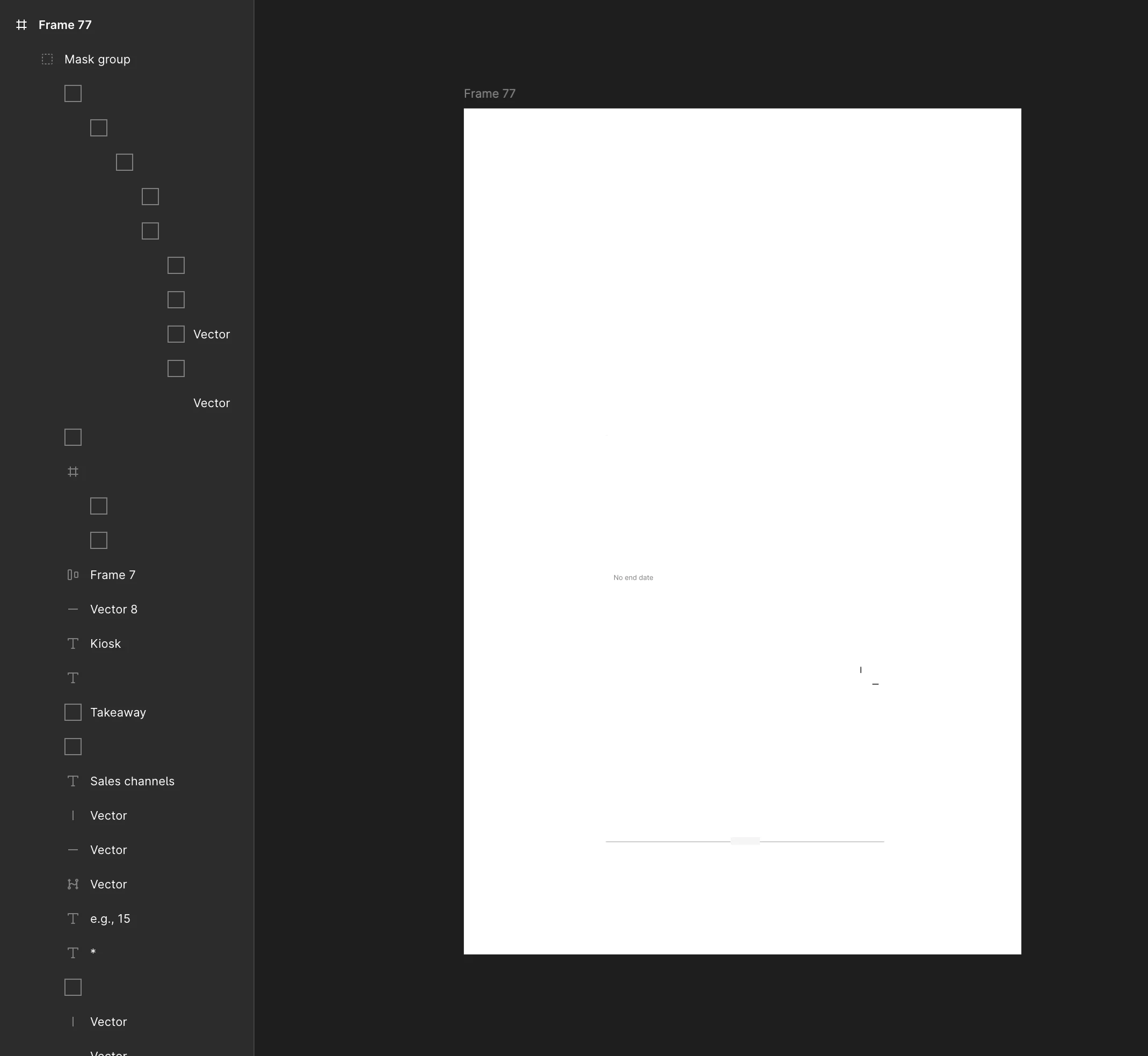
I was working inside an Auto-Layout group when – without any action on my part – the entire design on the canvas completely vanished into a blank frame. This is NOT a local issue, as the exact same corruption appears both in the macOS Desktop App and via Web Browser.

Here is proof that this is a critical backend/cloud corruption and not user error:

  1. Broken UI Elements: As seen in my screenshot, the entire layers panel is completely glitched. All the icons next to the layers have turned into blank square boxes. Layers have randomly lost or changed their names.

  2. Total Fail of Version History: The "Show Version History" feature is completely broken for this file. It fails to render any previous states and only shows blank previews. I cannot restore ANY previous work.

  3. Cross-Platform Issue: The bug persists everywhere. I tried checking the file on the macOS app and via browser (Chrome/Safari) – the artboard is completely dead on both.

  4. Standard Troubleshooting Done: Checked for accidental masks, hidden layers, wireframe mode, and opacity. Cleared app cache. Nothing works. The file structure is fundamentally corrupted on Figma’s backend.!!!!!!!!!!!

This is a critical cloud synchronization or file corruption bug. I am now facing a missed deadline and hours of wasted progress.

    16 replies

    Ozhered Michael
    New Member
    August 20, 2026

    I’m experiencing issues with Figma backend today, particularly with REST API requests. Few hours ago they started to fail by timeout. Since that approx. 90% of requests are timing out now.

    Looks like global Figma issue.

    adamsmasher
    Figmate
    Figmate
    August 20, 2026

    Thanks for submitting a support ticket, ​@Suzie Zack - you should hear back soon from our team. In the meantime, let’s troubleshoot this here, too.


    First, a few basic questions to rule out some of the more obvious stuff that you might have already tried (these are what ​@Celine_ mentioned above):

    • On the page with the missing design, if you zoom to fit all content on the canvas using Cmd/Ctrl + Shift + H, do you see the design?
    • If you check your version history, are you able to restore the design using a previous version?


    And now a few more specific questions:

    • Are the designs that are missing wholly created with the last few hours, or were they older than that and you just made some changes to them?
    • Are you using the desktop app or web browser? If it’s the former, can you check and make sure that you’re running the newest version? For me, this is v126.7.10.
    Suzie Zack
    New Member
    August 20, 2026

    Thanks for submitting a support ticket, ​@Suzie Zack - you should hear back soon from our team. In the meantime, let’s troubleshoot this here, too.


    First, a few basic questions to rule out some of the more obvious stuff that you might have already tried (these are what ​@Celine_ mentioned above):

    • On the page with the missing design, if you zoom to fit all content on the canvas using Cmd/Ctrl + Shift + H, do you see the design?
    • If you check your version history, are you able to restore the design using a previous version?


    And now a few more specific questions:

    • Are the designs that are missing wholly created with the last few hours, or were they older than that and you just made some changes to them?
    • Are you using the desktop app or web browser? If it’s the former, can you check and make sure that you’re running the newest version? For me, this is v126.7.10.

    Hi, I did try the first two bullets without any luck.

    The designs were created within the last few hours. Earlier in the week I’m realizing the same thing happened in the same file but I noticed that deletion the following day.

    I am using the desktop app. I did noticed after a restart today, before I realized my designs were missing my Figma app might have updated. The app icon in the toolbar went from a black background to a white background. I am now on version 126.8.16.

    adamsmasher
    Figmate
    Figmate
    August 20, 2026

    Hi, ​@Ozhered Michael - thanks for your reply! 90% of requests is a lot and I’m sure that’s frustrating for you.


    Are you using a computer or network that is managed by your IT department? I’m wondering if something changed with your network configuration that might be interfering with the requests you are making. If some are still succeeding, it doesn’t seem like a full block but could be some kind of throttling. Let’s start with the most simple stuff first, though - can you restart your computer (and if you are working from home, your modem or router)?

    Ozhered Michael
    New Member
    August 20, 2026

    Hi, ​@Ozhered Michael - thanks for your reply! 90% of requests is a lot and I’m sure that’s frustrating for you.


    Are you using a computer or network that is managed by your IT department? I’m wondering if something changed with your network configuration that might be interfering with the requests you are making. If some are still succeeding, it doesn’t seem like a full block but could be some kind of throttling. Let’s start with the most simple stuff first, though - can you restart your computer (and if you are working from home, your modem or router)?

    I’ve tried various connections (home, corporate, cellular) and experience the same result.
    As this is not urgent, tomorrow I’ll contact сolleagues in other locations to try the same.

    This is basically for your information to be aware in case if issue is worldwide.

    adamsmasher
    Figmate
    Figmate
    August 20, 2026

    Ok, thanks for the update, ​@Ozhered Michael - glad to hear it’s not urgent. I appreciate you posting to see if it’s a broader issue. Let me know what you find out!