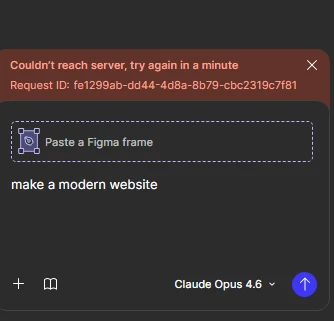
I’ve tried everything I can find in Figma troubleshooting and I’ve tried several different, shorter and easier prompts, and I’ve tried using ALL the AI options, and nothing changes - I keep getting this “Couldn’t reach server,” error! I hope they fix this soon, because time is ticking away on some big projects over here and now this is really screwing things up for us.
Hi @southernwrennie and @Ria Scureman — thanks to both of you for reporting this and for sharing those details. It’s especially helpful to know that this is happening across all of the AI options, and I’m sorry for the disruption.
First, can you let me know whether you’re still seeing the “Couldn’t reach server” error? In many cases, this message is tied to a temporary connection issue with Figma Make. Waiting a short time and then trying the prompt again often clears it. In case anyone else is following this post, this guide has a bit more context on what those errors mean: Troubleshoot in Figma Make → Error messages.
@southernwrennie → I can confirm that our Technical Quality team has received your report and is actively reviewing the details you shared. Your case number is: 1769124, and they’ll follow up with you directly by email with next steps specific to your file.
@Ria Scureman → if you’re still running into this as well, please go ahead and submit a bug report or, reply back here with the exact steps leading up to the error, and I’m happy to open a case for you so we can take a closer look at what’s happening in your file.
We’ll keep an eye on your open case and on this thread for any related reports. Thanks for sticking with us while we sort this out. 🙏🏻
@Tom Reem Not sure why I should take all the time and trouble to submit a bug report when it’s been clearly stated here and others have submitted the same bug report? It’s not feasible for me to do all those extra steps, so I’d appreciate it if you guys would just fix your broken app that I pay for. thanks!
Hi @Ria Scureman — thanks for following up, and I’m really sorry for this frustrating experience.
I checked in with our Product Support team and, while I can’t view or share account-specific details in our public forums, it looks like they were able to move things forward on your report before I opened a case.
I’ve also shared your feedback about the bug reporting process with the relevant teams. That perspective is important as we look at how to make reporting issues easier.
If any new questions or issues come up, you’re welcome to create a new thread or follow up with the team member assisting you directly.