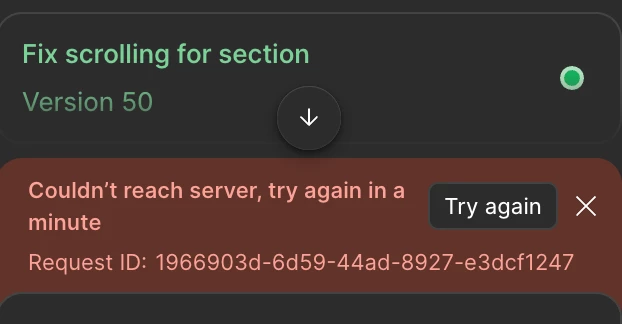
I too facing this. I recently too figma full seat professional plan to make my portfolio. from past few days i am facing the same error in figma make. multiple times, couldn;t move forward nor revert to previous version. i tried long detailed, short and crisp all kinds of prompts. not working please help.
Hey @vinayaka Kamana! Just to understand better, is this error happening in one specific Figma Make file?
If you haven’t tried it yet, could you duplicate the file and then test a prompt in the duplicate? This can sometimes bypass whatever is causing the issue. Let me know is that resolved the issue.
Hi, I’m facing the same issue while using Figma Make. I try to give prompt to the Figma Make and it thinks for some time and then eventually comes up with this error of ‘Couldn’t reach server, please try again in a minute’ with a request ID.
I have professional plan on my account on which I’m using Figma Make and I have tried duplicating the file but the same issue persists there too. No matter if I give a short prompt or a long one, it seems like to have given up on helping me out.
I have the same issue to, It started yesterday evening and I still get the same error message… I have due date for this project tomorrow so I am very stressed at this moment.
I tried to duplicate the project to see if I could continue my work in a new file, but the same error message appears.
I have the same problem using “Replace content” even though I tried to restart Figma
this iissue only in the experimental mode , i tried everything even duplicated the file but not fixed, the only thing left is wait till the plan is renewed maybe cause of the unlimited credits we have now Figma is restricting, the output limit of gemini 3 to optimize the tokens.
Hey everyone, the team is aware of this issue. They have recommended to toggle Gemini off in the Make’s settings. Please let me know if that works for you.
It didn’t work for me , after working for hours hoping some issues will be fixed by time and long explanaitions but it didn’t, so, I restored the yesterdays version
still facing the same issue until now , I hope it gets fixed soon
I just want to make sure I fully understand what you’re all experiencing before I bring this back to the team. Can you confirm whether the issue is still happening even after toggling Gemini off in your Make settings?
Hi, I’m seeing an error with the “Replace Content” functionality. It works fine in other Figma files, but in this particular file it keeps showing an error. I’ve already tried resetting Figma, but that didn’t help.
The original topic’s error message was occurring in Figma Make.
Since you’re experiencing this in Figma Design using Replace content, this is likely a connection issue between your server and Figma's servers. How is your internet connection? Are you using a VPN or any firewall settings that you can disable to see if things improve?
Please let us know, and we can continue troubleshooting together from there.
I’ve been experiencing the same issue for the past 4–5 days. Whenever I open a new file or duplicate a tab with an already opened file, both tabs stop working. This happens with different files as well.
I only see a white screen and have to reload the page, after which I get the message “Pages unresponsive.” Sometimes it takes 10–15 reload attempts before the file finally loads, and even then I still have to wait again before I can actually start working.