Question

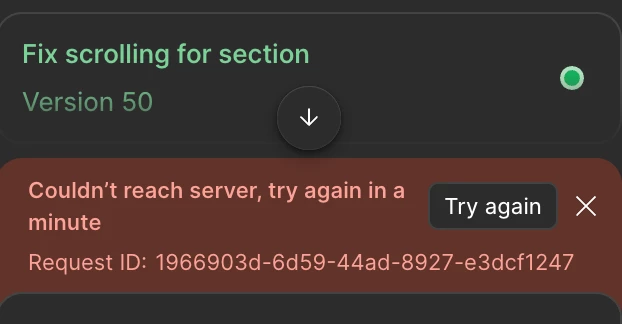
Couldn't reach server, try again in a Try again minute

  • November 25, 2025
  • 32 replies
  • 1062 views

Show first post

32 replies

ksn
Figmate
  • Community Support
  • December 29, 2025

Hey ​@viktoriia.g - I can’t say for sure, but I’m wondering if your issue is due to your file sizes.

 This happens with different files as well.

Does this mean you hit this error even when opening a new file as well? Or is it just other existing design files you have? Also, is it just the web browser where you hit this, or does it also get stuck when in the desktop app as well?
 

Just to cover all bases, can you try running through the troubleshooting steps noted on this page? I want to see if they help alleviate in any way: https://help.figma.com/hc/en-us/articles/360040523973-Troubleshooting-checklist

If anything, please try completely restarting your computer and trying again.


If that does not help -- are the files you are using pretty heavy on layers? Do you have a lot of general assets in them?


Rob Millington

I am hitting this same error. Same in the desktop application and web..

Couldn’t reach sever, try again in a minute.

I am wondering if it could be something our work VPN or firewall or something like that? Other designers in the company seem to be using it fine though! :D

Figma servers all look good and I am the organisation admin! 


Andrew290
  • New Member
  • January 21, 2026

I am hitting this same error. Same in the desktop application and web..

Couldn’t reach sever, try again in a minute.

I am wondering if it could be something our work VPN or firewall or something like that? Other designers in the company seem to be using it fine though! :D

Figma servers all look good and I am the organisation admin! 

After creating a new account and purchasing a Professional plan, Figma Make stopped working. When entering any query in Make, the error 'Unable to connect to the server, please try again in a minute' appears. The issue did not occur on the previous educational plan account. Standard troubleshooting steps (checking internet, waiting, network settings, reset Figma, Cach, Browser/Desktop, VPN, On default model AI) have been tried with no success. The problem is specific to the new Professional plan account.

Tech support has been ignoring me for 2 days now.

Here are my support tickets:
https://help.figma.com/hc/en-us/requests/1695239
https://help.figma.com/hc/en-us/requests/1694573
https://help.figma.com/hc/en-us/requests/1695214


Gayani_S
Figmate
  • Community Support
  • January 21, 2026

Hey ​@Andrew290, I’m really sorry for the delay you’ve experienced.

I’ve located your support tickets and have just escalated them internally so the team can investigate this as a priority.

Thank you for your patience and someone from the team should be in touch as shorty to review this! 


Gayani_S
Figmate
  • Community Support
  • January 21, 2026

Hey ​@Rob Millington! Are you still seeing the error? If so, I’m happy to get you connected with our support team so they can dig into what might be causing it on your account specifically (including whether a VPN or firewall could be involved). Just let me know and I’ll take it from there.


Andrew290
  • New Member
  • January 22, 2026

Hey ​@Andrew290, I’m really sorry for the delay you’ve experienced.

I’ve located your support tickets and have just escalated them internally so the team can investigate this as a priority.

Thank you for your patience and someone from the team should be in touch as shorty to review this! 

HI, Gayani_S.

Why is Figma ignoring me?

There have been a lot of bugs in the app lately.  

The AI-based technical support is useless. It doesn't offer solutions, it just creates useless support tickets. I created three tickets and didn't receive a single useful response in four days, just generic phrases. 

One support representative answered one question, gave me a text template to replace my email address with another, and left.

I encountered an error while exchanging emails. To replace my email address in the usual way, following the support representative's instructions, by clicking on the confirmation code from the new email, Figma simply created a new account for me, but I still didn't have a professional account. And I keep getting an error saying that the link has expired. 

I can't even delete this new account to try replacing my email address again because I get an error too.

You know what's funny about all this? Customer support responded to my request for a refund for my professional account faster than anything else. I was very surprised by this. I didn't think I would encounter such indifference.

Mistakes happen everywhere. But there is no support. I would like them to respond out of common courtesy.

I would be grateful, dear Gayani_S, if you could help me. Thanks


Gayani_S
Figmate
  • Community Support
  • January 26, 2026

Hey ​@Andrew290, I’m really sorry that you’re running into repeated errors and not getting clear, helpful responses back. That’s not the experience we want anyone to have.

I checked into your case and can see that your tickets were merged (#1694573), and I’ve re-escalated everything internally so it gets proper attention. I’ve also passed along your feedback to the team.

I understand how confusing it must’ve felt to see the refund request move faster than the actual issue blocking your work. I’m sorry about that, I’ll make sure to keep an eye on your ticket until it gets resolved!