

Tascha
Active Member
August 5, 2024
Question

Changing instance via variable resets text (and other properties) when inside component

  • August 5, 2024
  • 38 replies
  • 3988 views

So, in principle, if an instance is inside of another component, changing the variant causes the text to reset back to the text of the master component.
This also happens with other properties of the instance, e.g. if you set some booleans up they will be reset to how they were set in the master component once the variant is changed via variable.

Here’s a screenshot of what I mean:
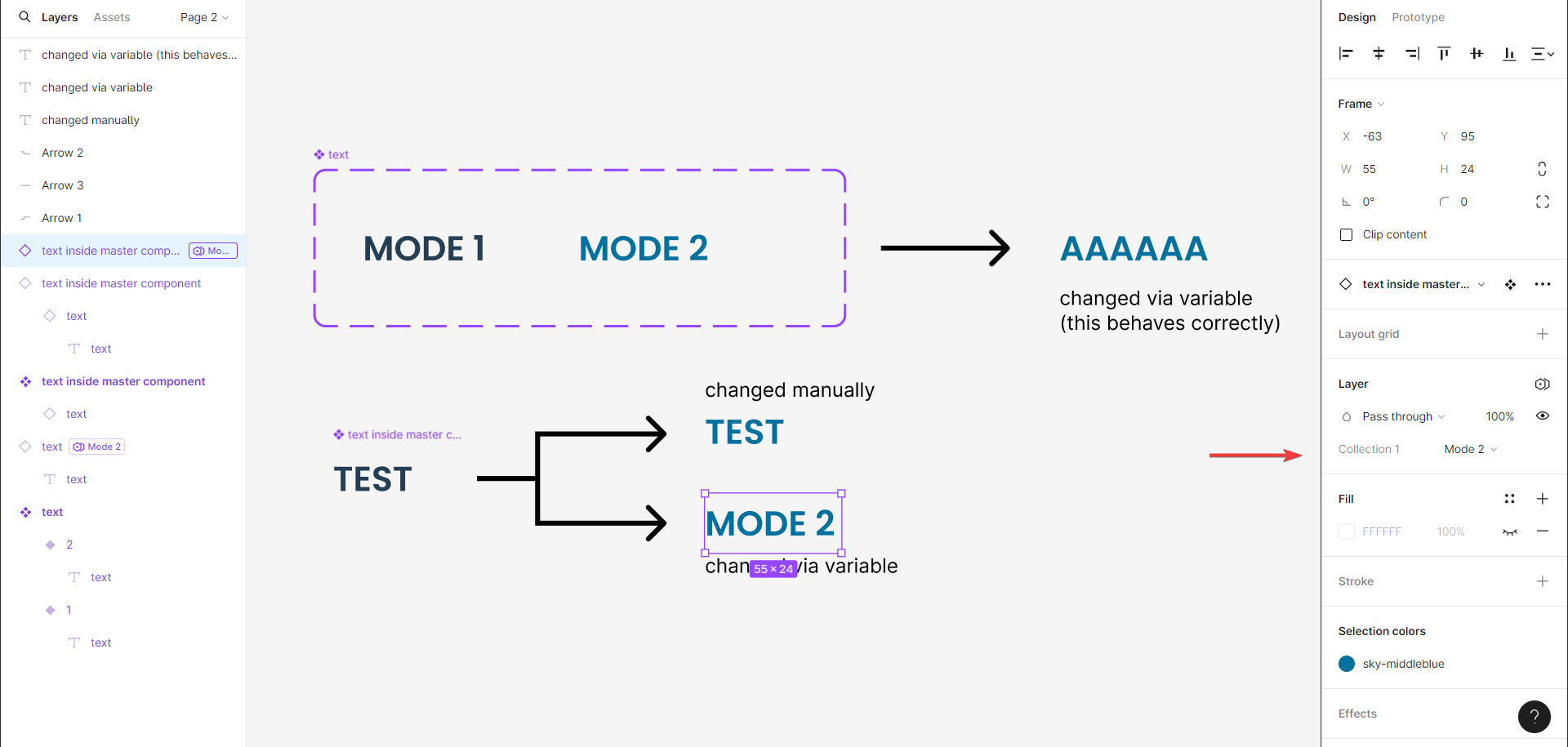
and here’s the link to the file to mess around with.

(So, this issue might be similar (or even basically the same) as discussed here: Change to on instance not keeping text change but frankly I haven’t had the patience to look into OPs setup 😅 I tried to break the issue down to the most bare-bones that I could in the file I provided (also to see if the issue has anything to do with my components or just is a bug)

If anyone has found a workaround do let me know 🙏 (and yes, I do need the instance within another instance; it’s a button inside a form layout that I want to reuse (and many other such cases).

38 replies

djv
Figmate
Community Support
June 4, 2025

Hey All, thanks for flagging this issue and apologies for the lack of acknowledgement here!

Our engineering team confirmed that this is a longstanding bug that they unfortunately won't be able to fix.

This issue typically happens when you've gotten into a bad data state by: 

  1. Unbinding a style on an instance (creating an text style ID override)
  2. The style already had variables or you bound variables to the text data (creating VCM overrides)
  3. Rebinding the original style (creating another text style ID)


The only temporary solution would be resetting your instance overrides and applying the overrides again. Even though the style is the same, this is happening because it’s not properly inheriting from the component because of the override, so you must reset:

  1. Reset instance
  2. Add text content overrides again
  3. Publish


For additional help with this, please feel free to reach out to our technical quality team here: https://help.figma.com/hc/en-us/requests/new 

Frank_K
Active Member
June 13, 2025

Hey All, thanks for flagging this issue and apologies for the lack of acknowledgement here!

Our engineering team confirmed that this is a longstanding bug that they unfortunately won't be able to fix.

This issue typically happens when you've gotten into a bad data state by: 

  1. Unbinding a style on an instance (creating an text style ID override)
  2. The style already had variables or you bound variables to the text data (creating VCM overrides)
  3. Rebinding the original style (creating another text style ID)


The only workaround would be resetting your instance overrides and applying the overrides again. Even though the style is the same, this is happening because it’s not properly inheriting from the component because of the override, so you must reset:

  1. Reset instance
  2. Add text content overrides again
  3. Publish


For additional help with this, please feel free to reach out to our technical quality team here: https://help.figma.com/hc/en-us/requests/new 

I can see how this might be a work around but it breaks the inheritance of the design so here we are back to having to redesign each item and having no way to inherit master changes. We still want the master interaction changes to take place  but be able to override some in an instance - this seems a relatively basic need for users who are sold the idea of a design system and component extendability by Figma. I.e. I have notices that text I place in a certain state, reverts back to the master component placeholder text when interacted with - an ongoing bug for a system that is meant to allow this extensibility.

CW2
New Member
July 1, 2025

Hey All, thanks for flagging this issue and apologies for the lack of acknowledgement here!

Our engineering team confirmed that this is a longstanding bug that they unfortunately won't be able to fix.

This issue typically happens when you've gotten into a bad data state by: 

  1. Unbinding a style on an instance (creating an text style ID override)
  2. The style already had variables or you bound variables to the text data (creating VCM overrides)
  3. Rebinding the original style (creating another text style ID)


The only workaround would be resetting your instance overrides and applying the overrides again. Even though the style is the same, this is happening because it’s not properly inheriting from the component because of the override, so you must reset:

  1. Reset instance
  2. Add text content overrides again
  3. Publish


For additional help with this, please feel free to reach out to our technical quality team here: https://help.figma.com/hc/en-us/requests/new 


Thank you for this. I was having the same issue as ​@Johannes_Eckert  (link to post) and fixed it with these instructions.

There were some text elements inside my master component which had overridden text styles. This happened because I applied a body text style to them and then added an underline to make them look like a link, causing the text style to be overridden. This meant that every component instance would lose its properties whenever its variant was controlled by a text variable, because the master component had overridden text styles.

I went through each text element in the master component and unlinked the ones which had a the little (1) in brackets after the style name:


Changing the variant with a text variable now works just fine.

I would never have guessed this was causing the issue, so I’m glad this was explained.

djv
Figmate
Community Support
July 1, 2025

Thanks for sharing your fix, ​@CW2

Hopefully this will help out all of the others having this same issue in the community. :) 

Frank_K
Active Member
July 9, 2025

Sadly still broken and suggested fix does not resolve :(

djv
Figmate
Community Support
July 9, 2025

Sorry to hear that, ​@Frank_K

As mentioned above, this is a long-standing bug that the team likely won’t be able to fix. 

For one-on-one support and possible alternative solutions, please feel free to reach out to our technical quality team here: https://help.figma.com/hc/en-us/requests/new 

nicholaskaschak
New Participant
August 22, 2025

This is still an issue even after following the directions to fix as Frank said.

For me, this is specifically happening when changing the text within the instance when using a component that has a text property applied to it (a link component in this case).

If I go to the master component and remove the text property and publish, and then update the instance, the issue is gone. No matter how many times I try to tinker with resets in the instance I’m still getting the issue unless I apply this change. 

Ideally I wouldn’t have to remove the text property from the master component of course - any other suggestions?

*EDIT: This is actually only happening where the master component is used in a component, and then that component is nested within in another component. The below screenshots show the before and after states of each instance / nested instance - you can see how the “New Label” text in the Component 2 instance resets on the boolean variable change. One thing to note is that the variable is NOT applied to the Component 1 instance in the master of Component 2, it’s only applied in the instance of Component 2 - this is necessary for my use case as I don’t want this variable to be applied to all instances of Component 2


Mojo
New Participant
December 8, 2025

I can’t believe this is still happening? Wasn’t happening for me before, but now switching modes (large / small variables) reset nested components. I’ts breaking everything on my end.. dunno how to workaround this.. but work in a dummy unorganized way

Nhung_Nguyen
New Member
January 27, 2026

Issue Description

When creating a Component (or Component with Variants) that contains text layers, after updating the text content and using the component for a period of time (e.g. around one month), the text content unexpectedly resets back to the original default text defined at the time the component was first created.

This happens without any manual reset or explicit action from the designer.


Steps to Reproduce

  1. Create a component (or component variants) with text layers (e.g. Alert component).
  2. Set default placeholder text when creating the component (e.g. {Title}, default description).
  3. Update the text content to real product copy.
  4. Save and continue using the component.
  5. After a long period of time (e.g. weeks or ~1 month), reopen the file or review existing instances.


Expected Behavior

  • Text overrides in component instances should persist.
  • Text content should only reset when the user explicitly:
  • Resets the instance
  • Detaches the instance
  • Or intentionally applies updates from the main component


Actual Behavior

  • Text content reverts back to the original placeholder text.
  • No warning, confirmation, or activity log indicates that the reset occurred.
  • The reset happens silently and is only noticed during review or QA.


Example

Component: Alert – Error variant

Initial component text:

  • Title: {Title}
  • Description: You can insert a description for the message here…

Updated with real copy for product usage.

After some time, the instance text automatically resets to the original placeholder content.


Impact

  • Loss of validated and approved product copy
  • High risk for Design System–based workflows
  • Creates inconsistencies across production-ready designs
  • Designers may not detect the issue until late in the process


Possible Causes (Hypothesis)

  • Text layers in the main component overriding instance text unexpectedly
  • Library publishing behavior affecting text overrides
  • Variant updates unintentionally resetting text content
  • State persistence issue when files are inactive for long periods


Suggested Improvements

  • Warning or notification when text overrides are reset
  • Change history or activity log for text overrides
  • Ability to lock text overrides at the instance level
  • Clearer documentation on how component updates affect text content
Xavier Lee
New Member
January 30, 2026

Yes I have similar experience creating components in Figma Site, hoping this bug can be fixed as soon as possible.