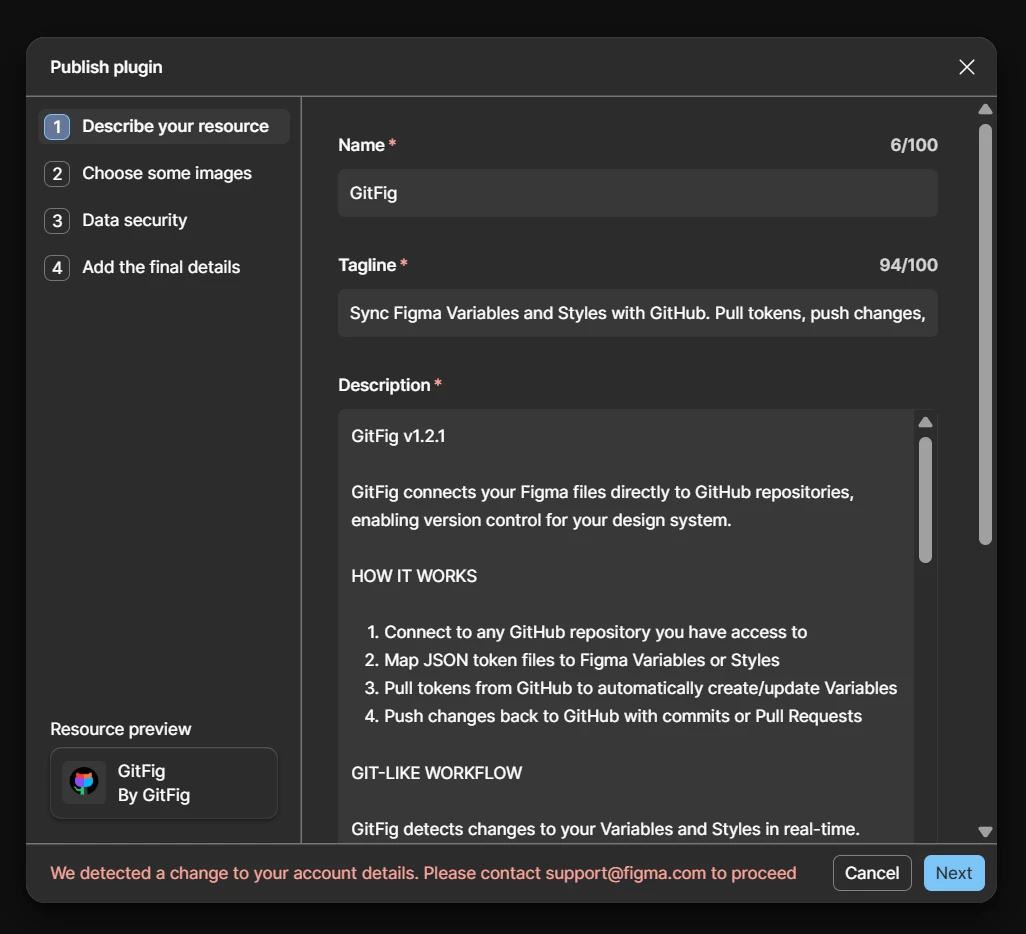
Cannot publish plugin update: "We detected a change to your account details. Please contact support@figma.com to proceed"
Hi,
Details as requested. This is a Community publishing restriction on my account, not a file issue.
Steps to reproduce:
1. Figma desktop app, signed in as [redacted by moderator to remove personal information]
2. Figma menu > Plugins > Manage plugins (Resources > Plugins tab)
3. Select GitFig (Community plugin ID [redacted by moderator to remove personal information]) > Next, or the "..." menu > Publish new version
4. The publish form opens; the footer shows in red: "We detected a change to your account details. Please contact support@figma.com to proceed"
5. The Publish/Next action cannot be completed while that message is present
Device: Windows 11 Home, Figma desktop app version app-126.8.16. Same result on repeated attempts since August 25, 2026.
Screenshot of the publish form footer attached. No console errors are involved; the message is shown by the publish form itself. No specific file is affected; the block is on publishing an update to my existing free Community plugin.
Context: the only recent account change was completing Community seller onboarding and activating the Stripe payout account on August 25, 2026. I have a free update of GitFig ready to publish. Please route this to Platform Support to review and lift the restriction; I can verify any account details needed. Related open ticket with Platform Support: #2089587.
Thanks,
Dan