Kuba Tokarski
New Participant
September 17, 2026
Solved

Bug: Figma Motion video exports recently became darker on macOS

Hi

I am creating this separate topic as a follow-up to this existing thread, as I am experiencing the exact same issue and wanted to share some technical findings.

When exporting animations to MP4 from the Figma Desktop app on macOS, an animation that exported perfectly a few weeks ago now renders drastically darker, despite using the exact same project and export settings.

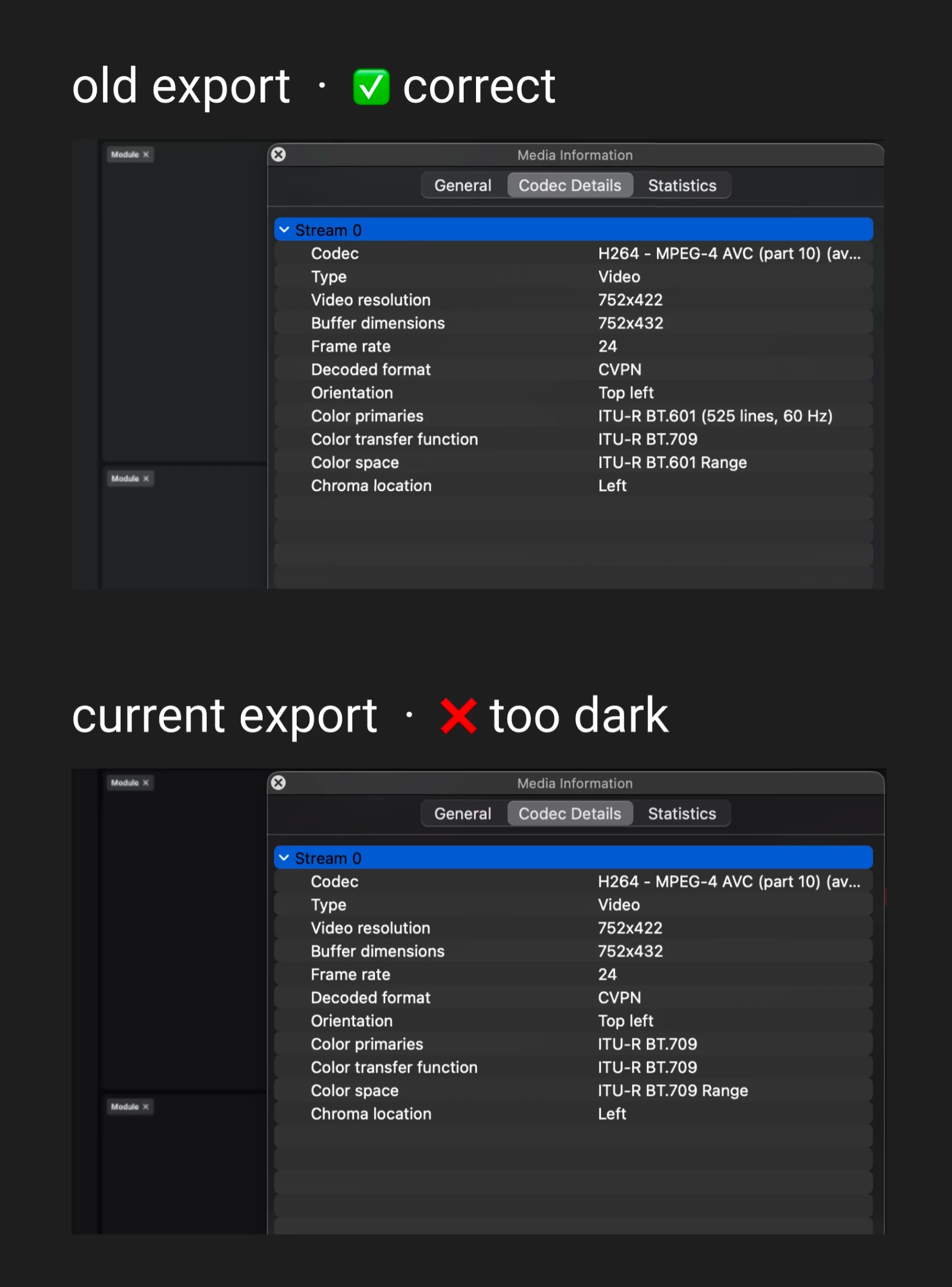
I compared the media files in VLC and found a clear change in the underlying color matrix used by the encoder:

  • Old (Correct) Render: Encoded using ITU-R BT.601
  • New (Bugged) Render: Encoded using ITU-R BT.709

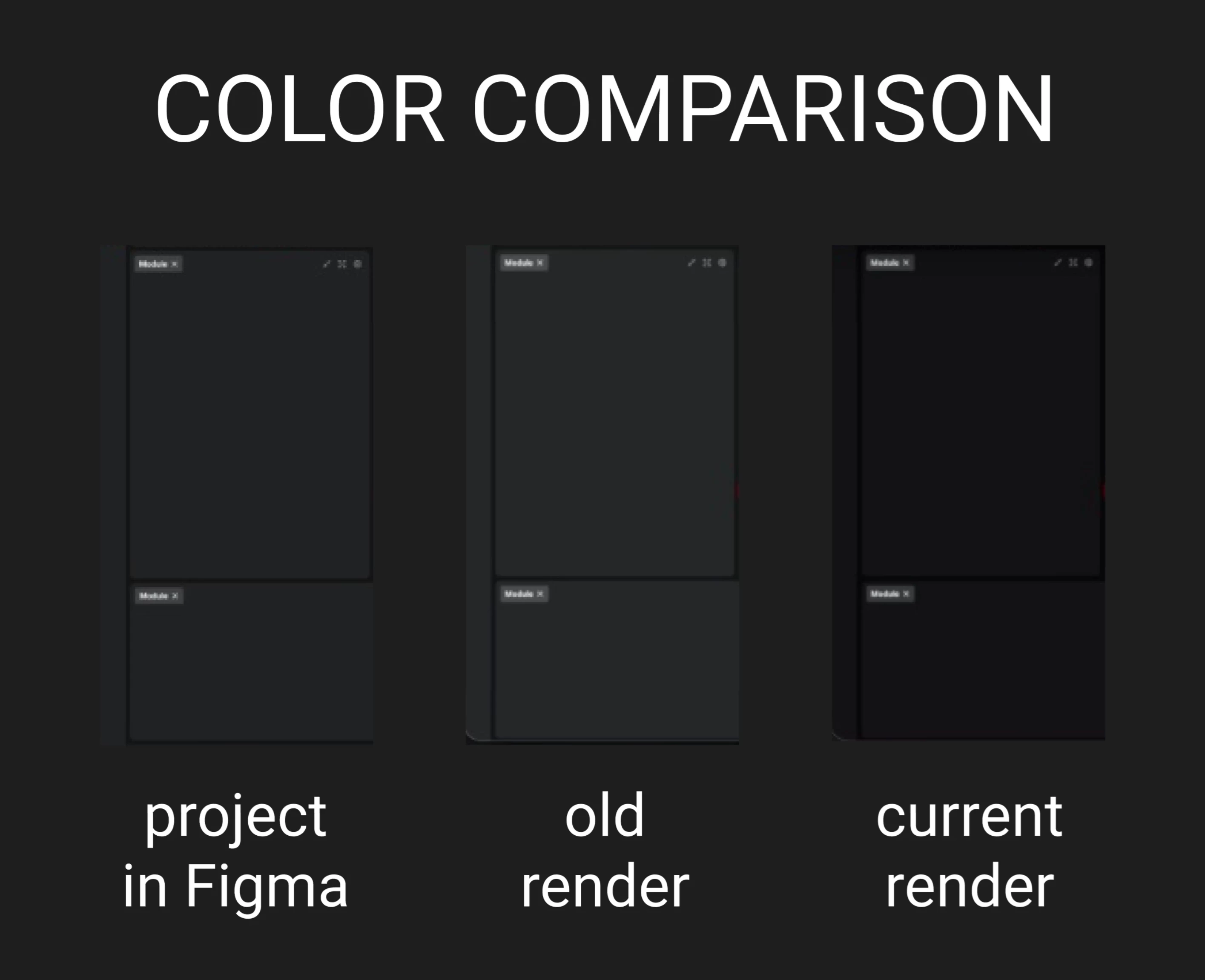
I'm attaching screenshots comparing the original canvas, the old vs. new renders, and the VLC codec data to help illustrate this.

Hope this helps the engineering team pinpoint the exact regression!


adamsmasher
adamsmasherSolution
Figmate
September 25, 2026

Hi everyone - our engineering team has released a fix for this. Thank you all so much for your patience while they worked on resolving it. Let us know if you have any trouble with your exports, or if you see any other differences in color.

13 replies

adamsmasher
Figmate
Figmate
September 17, 2026

Hey, ​@Kuba Tokarski. Really appreciate the detail and effort you put into tracing down what changed with MP4 exports. 


Interestingly, the old render seems a little lighter than the original as opposed to darker like the newer render. Are all colors darker, or is it only some colors? if it’s only some, what is the HEX code for the color used in your example? I shared your feedback with the team and they are investigating, though it would be helpful to know both. Thanks for your patience while we look into this!

Kuba Tokarski
New Participant
September 18, 2026

Hi ​@adamsmasher thank you for the update.

The animations I exported a few weeks ago and the current ones have a rather limited color palette, but I have checked the colors that appear in them and prepared a summary, which I am attaching. I’ve done a check across these different hues and lightness levels to give you precise data. I am attaching two new images that visually summarize these findings.

To answer your question: you are correct, gray colors were slightly lighter in the old render compared to the original project. However, in the current render, all colors have become significantly darker.


Kuba Tokarski
New Participant
September 23, 2026

Hi ​@adamsmasher 

Lossless Workaround for other users:

I chatted with Claude Code about this, and it provided a great lossless workaround that you can use to fix your exported videos right now. Since this turns out to be strictly a metadata tagging issue, there is no need to re-render the file or lose any quality.

Just run this exact command in your terminal using FFmpeg:

ffmpeg -i input.mp4 -c copy -color_primaries smpte170m -color_trc bt709 -colorspace smpte170m output_fixed.mp4

Here is how Claude Code explained what the command does:

ffmpeg

a program for video processing

-i input.mp4

i stands for input, your source file

-c copy

copy the video stream without any changes (no re-encoding, zero quality loss)

-color_primaries smpte170m

set the tag "what device produced this image" to BT.601

-color_trc bt709

set the tag "how brightness is encoded" to BT.709 (unchanged, it was already correct)

-colorspace smpte170m

set the tag "how colors are converted" to BT.601

output_fixed.mp4

the name of the output file


I’ve checked it, and my contrast immediately returned to normal, matching the older renders.

FYI: ​@Joe Michaletz ​@Sam Burke ​@Adam Kalinowski ​@bmpq1352 


For the Figma engineering team:

I think, that this FFmpeg proof confirms the encoder is processing the pixels correctly but simply assigning the wrong color matrix tags to the MP4 container. Hope this helps pinpoint the exact fix!

Joe Michaletz
New Member
September 22, 2026

I just wanted to add that I am running into the same issue, I’m including a screenshot of the side by side color difference (not super technical but just another example of the issue, left is an export from a few weeks ago, right is that same file exported today). I recently have been utilizing figma motion for a lot of branded social graphic templates so getting this issue resolved soon would be super helpful


Sam Burke
New Member
September 23, 2026

I’m experiencing the same issue where my MP4s are exporting in darker colors than specified in the design.

Adam Kalinowski
New Member
September 23, 2026

hi ​@adamsmasher I think this is a very problematic bug introduced in the latest update. Please increase the priority for fixing this or request a quick rollback to the previous version.

Anton Iva
New Member
September 24, 2026

Same for me, I hope it will be fixed soon

adamsmasher
Figmate
adamsmasherSolution
Figmate
September 25, 2026

Hi everyone - our engineering team has released a fix for this. Thank you all so much for your patience while they worked on resolving it. Let us know if you have any trouble with your exports, or if you see any other differences in color.

Gilberto-B-Omni
New Member
September 28, 2026

Hello there! we still have the trouble under Figma Desktop App version 126.9.9
which version should contain the fix? 
🙏

adamsmasher
Figmate
Figmate
September 30, 2026

Thanks for the reply, ​@Gilberto-B-Omni - that’s unfortunate you’re still seeing this. Are you on Windows or mac OS? My desktop app version is 126.9.10 on mac OS, so you might want to check if there’s another update available or try a web browser. If you still have trouble after that, let me know some specific HEX colors, if possible, and I’ll share that with the team to review.