

[BUG] Create Alias panel appears behind Variables panel and cannot be interacted with

  • December 22, 2025
  • 11 replies
  • 110 views

Jason_Fingland

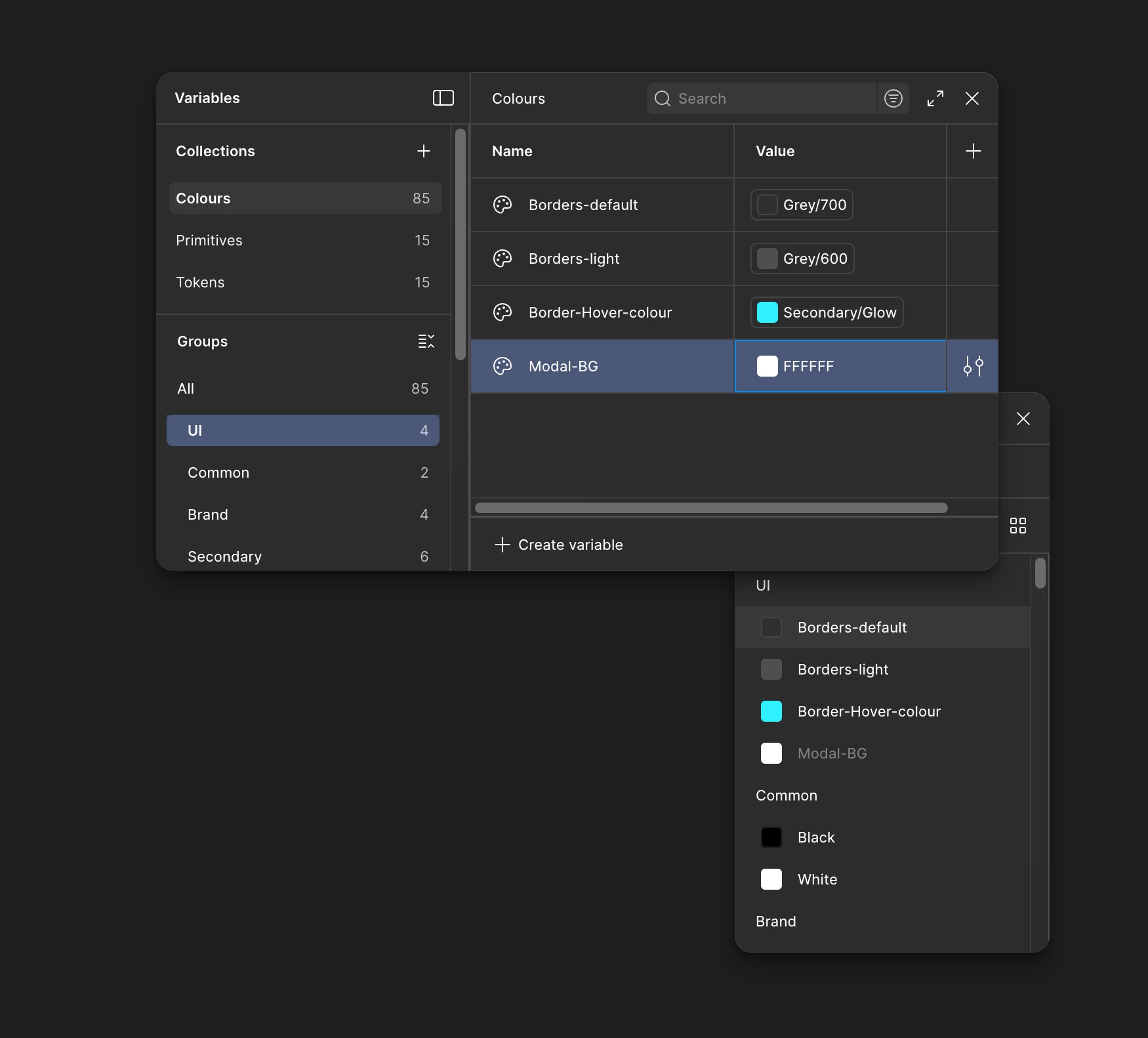
When attempting to create an alias for a variable, the Create Alias panel opens behind the Variables panel instead of appearing in the foreground. As a result, the Create Alias panel is partially obscured and cannot be interacted with, preventing alias creation.
 

Reproducibility

Yes, the issue is consistently reproducible.

  • Occurs when working within the Variables panel and attempting to create or assign an alias.

  • The layering order of panels appears incorrect, with the Create Alias panel rendering behind the Variables panel.

Reproduction steps

  1. Open a Figma file with variables enabled.

  2. Open the Variables panel.

  3. Select an existing variable.

  4. Attempt to create or assign an alias.

  5. Observe that the Create Alias panel appears behind the Variables panel and cannot be interacted with.

Figma product

  • Figma Design

  • Variables

Environment

  • Desktop app & Browser (Arc Version 1.103.0 (65269))

  • OS: macOS 14.6.1

  • Figma version: Figma Desktop App version 125.11.6

Troubleshooting steps already tried

  • Restarted Figma

  • Closed and reopened the file

  • Restarted Mac

  • Restarted cleared Figma cache.

11 replies

Muhammad Alfaifi UX

This issue is occurring on the desktop client and the browser client. I checked with my colleagues, and it works fine for them.


The problem occurs when I try to create an alias—the values window appears behind the variables window. I attempted to move the variables window and resize it, but that did not resolve the issue.


I also tried the following without success:


  • Creating a new file
  • Reinstalling the client
  • Using a different browser


However, the feature works correctly when I use my personal account.


The issue occurs only on my organization account.


sravan kumar
  • New Member
  • December 23, 2025

I’ve been facing a similar bug since yesterday. One solution is to copy the alias from another design file, then try editing the alias and selecting it from the primitives.


Dmitry Dronov
  • New Member
  • December 23, 2025

I encountered the same problem on my work account a couple of hours ago. It was happening in both the browser and the app. I've rebooted the app, cleared the cache, and tried everything. It just won't work.


Dmitry Dronov
  • New Member
  • December 23, 2025

I encountered the same problem on my work account a couple of hours ago. It was happening in both the browser and the app. I've rebooted the app, cleared the cache, and tried everything. It just won't work.


Jos Stibolt Holbak

I have the same issue. Not able to connect an alias when the panel opens behind the collection panel.


Marina Glushkova

I have the same problem


djv
Figmate
  • Community Support
  • December 23, 2025

Hey All, thank you for reporting this issue! 

I’ve created a bug report and sent this forum topic over to our team to investigate. To be completely transparent, most teams are offline for the Winter Break, so it may take some time before progress is made towards a fix. But I’ll do my best to provide any updates as soon as possible!

We appreciate your patience and understanding. 


Muhammad Alfaifi UX

i’m not sure if I should mention this here or create a another bug for it, but when I try to “delete” one of the Groups I just created it wont work.

the only work around is to delete every variable under that group one by one to delete the group.

the issue happened after facing the above issue


Nagicome
  • New Member
  • December 29, 2025

I’ve been facing a similar bug since yesterday. One solution is to copy the alias from another design file, then try editing the alias and selecting it from the primitives.

Thank you, it worked for me! 😭


Caleb Frieze
  • New Member
  • December 29, 2025

I’ve been experiencing the same issue


Rob Berrones
  • New Member
  • December 30, 2025

I have this issue as well. Desktop version, Mac OS Sequoia 15.7.2.