

Jason_Fingland
New Member
December 22, 2025

[BUG] Create Alias panel appears behind Variables panel and cannot be interacted with

  • December 22, 2025
  • 15 replies
  • 467 views

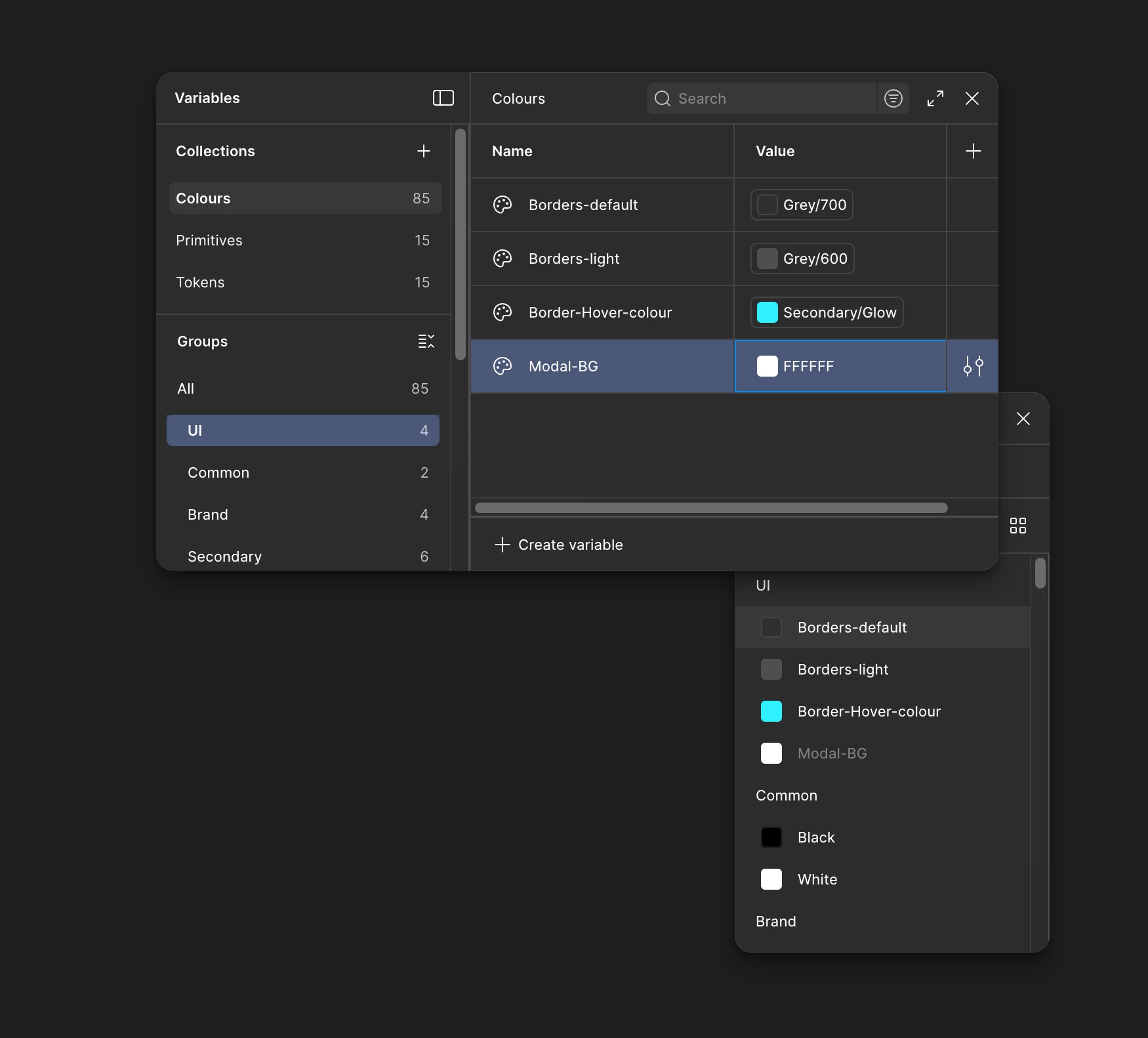
When attempting to create an alias for a variable, the Create Alias panel opens behind the Variables panel instead of appearing in the foreground. As a result, the Create Alias panel is partially obscured and cannot be interacted with, preventing alias creation.
 

Reproducibility

Yes, the issue is consistently reproducible.

  • Occurs when working within the Variables panel and attempting to create or assign an alias.

  • The layering order of panels appears incorrect, with the Create Alias panel rendering behind the Variables panel.

Reproduction steps

  1. Open a Figma file with variables enabled.

  2. Open the Variables panel.

  3. Select an existing variable.

  4. Attempt to create or assign an alias.

  5. Observe that the Create Alias panel appears behind the Variables panel and cannot be interacted with.

Figma product

  • Figma Design

  • Variables

Environment

  • Desktop app & Browser (Arc Version 1.103.0 (65269))

  • OS: macOS 14.6.1

  • Figma version: Figma Desktop App version 125.11.6

Troubleshooting steps already tried

  • Restarted Figma

  • Closed and reopened the file

  • Restarted Mac

  • Restarted cleared Figma cache.

This topic has been closed for replies.

15 replies

Rob Berrones
New Participant
December 30, 2025

I have this issue as well. Desktop version, Mac OS Sequoia 15.7.2.

Ghazy911
New Member
January 4, 2026

Is there any solution for this problem?

i have the same issue in the Windows too 

Figmate
January 5, 2026

Hi there,


While our engineers continue to investigate this issue, you can try the following approach to create an alias.

For color variables: click the color swatch

For number or text variables: click the variable icon


Thanks for your patience and for your help while we look into this further.

Naweskil
New Member
January 7, 2026

Hi there,


While our engineers continue to investigate this issue, you can try the following approach to create an alias.

For color variables: click the color swatch

For number or text variables: click the variable icon


Thanks for your patience and for your help while we look into this further.

Nice! Waiting for the next release! \o/

MaxiJob
New Member
January 11, 2026

Perfect! I've noted your bug report about the alias popup for token variables that keeps appearing and disappearing, making it impossible to select options when trying to create an alias.

Your report includes:

  • Issue with alias creation popup functionality
  • Popup appears but then hides/disappears when trying to select
  • Prevents proper variable alias creation

This information has been documented for investigation. The technical team will look into this popup behavior issue with variable aliases.