

Gaston_S
August 29, 2023
Question

Wrong display of Font Awesome 6 icons (text instead)

  • August 29, 2023
  • 27 replies
  • 4809 views

I have a display problem on the icons from Font Awesome 6:
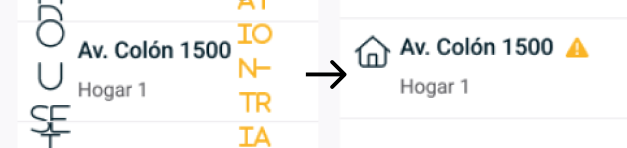
image
Instead of displaying the icons, the names of the codes of each one are displayed

I can temporarily fix the problem using the quick actions:

  • Select all with the same font
  • Recompute text layout in selection
    But randomly the problem occurs again.

What other things have I tried?

  • Test with a partner to recompute the text to see if it fixed it for both of us at the same time to rule out that it is a local or cache problem.
  • It is not tied to anything specific to windows or macos as it happens on both.
  • We tried uninstalling the font and installing it again.
  • When the characters are changed, it does not happen in the whole file, but in some sections (That section conflicts with the display all at once), which leads me to suspect that it may be a user with a font with a sub different version but I can’t verify it (since Figma does not communicate any error related to this).
This topic has been closed for replies.

27 replies

June 5, 2024

I had the same problem. I fixed it by:

  1. Removing the fontAwesome .woff and .ttf from the font book.
  2. Install the “Desktop fonts” instead. So the .otf
  3. Reboot Figma

Attachment.png

I hope it helps. It was very frustrating for me tbh, I was the only one having this problem in my team.

I am using MAC btw.

Success!

July 5, 2024

This fixed it for me just now. I’m on mac. I uninstalled all fonawesome fonts and the re-installed otf fonts from the desktop fonts. REstarted Figma. I had to click on all representations in the design to get it to switch back to displaying the FA icons. No I hope it stays all right!

Fernando_Nonaka
October 27, 2024

I’m having this issue right now… I did what Brian mentioned before, but it didn’t solve yet…

Fernando_Nonaka
October 29, 2024

Obs: I installed Font awesome 5 and then 6… tried to unninstal them, but the problem remained… I think the problem was because I installed Font awesome 6, because at my laptop, I didn’t install neither Font awesome 5 and 6, but there’s no problem viewing the fonts - this is very strange for me: to proper view Font Awesome in Figma, it’s not necessary to install them locally???

Satjaleen Madan
New Member
January 23, 2025

I’m having the same problem and after alot of try what has worked for me is to either copy paste the component manually from the design system into my file or to change the variant in my file and when I undo it reverts back to normal correct icon. It’s very strange but this is what worked for me.

Kailyn
New Member
February 14, 2025

Also having this issue. I removed all installations of FA5 and made sure all my installations of FA6 are .otf files. I just asked my teammates to check which versions they have installed and will report back. 

I can Command+click the errant text layer to instantly correct it back from INFO-CIRCLE to the appropriate FA6 Pro icon, but this is super tedious to do throughout a large design file, and I assume it’ll keep reverting back from the desired icon to the undesired INFO-CIRCLE text, whatever triggers it.

lea_dvn16
New Participant
June 11, 2025

I also still have this issue. I need to go copy the glyph from the FA website, it`s very annoying. It works well with v5 though.