

Gaston_S
August 29, 2023
Question

Wrong display of Font Awesome 6 icons (text instead)

  • August 29, 2023
  • 27 replies
  • 4809 views

I have a display problem on the icons from Font Awesome 6:
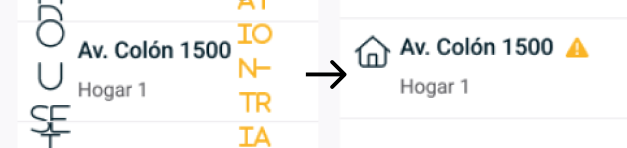
image
Instead of displaying the icons, the names of the codes of each one are displayed

I can temporarily fix the problem using the quick actions:

  • Select all with the same font
  • Recompute text layout in selection
    But randomly the problem occurs again.

What other things have I tried?

  • Test with a partner to recompute the text to see if it fixed it for both of us at the same time to rule out that it is a local or cache problem.
  • It is not tied to anything specific to windows or macos as it happens on both.
  • We tried uninstalling the font and installing it again.
  • When the characters are changed, it does not happen in the whole file, but in some sections (That section conflicts with the display all at once), which leads me to suspect that it may be a user with a font with a sub different version but I can’t verify it (since Figma does not communicate any error related to this).
This topic has been closed for replies.

27 replies

October 13, 2023

Having this problem now — I just reactivated my FA account to upgrade my local font collections from v5 to v6, downloaded and installed the local .otf files, added to FontBook, confirmed the fonts are Active…

Figma is not showing icons, shows instead the text. I’ve tried changing icons that were already existing in the layout, tried using the Font Awesome Official Icon Component from the community, and tried creating new text boxes from scratch, changing the weight, etc.

Font Awesome is definitely not working as it should—It should not be this hard to make an icon happen. That said, any advice on how to resolve this appreciated!

October 13, 2023

Update. I can copy and paste the glyph from the Icons sheet at Find Icons with the Perfect Look & Feel | Font Awesome But honestly, that is not how I want to work with FA… I’ve gotten quite used to typing “chevron-…” and so on, and my original/previous icon placements are breaking.

October 13, 2023

Okay, sigh. I believe I have resolved my issue. I believe I may have added only .otf files from the collection to FontBook initially, but instead should have added the whole folder that includes folders like “svgs” and “metadata”…

I quit Figma. I removed my FA icons from Font Book. Quit and re-opened Font Book. Selected File/Add Fonts to All Users… Selected the parent folder “fontawesome-pro-6.4.2-desktop”

Brent
October 21, 2023

This is still very much an issue for me. Doesn’t happen with Font Awesome 5. Seems to come and go with FA6. Some styles of FA6 (eg., Sharp - Light) render just fine. Very bizarre and problematic issue. I’ll be replacing all font-based icons with their SVG counterparts for now, which will be time consuming.

andrewp
October 25, 2023

Thank you Brian! You probably just saved me several hours of frustration.

jessie1
Active Member
January 8, 2024

Thank you!! This is the answer 🙂

Negar2
New Member
February 12, 2024

Hello! does this reply work also for someone who is using free version of Figma? if yes, could you please explain how?

Thanks in advance

OphelieWR
February 13, 2024

Hello, has anyone managed to solve this problem on Windows? 🙏

Mollie
New Participant
March 5, 2024

My team is having this issue currently, both those with view and edit access.

Gaston_S
Gaston_SAuthor
March 8, 2024

Not yet Ophelie, I´m triying to find a way to make something similar to the actions on Photoshop to automate the quick actions named above and automate the temoporary fix.