August 19, 2024
Solved

Where is absolute position?

  • August 19, 2024
  • 22 replies
  • 25505 views

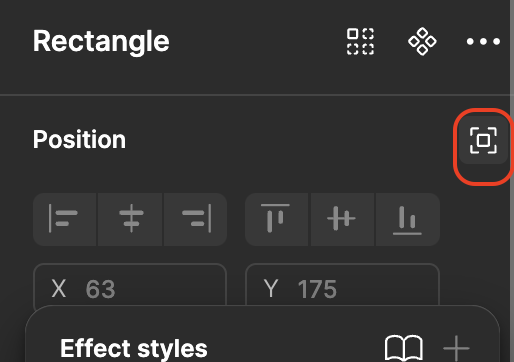
Where is absolute position option is there in Figma in latest version? is the name changed as “ignore auto layout”?

This topic has been closed for replies.
Best answer by djv

Hey @Ambalika_guha, sorry for the confusion!

Yes - absolute position is now Ignore auto layout in UI3.

Screenshot 2024-08-19 at 10.48.32 AM

22 replies

CowboiiWill
New Member
June 15, 2025

You have to set fixed position within Prototype section of the design panel. if you do not have access to the main component, then you will need to detach instance. 


Marissa Traver
New Member
July 27, 2025

Why is my absolute button not popping up when I select my frame? I am trying to make a sticky navigation bar

Nellya
Power Member
July 27, 2025

Why is my absolute button not popping up when I select my frame? I am trying to make a sticky navigation bar

Can you share some screenshots?

Marissa Traver
New Member
July 27, 2025


Nellya
Power Member
July 27, 2025


Looks like your toolbar is not inside an auto layout, that’s why this option is not available and not needed here. Just open the Prototype tab and make it sticky.

Marissa Traver
New Member
July 27, 2025

How do I make it in an auto Layout?

Marissa Traver
New Member
July 27, 2025
even when I have it in fixed it still won't stay at the bottom 


Nellya
Power Member
July 27, 2025
even when I have it in fixed it still won't stay at the bottom 


Change the constraint of the toolbar from top to bottom


Nellya
Power Member
July 27, 2025
Konstantin LA
New Member
December 17, 2025

Hi! After last update I can’t find Absolute Position button any more!