August 19, 2024
Solved

Where is absolute position?

  • August 19, 2024
  • 22 replies
  • 25505 views

Where is absolute position option is there in Figma in latest version? is the name changed as “ignore auto layout”?

This topic has been closed for replies.
Best answer by djv

Hey @Ambalika_guha, sorry for the confusion!

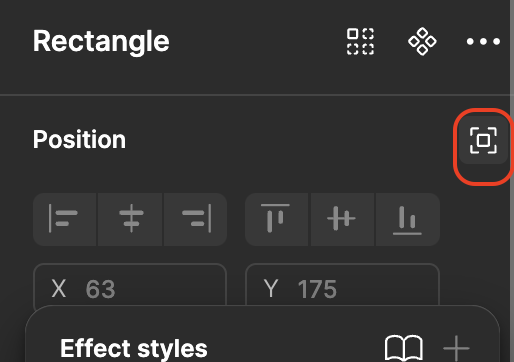
Yes - absolute position is now Ignore auto layout in UI3.

Screenshot 2024-08-19 at 10.48.32 AM

22 replies

djv
Figmate
djvAnswer
Community Support
August 19, 2024

Hey @Ambalika_guha, sorry for the confusion!

Yes - absolute position is now Ignore auto layout in UI3.

Screenshot 2024-08-19 at 10.48.32 AM

Danijel_Bosnjak
September 3, 2024

I have two same objects in my layers in Figma, one of them is marked as absolutely positioned, the other one is not. However, looking at the top right panel there is no indication that either of them have absolute positioning applied. Why?
image

Celine_
Figmate
Community Support
September 3, 2024

Hey Danijel, can you confirm that when you click on a specific element with an absolute position, this is not applied?

If you select these two elements as shown in your screenshot (one has the absolute position and the other doesn’t), the absolute position is not highlighted in the right panel but it is still applied (as shown in your left panel). It will only be highlighted in the right panel if both elements have an absolute position.

If it’s not the case, does this happen in your specific file or in any file?
I’d also recommend you to reach out directly to the support team with the link of the affected file, so they can try to reproduce it and investigate: here
Be also sure to use your Figma account email, include a link to the file, and share it with support-share@figma.com as an Editor, thank you!

Brandon_White
December 12, 2024

Figma Version 124.6.5 Ignore Auto Layout is not working. The layer item is acting as if it is locked but it’s not. Clicking on Ignore Auto Layout is not toggling it off and on. What is the problem? Thank you.

djv
Figmate
Community Support
December 13, 2024

Hey @Brandon_White, thanks for reaching out!

It’s hard to be sure what’s happening with Auto Layout from your screenshot alone. Are you able to share a link to your file, so we can take a closer look at your layers?

If so, please add a link to this topic’s thread, and be sure to share edit access with support-share@figma.com.

Brandon_White
December 16, 2024

Thank you for the response. I sent an email to support with a link to this thread and an editable Figma link.

tank666
December 16, 2024

Go to the main component and change this property there. You can’t do that in an instance.

UX/UI designer. Figma expert. Creator and developer of plugins and widgets for Figma and FigJam. Check out my resources in Figma Community: figma.com/@tank
Brandon_White
December 16, 2024

I do not have access to the main component. Strange that I am able to copy and paste the element with no problem.

New Member
January 20, 2025

why is it hidden when I clicked ignore auto layout?

Nellya
Power Member
January 20, 2025

why is it hidden when I clicked ignore auto layout?

Probably the layer is inside a frame with a clip content