
PierreL
New Participant
April 27, 2025
Question

What is the "Storm icon" in Effect styles ?

  • April 27, 2025
  • 4 replies
  • 588 views

Hi,

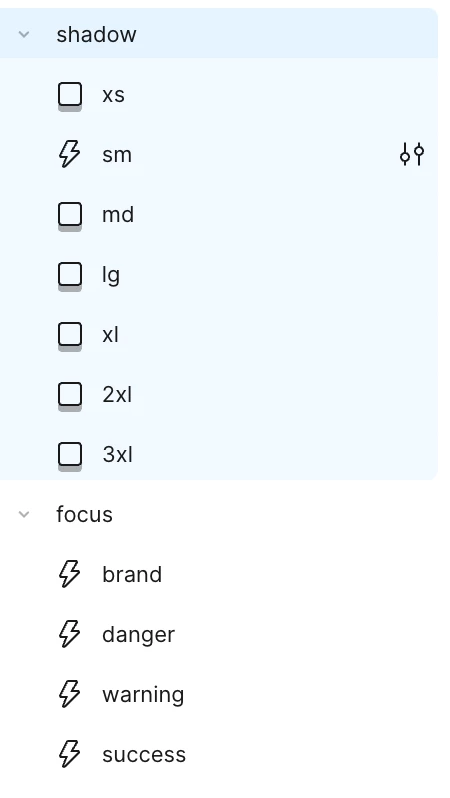
On right sidebar, Effect styles category, I see a storm icon between drop shadow icon.

I only have drop shadows in my effect styles, can you explain me why I have a storm icon ?


    This topic has been closed for replies.

    4 replies

    Aguiar_Leonardo_extern
    Active Member
    April 28, 2025

    Noticed this for the first time today. It seems like if I have an effect value being applied to just the blur parameter of the dropshadow effect then the lightning bolt icon is assigned to the effect style. So for example I have a series of effects that are mainly dropshadow effects intended to be used with cards for creating elevation. The effects that have the lightning bolt are effects where only the blur parameter has a value. Other effect styles that are dropshadows but have values in their y offset parameter or spread parameter do not have the lightning bolt icon. Is this also the case with your effects?

    PierreL
    PierreLAuthor
    New Participant
    May 2, 2025

    @Aguiar_Leonardo_extern In my file, all of my effects have blur settings, yet only one has the lightning bolt icon.

    My XS shadow effect has no lightning bolt icon (the usual shadow elevation icon) and has a blur value of "2" :


    My SM shadow effect has lightning bolt icon and has a blur value of "4" :


    My first “brand” focus effect has no shadow effect, yet has the lightning bolt icon :


    Alexey_Loginov
    New Member
    May 15, 2025

    It seems like if the shadow has an X or Y offset, a shadow icon is shown, but if there’s no offset, a lightning bolt is displayed instead — so Figma is kind of suggesting it’s more of a glow than a shadow. And if there are multiple layers, Figma determines whether it’s a glow or a shadow based on the topmost one.

    Sam008001
    New Participant
    May 15, 2025

    It seems like if I have an effect value being applied to just the blur parameter of the dropshadow effect then the lightning bolt icon is assigned to the effect style. ... Other effect styles that are dropshadows but have values in their y offset parameter or spread parameter do not have the lightning bolt icon.
