JulsQQ
New Participant
October 16, 2023
Solved

What is the latest version of Figma?

  • October 16, 2023
  • 15 replies
  • 9985 views

Hi, I’m trying to figure out if I’m using the latest version of Figma. If I click the check for Updates button nothing is happening. The current version I’m using is 116.14.4

This topic has been closed for replies.
Best answer by djv

Hey @Dave_House1 and @MarkT, sorry for the delayed reply!

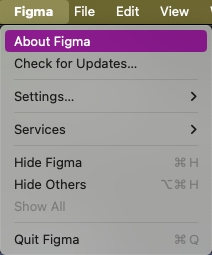
On macOS, you can see the Figma version you’re using by clicking Figma > About Figma. To check if you’re using the latest version, you can select Figma > Check for Updates…
Screenshot 2024-06-17 at 10.47.39 AM

On Windows, to the left of the window controls, select the ⌄ icon. In that dropdown menu, select About Figma for the version number or Check for Updates… to see if there is a newer version.

15 replies

djv
Figmate
Community Support
October 18, 2023

Hey Juls, are you using Figma in browser or using the desktop app? Or are you possibly using Figma Beta? Also, what OS?

From our end, we’re using the latest desktop app version 16.13.3 and beta version 116.15.

Dave_House1
January 15, 2024

@dvaliao Hey Denise, How can we find out what the latest version number is at any time? The release notes do not include the version number.

MarkT
New Participant
June 17, 2024

Any update on @Dave_House1 question regarding where we locate version numbers ?

djv
Figmate
djvAnswer
Community Support
June 17, 2024

Hey @Dave_House1 and @MarkT, sorry for the delayed reply!

On macOS, you can see the Figma version you’re using by clicking Figma > About Figma. To check if you’re using the latest version, you can select Figma > Check for Updates…
Screenshot 2024-06-17 at 10.47.39 AM

On Windows, to the left of the window controls, select the ⌄ icon. In that dropdown menu, select About Figma for the version number or Check for Updates… to see if there is a newer version.

MarkT
New Participant
June 17, 2024

Thanks Denise. Much appreciated.

M-Haris
August 13, 2024

Same problem i am using windows 11 and Figma latest version but its not the layouts are the same their is no UI3 module i can see please help!! i can’t do anything i am interested in new update.

djv
Figmate
Community Support
August 13, 2024

Hey @M-Haris, sorry for the confusion!

We launched an early access waitlist for UI3 to get it into the hands of users as fast as possible for early feedback. But due to high interest, the waitlist quickly reached capacity and all available slots were filled.

We’ve moved from waitlist to a multi-week rollout. We’re taking this approach so that we can collect your feedback and make adjustments along the way.

This means that UI3 is now rolling out gradually to all users—regardless of waitlist status, plan, or seat type. It doesn’t matter if you’ve updated to the latest version Figma, you won’t see UI3 until it’s been rolled out to you, and we notify you that you now have access.

djv
Figmate
Community Support
August 19, 2024

A post was split to a new topic: Where is absolute position?

Pugazh
August 29, 2024

What is the latest version number of Figma that released on Jul 26, 2024. @dvaliao

Anya_indesign
August 29, 2024

Hello! Tell me how to return to the previous version of the interface? I heard about the advice "click on “Go back to previous UI”, but I do not have such a function when clicking on the icon with a question mark